What's new

Purple Reflections/Glare. Possibly Chromatic Abberation?

HaydenLindwall

TPF Noob!
Joined
Oct 5, 2013
Messages
13
Reaction score
0
Location
Wisconsin
Can others edit my Photos
Photos OK to edit
Okay so I am shooting with my D3100 and Nikon 35mm f1.8.

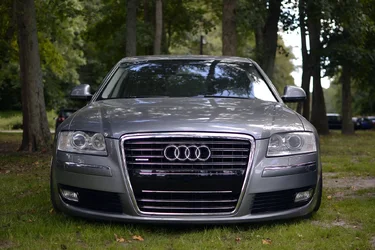
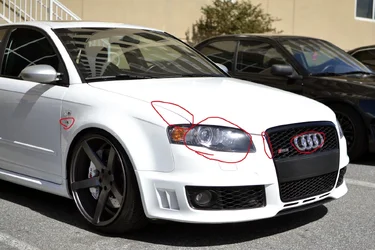
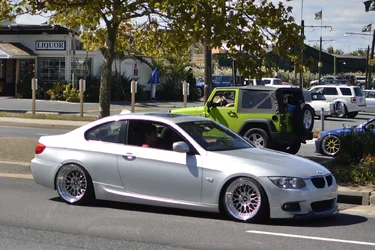
In many of my shots from last weekend, reflective surfaces have a huge purple glare. I have posted some of the really bad examples below from when I was messing around, unedited of course. These were shot at f/1.8 ISO 100. I suspect that this could be Purple Fringing or Chromatic Abberation, but I've never had anything like this happen before this weekend and I have shot a lot with this lens. Here is the link to the album if that's easier: Purple Glare - a set on Flickr
$10106112713_18fae41df1_h.webp

$10105970263_0b08aa58a3_h.webp

$10105906585_2387ca404b_h.webp

Thanks in advance.
 
Google "AF-S Nikkor 35mm f/1.8 G + The Perfect Storm"...

The specific lens used, plus the subject matter is perfect for producing this to a degree where it is VERY obvious.
 
Thanks for the response, Derrel. I Googled that phrase but didn't get any results that stood out.

I just think the issue showed up at weird times, like in the third photo of the Audi. That was in a relatively shaded area. I guess I will try a smaller aperture next time if I have this issue again!

So in conclusion, what is the name for this issue, and should I conclude that this is a fairly common issue with this lens, if the right conditions are present? Also, is there an easy way to correct this in CS6? I tried the Lens Correction but it didn't have any effect on the purple.
 
Oh god, that's pretty extreme.

Your options are pretty much, in order of inconvenience:
1) Attempt to use photoshop auto lens CA correction. If that works, then you're golden.
2) Delete the most offending color channel and then just make the remaining ones black and white, or use one channel. This lets you still use the lens in such situations at least, but only in B&W.
3) Use a different, better designed lens.
 
Gav, Keith- thanks for the responses. I guess it was just the perfect combination of the lens and the lighting that caused the fringing as I have taken thousands of pictures with this lens without a problem before.

I tried the Lens correction before posting this thread but that didn't do anything. I fixed it by going to Hue/Saturation in Photoshop, selecting "Magentas" and desaturating them.
 
I tried the Lens correction before posting this thread but that didn't do anything. I fixed it by going to Hue/Saturation in Photoshop, selecting "Magentas" and desaturating them.
That does help, yes, but it will still leave you with blurry edges, since the magenta essentially acts as a smeared out part of the rest of the edge.
 

Create an account or login to comment

You must be a member in order to leave a comment

Create account

Create an account on our community. It's easy!

Log in

Already have an account? Log in here.

Back
Top Bottom