What's new

Question about making prints

joeysmom

TPF Noob!
Joined
Aug 12, 2009
Messages
14
Reaction score
0
Location
Buckley, WA
Can others edit my Photos
Photos OK to edit
Hello...I've been a "lurker" for a couple of years. I am absolutely an amateur, but have been taking my kids' portraits for years, as well as some of their friends. I've even had the opportunity to help at a few weddings, which has been a kick. So here's my question.

Recently, I sent a bunch of pictures through Costco to get prints. I know it's not the best place to go, but I don't know where else to have photos developed. Alot of my pictures came back without the whole picture! Like I have some that I photoshopped and my daughter's chin is gone in the print, even though the file I sent them wasn't like that. I'm sure I'm saving them wrong or something. I get confused about how to save them on PS. How can I make sure I get the quality I want and also the WHOLE picture would be nice.

thanks so much. I know it's got to be simple and I just don't know what I'm doing. Any help is greatly appreciated.
 
The problem is, the width to height ratio of your picture isn't exactly matching up with the paper the photo's being printed on... 4x6, 8x10, etc. You'll have to either crop them yourself to a size that fits the paper, specify you want the entire photo printed (which will leave 2 wider white borders), or specify where you want them to make the crop.

You can go to WallyMart and use their picture print machine yourself and it will allow you to make all those choices for the print, but it's not exactly a professional print. Probably on-par with what Costco can do, so if you're happy with the quality there, you're probably going to be OK with Walmart. Otherwise, you'll have to go to a professional printing business.
 
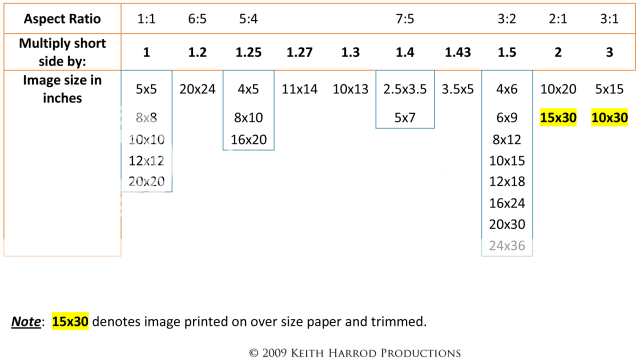
Aspect Ratio

Most DSLR cameras have native aspect ratio of 3:2 or the same as an 4x6, 6x9, 8x12, etc. Most P&S cameras have nearly square native aspect ratios.

If you want to print an 8x10, a 5:4 aspect ratio, from an image that was captured at 3:2, it usually means the sides get cut off. Or a 5x7 which is a 7:5 aspect ratio, the top and bottom get cut off.

The photographer usually has to allow for the different aspect ratios by leaving enough room around the subject in the original image capture so it can be cropped to the various popular aspect ratios.

It's called shooting fat. Hope that helps.

AspectRatioChartv2.png
 
Last edited:
Thank you so much! I forgot to come back on here and check for answers to my question. You guys have been a huge help. I do have DSLR, but am still learning how to use it, so i will have to see what I have it set up for. The other pictures that I already had printed were taken with my old camera, a P&S...Sonyf707. Again...thank you!
 
You can't imagine how long I've been searching for a chart that shows this. After searching and making calculations I did come up with the 10x15 size (about what I'd been hoping to get). But it does amaze me why, with digital being the main photo process, why most labs don't print in the correct sizes. I want all my photograph to show, so I now print 6x9 and 8x12, but wanted the next larger size. Thanks for showing this chart; I wish I had found it yesterday before I searched for 2 hours.
 
I use Meridian Pro for all my photos, they come out awesome and they are super cheap!
 

Create an account or login to comment

You must be a member in order to leave a comment

Create account

Create an account on our community. It's easy!

Log in

Already have an account? Log in here.

New Topics

Back
Top Bottom