theSugaredLotus
TPF Noob!
- Joined
- Aug 27, 2008
- Messages
- 3
- Reaction score
- 0
- Location
- California
- Can others edit my Photos
- Photos NOT OK to edit
Hello everyone,
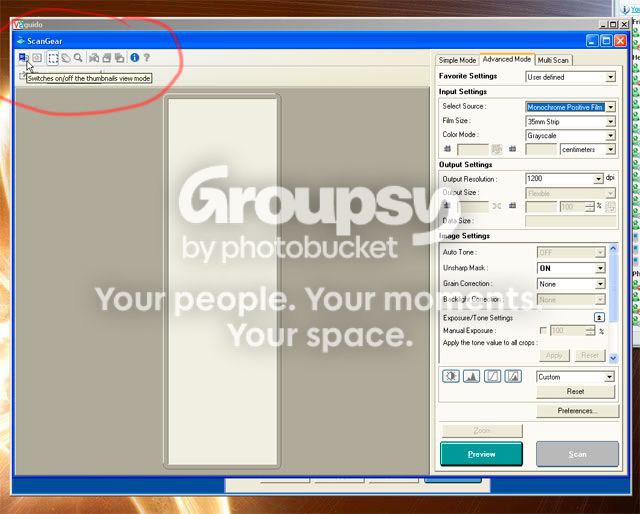
I was hoping someone could answer my question about my Canon Canoscan 8800F. I successfully scanned my 35mm film but the MP Navigator EX program cut up all my images. My question is, will this happen when I scan my panoramic film negatives as well? I would try it myself, but my film is sitting at the lab and I am anxious to find out if this will happen with the panoramic film. Will the software recognize that it's panoramic film? I understand everyone is very busy, but any help would be greatly appreciated.
Thank you in advance,
Alie
thesugaredlotus
I was hoping someone could answer my question about my Canon Canoscan 8800F. I successfully scanned my 35mm film but the MP Navigator EX program cut up all my images. My question is, will this happen when I scan my panoramic film negatives as well? I would try it myself, but my film is sitting at the lab and I am anxious to find out if this will happen with the panoramic film. Will the software recognize that it's panoramic film? I understand everyone is very busy, but any help would be greatly appreciated.
Thank you in advance,
Alie
thesugaredlotus




![[No title]](/data/xfmg/thumbnail/35/35668-5ed46d3abc5acbedc69d68e0c3a2173a.jpg?1734167299)

![[No title]](/data/xfmg/thumbnail/33/33421-38d09827e584b8381c5e3a468cdf0159.jpg?1734163435)
![[No title]](/data/xfmg/thumbnail/35/35670-0571a45fff5cc94fc333fb959ce54517.jpg?1734167303)