What's new

Rank Amateur~Low Budget Portraits~ C&C Please

CapturingLight

TPF Noob!
Joined
Sep 7, 2011
Messages
23
Reaction score
0
Location
SE Mass
Can others edit my Photos
Photos OK to edit
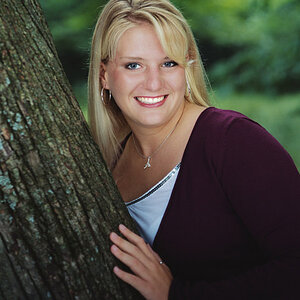
So I grabbed a sheet, table lamp, and a patient teenager, threw in some meager talent and here are the results. No post processing. What's right, what's wrong, tell me because I really don't know. Canon XSi, 28-135 IS, 430EXII. Second attempt ever with on camera speedlight.

IMG_8220.JPG

#1. Elbows? Shadows?

IMG_8246.JPG

#2. Is the hair on the model's left side to soft?

IMG_8275.JPG

#3

Thanks, Jesse
 
Be very careful when cropping joints, digits, skin. Generally on skin it doesn't work always that well. Patterned clothes distract from your subject as well. If you can get that camera speedlight off of the camera you will be more pleased with the results. And to get a bit more separation from your backdrop and the girl. That way you wont be able to see the wrinkles and what not. With woman don't show the flat hand, try to show just the side curve or the pinky or thumb side it tends to be more flattering. In number two you have the meat of the hand showing beside her face and it becomes its own second subject. rather than part of your subject if that makes sense. The other thing I would mention is camera WB with this is off leaving it a tad orangy. The pose in number is closer to what you want with the hands on the hips because its slimming. Posing and dressing your model is your responsibility also.

My suggestion is get a solid colored long sleeved top or tshirt no patterns, logos, move her away from the backdrop and get that camera flash off to the side. Watch her hands lol. Even if you can't just changing the above will probably make a big difference.
 
Love the expression in the third shot.....

She looks like "Why are you making me do this?"
 
I'm also an amateur, but I'll give you my feedback for what it's worth =).

1. Yep, elbows! One thing that a lot of people look out for is the cutting off of elbows and other limbs at the joints.

2. I'm not sure if this is 'wrong' or not, but to me it just seems too tightly cropped.

3. I can't see anything technically wrong with this one, though some post processing would help to brighten them all up a but and seperate her more from the background, cause now that I look at them it seems her skin kind of matches your backdrop. Also, it looks as though her patience was coming to an end, lol.
 
If you can get that camera speedlight off of the camera you will be more pleased with the results.

Thanks, Dee. What is the simplest method for off camera flash? I was considering a 32" umbrella with a 6' stand. Do I use a cord, slave unit, etc? I don't shoot for profit, so cost is an issue.
I appreciate all the pointers!
 
the aperture seems a little high for a portrait you can tell it's a sheet... I think if you put the flash on a stand with umbrella like you're saying it would look better also, I don't know if the XSi has that wireless option built in. I agree I like the expressions, it almost looks like a daughter saying Dad what the hell are you wasting my time for I could be at the mall with my friends...
 
The white balance is wrong, and from trying to correct the white balance it looks like you used mixed lighting (window & tungsten).

Try and pose so the eyes aren't jammed into the corner of the eye sockets. Also be mindful of creases in the neck when posing.

The light is very flat in that there are few shadows in the facial mask to give a sense of depth and character
 
Thank you all for taking the time to comment.
Compared to what I produced prior to this with no flash, I am happy with my progress. White balance is something I agree I need to do more research on, as there are so many sources of info available. These all had WB set to auto. Composition is another area I've advanced in, and I think I am getting closer. Just not "there" yet.


I had the aperture opened up all the way, but the Canon 28-135 is relatively slow. A Canon 50mm f1.8 was used later in the shoot, but I struggle with softness when that is opened up.


This was at f2.5, with the face slightly overexposed to hide blemishes.
IMG_8334.JPG
 
From what I see... The backdrop is quite similar to the skin tones of the model.... Perhaps changing that to a different color/higher contrast would be a though...
 
This afternoon I utilized the method of a white piece of paper to establish custom white balance. Pretty simple. Changing the background for contrast will be next, again, rather easy to change.
 
White paper isn't always 'white', which is why most portrait photographers use a good grey card and/or color checker. Plus mixed light is still mixed light, and even a custom white balance setting can only fully correct for one or the other light source, but not both. I highly recommend this tutorial on White balance: Understanding White Balance and all the other tutorials on that web site.

X-Rite ColorChecker Passport

GENUINE WhiBal G7 Certified Neutral White Balance Card - Studio Card (3.5"x6")

I would also recommend: On-Camera Flash Techniques for Digital Wedding and Portrait Photography

Off-Camera Flash Techniques for Digital Photographers

Posing for Portrait Photography: A Head-to-Toe Guide
 
Last edited:
Thanks KmH, very helpful indeed. Since I currently lack the skills to be compensated, I like to find the lowest cost option available. Controlling the light source, as in limiting the type of light to one source is where I will turn next. I have a Gary Fong Lightsphere, and I read that I can use the removable dome as a source for white balance setting, perhaps not?
 
Keith, I just read your blog, including the entry on metering. I just stepped up to an XSi from an XS, (a small step!). One of the primary reasons was the XSi's spot meter, which the XS doesn't have. The XSi has only been in my possession for a week, so I'm learning the differences gradually, including using spot metering. Would the above shots have benefited from metering other than evaluative, or is the WB that far removed from exposure factors?
 
Yes, the white balance is that far removed from the metering mode you use.

I have mentioned mixed lighting a couple of times, and wonder if you understand what that refers to.

The lowest cost option available often makes it virtually impossible to get good results. However, that doesn't mean there are not DIY, low cost options, like using a bed sheet and incandescent light bulb in a household lamp, that can be effectively used.

However, using the low cost, or DIY options requires having a very good technical understanding of how photography works, so you can maximize using camera/lens/light features/functions/properties to mitigate any of the short comings of the lowcost/DIY options used.
 

Create an account or login to comment

You must be a member in order to leave a comment

Create account

Create an account on our community. It's easy!

Log in

Already have an account? Log in here.

Back
Top Bottom