What's new

RAW vs JPEG - Freedom Or Limiting

Wow that's all interesting, including that cameras take photos "as if" they were shooting film? No I don't use highlight or noise reduction, that I know of. Even when it's long exposure noise reduction, I turn it off. I suppose somewhere in all those settings menus, there are styles, which I don't use. But this will make me go look.

@Ysarex I can go look at a histogram and see that kind of thing from one of my photos? The wasted capabilities? This is something pretty normal with minimal editing, which is what I do and what I use. From the card to the computer to done editing takes minutes and then it's uploaded to the agency.
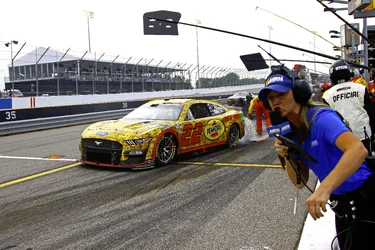
 

Attachments

  • 2023 WWTR Race 22 pit stop 393.webp
    2023 WWTR Race 22 pit stop 393.webp
    3.6 MB · Views: 28
Wow that's all interesting, including that cameras take photos "as if" they were shooting film? No I don't use highlight or noise reduction, that I know of. Even when it's long exposure noise reduction, I turn it off. I suppose somewhere in all those settings menus, there are styles, which I don't use. But this will make me go look.

@Ysarex I can go look at a histogram and see that kind of thing from one of my photos? The wasted capabilities?
No. Info like that won't show in a processed SOOC JPEG, you have to examine the raw data (RawDigger).
This is something pretty normal with minimal editing, which is what I do and what I use. From the card to the computer to done editing takes minutes and then it's uploaded to the agency.
It's a good photo of the car and captures something going on with whatever is splashing out of the back. That's what's important to you and you've captured that. The tech IQ isn't a concern for you and so you're OK with this photo. There are tech IQ issues that I would fix and/or not create like the CA in the image which is much easier to remove from raw data than from a processed RGB image.
 
@Ysarex Thinking about your earlier comments and conclusions. When you did the comparisons of the RAW where you did the maximum sensor exposure showing JPEG overexposed, did you have the in camera DR enhancements (highlight/shadow/HDR) turned off????

I've been studying how Pentax applies these adjustments. If saving JPEG with highlight/shadow correction on, (according to them) the camera underexposes by a stop, then pushes the exposure a stop by raising the ISO a stop (excluding the highlights), and using a modified tone curve on the midtones and shadows. If you're trying to compare a JPEG without the in camera DR enhancements applied or a JPEG converted from a RAW file, then it would in fact look over/under, because it's without benefit of the DR enhancement.

Have you done a comparison of an in camera JPEG with DR enhancement, to a RAW file saved using your method? It's been so long since I saved JPEGs I'd just about forgotten about them.
 
@Ysarex Thinking about your earlier comments and conclusions. When you did the comparisons of the RAW where you did the maximum sensor exposure showing JPEG overexposed, did you have the in camera DR enhancements (highlight/shadow/HDR) turned off????

I've been studying how Pentax applies these adjustments. If saving JPEG with highlight/shadow correction on, (according to them) the camera underexposes by a stop, then pushes the exposure a stop by raising the ISO a stop (excluding the highlights), and using a modified tone curve on the midtones and shadows. If you're trying to compare a JPEG without the in camera DR enhancements applied or a JPEG converted from a RAW file, then it would in fact look over/under, because it's without benefit of the DR enhancement.

Have you done a comparison of an in camera JPEG with DR enhancement, to a RAW file saved using your method? It's been so long since I saved JPEGs I'd just about forgotten about them.
I believe that function for Pentax works the same way as Fuji's DR function. I'm familiar with the Fuji version and what you're describing sounds the same. I never use that function as it offers me no value. Although it has an effect on the raw file it is primarily a JPEG picture control function. Bottom line it requires that you raise the ISO above base. It works then by withholding the analog amplification to the sensor signal as a way to create highlight headroom (evident in the raw file) and then applies the ISO lightening along with a modified tone curve in the camera's image processor. I'll simply use the camera at base ISO and out-perform it every time. Maximum DR from a sensor is achieved with a full sensor exposure at base ISO -- that delivers all the DR possible with that sensor.
 
Bottom line it requires that you raise the ISO above base
It's been a few moons ago since I worked with it, but I don't believe it requires any ISO adjustment.....it does it for you. So in essence, it drops the exposure a stop, then boosts it a stop by raising the ISO (limiting the effect on highlights).
 
It's been a few moons ago since I worked with it, but I don't believe it requires any ISO adjustment.....it does it for you. So in essence, it drops the exposure a stop, then boosts it a stop by raising the ISO (limiting the effect on highlights).
Not that AI can be trusted but:

Yes, the Highlight Correction option within the Pentax D-Range (Dynamic Range) function requires raising the ISO above the base setting.
Here are the key details regarding how this works:

  • ISO Increase: Activating the Highlight D-Range (often labeled as "Highlight Correction" or "D-Range Expansion") typically forces the camera to raise the minimum available ISO by one stop. For example, on cameras with a base ISO of 100, activating this feature will set the minimum ISO to 200.
  • How it Functions: The camera underexposes the scene by one stop to protect the highlights and then lifts the mid-tones and shadows during JPEG processing to make them look properly exposed.
  • Limitation: This means you cannot use the Highlight D-Range option while shooting at the lowest base ISO (e.g., ISO 100).
Canon has a similar function (HTP) -- also requires ISO raised above base and the Fuji function does the same.
 
@Ysarex yes thats what I said, just didn't explain right. As ISO100 is base, dropping the exposure by one stop automatically bumps to ISO200 to raise it back
 
@Ysarex yes thats what I said, just didn't explain right. As ISO100 is base, dropping the exposure by one stop automatically bumps to ISO200 to raise it back
I think the best way to think about it is you can't use the function at base ISO (assume 100). At ISO 200 and above then the camera does not underexpose but rather it withholds analog amplification from the sensor signal and that's what creates the highlight headroom. Test it: Set the camera to ISO 200 and take a meter reading. Then activate the D-Range function and see if the camera meters the scene differently. On a Fuji camera you get the same meter reading with DR function OFF or ON.
 
I think the best way to think about it is you can't use the function at base ISO (assume 100). At ISO 200 and above then the camera does not underexpose but rather it withholds analog amplification from the sensor signal and that's what creates the highlight headroom. Test it: Set the camera to ISO 200 and take a meter reading. Then activate the D-Range function and see if the camera meters the scene differently. On a Fuji camera you get the same meter reading with DR function OFF or ON.
Okay, like I said it's a relearning process for me. I've found out that the K3ii, WILL ONLY raise base ISO100 if it thinks it needs to, otherwise if you've set it at 100 it will prioritize that setting and might not raise it. :oops: this is why I hate all the behind the scenes crap. Going to try another shot later.

Edit: When I tried the comparison the first time with ISO100 the JPEG and the RAW file were very close on exposure, on manual with same shutter/aperture (the JPEG showing more shadow detail than the RAW). When I did it again with ISO200 it gave me the option to force Highlight correction to turn on, this time though the RAW file was on and the JPEG was obviously overexposed using the same manual shutter/aperture. Need to do more testing.
 
Last edited:
No. Info like that won't show in a processed SOOC JPEG, you have to examine the raw data (RawDigger).

It's a good photo of the car and captures something going on with whatever is splashing out of the back. That's what's important to you and you've captured that. The tech IQ isn't a concern for you and so you're OK with this photo. There are tech IQ issues that I would fix and/or not create like the CA in the image which is much easier to remove from raw data than from a processed RGB image.

OH!
apcjdL0suO0GJcuMHTU0.gif
DOH!
ZnopQJVzGY0PTisbOjXe.gif
Jezz I'm being thick...
bKWDLaqZMGyXXKuFjESY.gif


It was comparing the same image shot RAW + JPG. Now I get it. Since I don't shoot RAW, I'd have to turn that on and then look. What software would show me the histogram like the examples you posted?

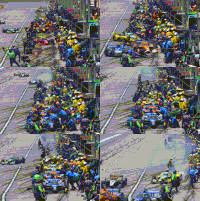
Yes, that's a NASCAR pit stop action shot, with the pit reporter leaning in and shouting into a microphone. At first I was unhappy, because I wanted the car with the fuel, the action and I thought the reporter was in the way. Instead when I got home and looked, she makes the shot better and more alive. The usual problem is, too fast of a shutter speed, and it looks like a parked car. Too slow and it's blurred, even with panning, Everything isn't always the same speed at the same next moment or in the same zone. It could be near or far, fast or slow, light or dark, and changes in seconds or less.

2025IowaPitStopgroup-100.gif
 
OH!
apcjdL0suO0GJcuMHTU0.gif
DOH!
ZnopQJVzGY0PTisbOjXe.gif
Jezz I'm being thick...
bKWDLaqZMGyXXKuFjESY.gif


It was comparing the same image shot RAW + JPG. Now I get it. Since I don't shoot RAW, I'd have to turn that on and then look. What software would show me the histogram like the examples you posted?
RawDigger.
Yes, that's a NASCAR pit stop action shot, with the pit reporter leaning in and shouting into a microphone. At first I was unhappy, because I wanted the car with the fuel, the action and I thought the reporter was in the way. Instead when I got home and looked, she makes the shot better and more alive. The usual problem is, too fast of a shutter speed, and it looks like a parked car. Too slow and it's blurred, even with panning, Everything isn't always the same speed at the same next moment or in the same zone. It could be near or far, fast or slow, light or dark, and changes in seconds or less.
Yes, shotting sports action is hard. I've know a number of sports photographers over the years and they were highly skilled.
 
I don't agree with the article at all either. Shooting raw doesn't mean you ignore getting the best picture your capable of BUT most importantly it allows you room for adjustment when the conditions are just not there to get that perfect image. In fact I have not shot a JPEG image since I have owned an actual camera (Not counting cell phone as one).
 

Create an account or login to comment

You must be a member in order to leave a comment

Create account

Create an account on our community. It's easy!

Log in

Already have an account? Log in here.

Back
Top Bottom