What's new

Raw vs JPEG question

Pandion

TPF Noob!
Joined
May 13, 2013
Messages
5
Reaction score
0
Location
Olympia, WA
Can others edit my Photos
Photos OK to edit
Okay, so I'm new here and fairly new to DSLR photography. In truth I haven't hald an SLR since my old Canon AE1 Program from the mid 80's. Anyway, I'm a painting contractor now & I'm having a new website done up that's pretty state of the art from a tech standpoint and I'd like my shots, which will be full screen, to really be as impressive as I can get. Hence the dumping of my old Nikon S8300 point & shoot and the purchase of the Canon 60D. So my question is this: My web guys all tell me to get them Jpegs since their smaller and easier to work with in their environment, and they'll do the post photo work before posting to the site. But everything I see on the forum here & in my studies says to go RAW. I think I saw where you can go from RAW to Jpeg in post production. I know nothing about post production work, so I'm sort of at his mercy. At the same time, if RAW is easier to work with.......What is the opinions of all you experts out there? I'll take any input I can get. Thanks.
 
Most websites won't support raw files, so that's a moot point there.

However, shooting in raw gives you far more editing and post-processing choices. You'll need to shoot raw, and if nothing else convert it in post so it can be uploaded to your website.
 
Okay, so I'm new here and fairly new to DSLR photography. In truth I haven't hald an SLR since my old Canon AE1 Program from the mid 80's. Anyway, I'm a painting contractor now & I'm having a new website done up that's pretty state of the art from a tech standpoint and I'd like my shots, which will be full screen, to really be as impressive as I can get. Hence the dumping of my old Nikon S8300 point & shoot and the purchase of the Canon 60D. So my question is this: My web guys all tell me to get them Jpegs since their smaller and easier to work with in their environment, and they'll do the post photo work before posting to the site. But everything I see on the forum here & in my studies says to go RAW. I think I saw where you can go from RAW to Jpeg in post production. I know nothing about post production work, so I'm sort of at his mercy. At the same time, if RAW is easier to work with.......What is the opinions of all you experts out there? I'll take any input I can get. Thanks.

The purpose of raw files are to increase your editing latitude. If your designer asked for JPEGs, and you don't know how to process raw files, I would shoot in Jpeg for this application. There is a chance that your designer doesn't have a way to process raw files as well, even if its a small chance.

JPEGs taken at the largest and finest quality setting will be the same output resolution as your raw files, so image size is of no concern in that regard.
 
You can always set your camera to capture both simultaneously. It fills your card quicker, but then you can delete the ones you don't want. With the ones you do want, you can then compare the raw vs. JPEG to see the immediate visual difference. Its definitely a great topic for you to research depending on where you want to take your photography. Since it sounds like these particular shots will be for screen and not necessarily print JPEG will be just fine. They will be fine for print too as long as they don't need a lot of editing. Good luck and congrats on your new 60d.

Jake
 
But everything I see on the forum here & in my studies says to go RAW. I think I saw where you can go from RAW to Jpeg in post production. I know nothing about post production work, so I'm sort of at his mercy. At the same time, if RAW is easier to work with...

If someone is planning to do extensive editing later, he should shoot in RAW to enable a wider latitude of data for the adjustments. Since you need special software (editing software) to even view RAW images, most people will not be able to view them as RAW files. As has been pointed out; Most websites will not support RAW files either.

So in post-production, the RAW files are worked over, then a JPG copy is produced to enable transferring and uploading images to other computers.

If your tech guy can edit RAW, then give him both RAW and JPG files of each photograph. Or if he can only edit JPG files, just take the pictures in large, fine, JPG, and he can manipulate the size according to the desired display size.

Bear in mind that large files take longer to download, so don't make them so large that potential clients get tired of waiting on their computer to load the pictures, and just log off without demonstrating further interest in your services.
 
........ you can then compare the raw vs. JPEG to see the immediate visual difference.............


Really? What differences do you see? And what program are you using that makes them look different?

Yea RAW files often look WORSE straight out of the camera than JPG, because the camera usually handles some back-end stuff like sharpening when creating JPGs. If you shoot in RAW, you pretty much will have to edit them and then convert to JPG. This can be done in Lightroom, Photoshop, or most likely the software that came with your camera (e.g., Nikon comes with ViewNX)
 
........ you can then compare the raw vs. JPEG to see the immediate visual difference.............


Really? What differences do you see? And what program are you using that makes them look different?

Yea RAW files often look WORSE straight out of the camera than JPG, because the camera usually handles some back-end stuff like sharpening when creating JPGs. If you shoot in RAW, you pretty much will have to edit them and then convert to JPG. This can be done in Lightroom, Photoshop, or most likely the software that came with your camera (e.g., Nikon comes with ViewNX)

Exactly. I personally use lightroom but the software that came with the 60d should do the trick. There is a ton of info out there on the subject and its definitely with experimenting with. Here is a quick link for a start.

http://www.slrlounge.com/raw-vs-jpeg-jpg-the-ultimate-visual-guide
Jake
 
Really? What differences do you see? And what program are you using that makes them look different?

Yea RAW files often look WORSE straight out of the camera than JPG, because the camera usually handles some back-end stuff like sharpening when creating JPGs. If you shoot in RAW, you pretty much will have to edit them and then convert to JPG. This can be done in Lightroom, Photoshop, or most likely the software that came with your camera (e.g., Nikon comes with ViewNX)

Exactly. I personally use lightroom but the software that came with the 60d should do the trick. There is a ton of info out there on the subject and its definitely with experimenting with. Here is a quick link for a start.

RAW vs JPEG (JPG) - The Ultimate Visual Guide
Jake


It depends on the software you use, and whether or not it applies the in-camera settings to the raw file before displaying on your monitor. If it does, then SOOC raw & JPEGs should look identical. If not, the raw will tend to look blah.
 
........ you can then compare the raw vs. JPEG to see the immediate visual difference.............


Really? What differences do you see? And what program are you using that makes them look different?
I shoot both jpeg and raw a lot, and then I will upload to LR4. The jpegs will look finished and the raw files will look like poop.
 
Really? What differences do you see? And what program are you using that makes them look different?

Yea RAW files often look WORSE straight out of the camera than JPG, because the camera usually handles some back-end stuff like sharpening when creating JPGs. If you shoot in RAW, you pretty much will have to edit them and then convert to JPG. This can be done in Lightroom, Photoshop, or most likely the software that came with your camera (e.g., Nikon comes with ViewNX)

Exactly. I personally use lightroom but the software that came with the 60d should do the trick. There is a ton of info out there on the subject and its definitely with experimenting with. Here is a quick link for a start.

RAW vs JPEG (JPG) - The Ultimate Visual Guide
Jake

Raw files don't "look" any specific way compared to the camera JPEG. First of all it's the same photo originating from the same source. One option is to use the camera's automated software to convert the sensor capture to an RGB photo and another option is to use raw conversion software on your computer to convert the sensor capture to an RGB photo. When you open a raw file in a raw converter there is no universal unedited look or state for that photo. The raw conversion software has to begin editing the photo immediately in order to display it for you.

You and Kathy are both using LR and referencing that experience. Your experience is unique to LR and in no way universally applicable to other raw conversion software. Just because LR displays your raw files looking like poop (to use Kathy's terminology) doesn't mean that's what happens if you open a raw file in say Photo Ninja or DxO or Capture One or RT or some other raw converter. My experience using Capture One is the opposite of Kathy's experience using LR.

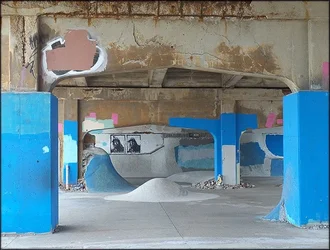
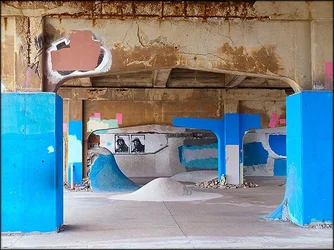
Here's a camera JPEG (looks like poop):

$bridge_01.webp

Here's that same photo (raw file) opened in Capture One with zero editing by me (looks better than JPEG):

$bridge_02.webp

If I open that same photo in 5 other raw converters I'll get five different default renditions including one that is identical to the camera JPEG if use the raw converter supplied with the camera (as Sparky correctly noted).

Joe
 
Last edited:
Web designers aren't photographers. They want to piddle around with editing JPEGs but I doubt they understand what that means. If they insist on JPEG, then give them JPEG. For your situation, it's probably the easiest route, but not the highest quality route. There's nothing wrong with JPEG if you have everything perfect in camera and your post processing is minimal. But for that to happen, you have to know what you're doing at the time of capture. You have to understand and control the fundamentals. You can bend JPEG a little, not a lot. It's a painting that's already dried. What if your white balance is off and the picture has a color cast? Trying to take that out in JPEG degrades the image. What if it's not exposed correctly? Correcting it will introduce noise and fiddling with contrast adds banding. I don't recommend viewing RAW as a fix; it should be used as a platform for greater development potential. But these are real problems that I've seen come into play even with careful JPEG editing on perfect exposures. If you want to shoot RAW, however, you need something to edit it with and you should understand post processing.

If you haven't mastered the fundamentals of photography, RAW is a better bet, but you still have to know how to process it. You probably know the white balance, exposure and sharpening benefits of RAW, but cameras actually aren't capable of producing accurate color in every instance. It may look great, but until you compare it to a color profiled image, you don't know how off it is. If you require the most accurate color, you can do color profiling, which you can't do with JPEG. This instantly sets your color where it should be under the spectrum of light, and colors will look natural. You can export a JPEG to be used on the Web. The other problem with JPEG is it's always finished. If new software comes out that enables you to manipulate RAW in a new way, it won't apply to JPEG. You simply can't go back into JPEG and change the original settings. If you could, it'd be RAW.

If you don't think there's a visible difference between JPEG and RAW out of the camera, you shouldn't be teaching people about this topic. JPEG is a processed file. The camera applies a color space, white balance, contrast curve and sharpening to the file as it's recorded. RAW is an unprocessed file. It has no color space, no sharpening and no contrast curve and thus looks different than JPEG right out of the camera. In fact, RAW usually looks flat compared to a JPEG copy. The changes are applied to the RAW file only upon export. The reason RAW may look the same as you review it on the LCD is because it's a JPEG of the RAW information.

Jay Maisel: "I don't want to look at RAW because RAW looks like s#&!" If you want to argue, argue with Jay.

 
JPEG is really a "final output" format. When you're done adjusting your image, export a version in JPEG. THAT's the version you share with others.

RAW preserves all original information. By definition, the camera isn't allowed to make any change to the image that would result in an irreversible loss of information. That's why it wont have adjustments applied to it IN the camera.

Most photographers prefer RAW because it puts THEM in control. They have the highest degree of latitude for adjustment when post processing.

When someone says "RAW looks like poop" it's because nothing has been done to the RAW. RAW is technically more true to life. The JPEG, on the other hand, has several things done to it at a MINIMUM and may have even more done to it depending on some of the effects a camera can apply (most cameras have settings to let you pick color enhancement modes.)

I use Aperture to handle my RAW workflow. Aperture has a camera profile for each camera. When I import a RAW, it automatically applies some adjustments based on "camera profile" -- so I generally never see the true RAW (straight-out-of-the-camera) -- although I can force it show me.

RAW isn't a standard format... it's more of a concept. Each unique camera model has a slightly different format. As such, there's no universal RAW file reader. Apple provides RAW updates to their operating systems because Apple's "Preview" app, "iPhoto" app, and "Aperture" app all share the same RAW engine. But programs such as Adobe Lightroom and Photoshop don't use the built-in RAW reader in the OS (and while I don't use Windows, when I did last use Windows, Microsoft doesn't provide any sort of "RAW" processing engine at the OS level -- so companies like Adobe would have to include their own.) This can be a problem... I started with Photoshop CS3. I noticed once CS4 released, I got about one last Adobe Camera RAW update for CS3 and that was the end of it... if you wanted to buy a new model camera and be able to open RAW files, you'd need a newer version of Photoshop... so you'd have to upgrade to CS4 to get that. They did the same when CS5 released, etc.

This means if your web designer doesn't have a current version of Photoshop, then depending on the camera model you have, he or she may not be able to open your RAW files. Photoshop updates are expensive. Unless you're making a good income in your job as a photographer or graphics designer, you may not want to buy every update they release (now Adobe wont sell you a perpetual license, you basically have to "rent" their software on a subscription model and the cost of the subscription for 1 year is more than the cost they used to charge for an upgrade version.)
 

Create an account or login to comment

You must be a member in order to leave a comment

Create account

Create an account on our community. It's easy!

Log in

Already have an account? Log in here.

Back
Top Bottom