What's new

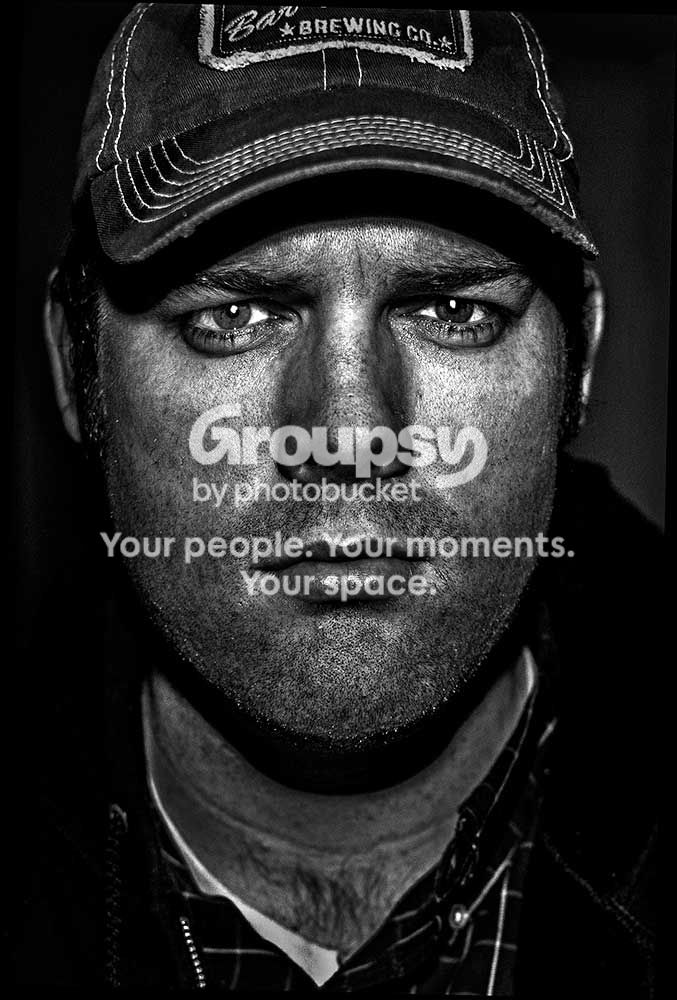
Self portrait trying to pull of a look

runnah

Moderator
Staff member
Supporting Member 📸
Joined
Oct 16, 2012
Messages
14,632
Reaction score
7,563
Can others edit my Photos
Photos OK to edit
I was going for all those super textured looks that you see. Inspired to give it a go in my office with my camera on some paint buckets. How did I fair?


Not normally so serious, but I looked doofy casual.

me1 by runnah555, on Flickr

Exposure 0.004 sec (1/250)
Aperture f/3.2
Focal Length 35 mm
ISO Speed 200
sb-800 set to some mode.

Lots of tweaking in post to bring out textures.
 
I can't look at his too long. It's freakin' me out!

:sexywink:


I don't do portraiture, but what bothers me here are the very hard lined shadows of the hat, and under the chin, giving you sort of a floating face.
 
  • Thread Starter 🔹
  • Moderator 🛠️
  • #3
I had a hard time getting the flash right on this. I see exactly what you are saying.

Posing myself is a hell of a lot harder than it sounds.
 
I agree with bitter, but at the same time I kind of like the fact that it's a floating face. It really emphasizes the facial features and helps keep my eyes from wandering - or is it the fact that no matter where I move, your eyes follow me?
 
  • Thread Starter 🔹
  • Moderator 🛠️
  • #5
I agree with bitter, but at the same time I kind of like the fact that it's a floating face. It really emphasizes the facial features and helps keep my eyes from wandering - or is it the fact that no matter where I move, your eyes follow me?


I have that effect.

I ran into the issue of not having any people around to take photos (that sounds sad). So when in doubt use yourself.

Normally I am much more happy/groomed but it's vacation week.
 
I would tip the hat up a bit to see the eyes more (most important in any portrait), auto-bracket at 2.0 EV, stay still, and re-shoot it. Then load those puppies in photomatix and do a real HDR. And I'd frame the eyes in a third.
 
  • Thread Starter 🔹
  • Moderator 🛠️
  • #7
I would tip the hat up a bit to see the eyes more (most important in any portrait), auto-bracket at 2.0 EV, stay still, and re-shoot it. Then load those puppies in photomatix and do a real HDR. And I'd frame the eyes in a third.

I have used bracketing in the past for other scenes I know I want to HDR, but I've never tried it with a flash. Does that change the bracketing values?

Yeah This has been a learning experience, next time no hat and I'll run a comb through my hair. I thought I did get the crop right but I will try again.

Thanks for sharing your insight on this subject.
 
I would tip the hat up a bit to see the eyes more (most important in any portrait), auto-bracket at 2.0 EV, stay still, and re-shoot it. Then load those puppies in photomatix and do a real HDR. And I'd frame the eyes in a third.

I have used bracketing in the past for other scenes I know I want to HDR, but I've never tried it with a flash. Does that change the bracketing values?

Yeah This has been a learning experience, next time no hat and I'll run a comb through my hair. I thought I did get the crop right but I will try again.

Thanks for sharing your insight on this subject.

Thanks for posting the image for us to view!

I've found that using flash does effect the results of my bracketed shots, however with a softer light source, like a diffused ring light, it performs especially well for HDR images (especially portraits). Generally, the bracketing I use is 2.0, but with flash sometimes I get an image with my highlights completely blown out, or other funky results, so I just turn the exposure bracket difference down to like 1.5-1.7

Great example of what a ring light does with HDR: HDR Portrait of Frank | Flickr - Photo Sharing!
Photo by William Yu

But, just play with it. I'm still VERY new to photography, but I notice that I make quantum leaps by watching video tutorials from the industry giants (ie, Joel Grimes has tons of free content on YouTube, and he's a true master).

Good luck dude!
 
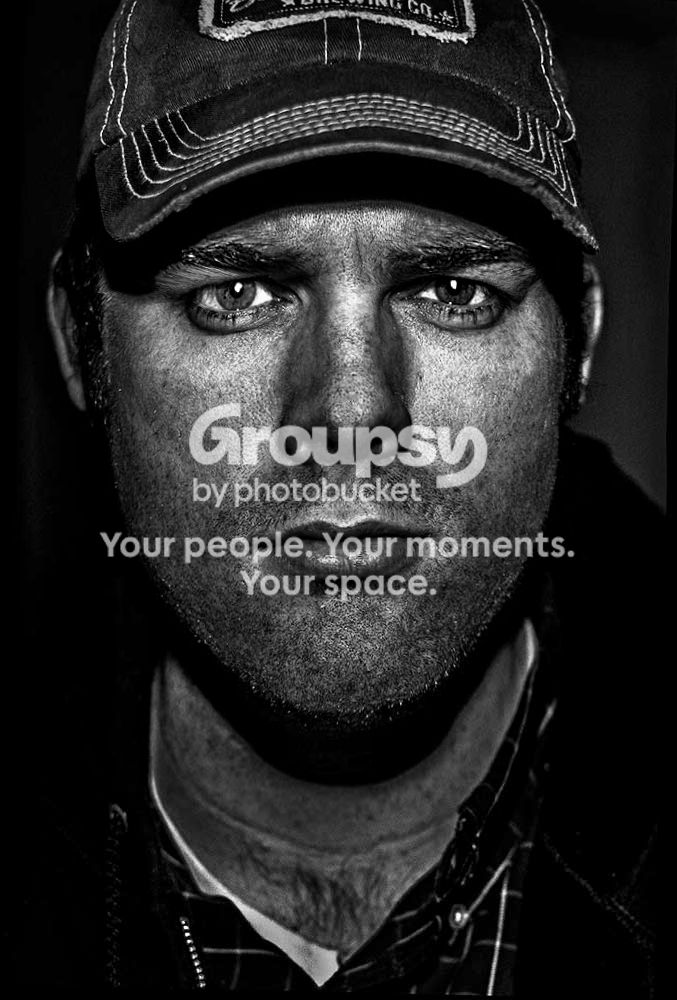
This is a good start and I think just needs a bit of re-evaluation.
What is it that typifies these kinds of images, besides the obvious grunge look.

They look sharp, gritty, in focus,
The eyes and face draw all the attention
eyes particularly are bright, focussed
the rest is duller and smudged.

OK, looking at yours, the face is tilted, thus looking weaker, there is a brighter, oof spot on the tip of the nose, the eyes are dark and the catch-lights tiny.
There aren't any/many real blacks and the contrast isn't so great.
There are bright spots in the clothing.

If we change all that.

  • upright face
  • burn in all the bright areas
  • lighten and sharpen the eyes.
  • clone over the nose and sharpen it
  • enlarge the catch lights
  • increase contrast in the face

this is what results.
closer, perhaps, to your desired end.

8250331995_c7e26652c0_kllllll22222.jpg
 
  • Thread Starter 🔹
  • Moderator 🛠️
  • #10
This is a good start and I think just needs a bit of re-evaluation.
What is it that typifies these kinds of images, besides the obvious grunge look.

They look sharp, gritty, in focus,
The eyes and face draw all the attention
eyes particularly are bright, focussed
the rest is duller and smudged.

OK, looking at yours, the face is tilted, thus looking weaker, there is a brighter, oof spot on the tip of the nose, the eyes are dark and the catch-lights tiny.
There aren't any/many real blacks and the contrast isn't so great.
There are bright spots in the clothing.

If we change all that.

  • upright face
  • burn in all the bright areas
  • lighten and sharpen the eyes.
  • clone over the nose and sharpen it
  • enlarge the catch lights
  • increase contrast in the face

this is what results.
closer, perhaps, to your desired end.

8250331995_c7e26652c0_kllllll22222.jpg

Spot on. Great job, exactly what I was looking for.

Catch light I assume or the reflections in the eyes?
 
  • Thread Starter 🔹
  • Moderator 🛠️
  • #12
Even better...I did shoot in raw so I will try to get the same effect.
 

Create an account or login to comment

You must be a member in order to leave a comment

Create account

Create an account on our community. It's easy!

Log in

Already have an account? Log in here.

New Topics

Back
Top Bottom