What's new

Senior Photos

kassiexlee

TPF Noob!
Joined
Aug 3, 2011
Messages
14
Reaction score
2
Location
Massachusetts
Can others edit my Photos
Photos OK to edit
Hey guys. I'm trying the whole, asking for tips thing, again.
I have a friend and I'm doing his senior photos, and I plan to do it for another friend as well.
I'm doing it for free, and I've been using Photoshop and Lightroom to help edit, but I'm very very new to both programs.
(Thank you to whoever told me trying them would be worth it, you were all totally right. :thumbup: )

But anyways, I have only one that's done and that I personally like. I like it because it's bright and shows he's outdoors-y but his face is definitely the focus point, because it takes up the majority of the photo.
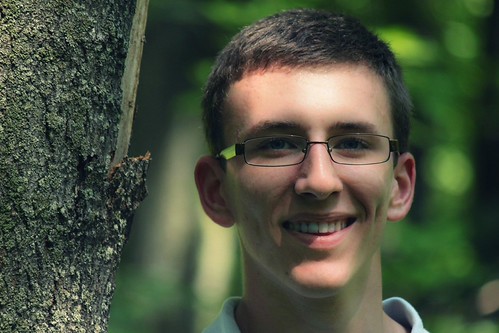

http://www.flickr.com/photos/66301413@N03/6035053629/by kassiexlee, on Flickr

Please let me know what you think of this one, and tips for the next ones, or senior photos in general, and try to be honest yet gentle?(: Haha.
 
1) Portrait orientation would have been much greater in this shot.
2) This shot is underexposed.
3) Fill flash would have been extremely beneficial with the shadows on his face.

Good luck in the future!
 
Do you have a reflector?

If not, get one. A nice 42" 5 in 1 reflector can be had at the ebays for about $25. It's a good investment, and might have helped with light in this one.

I only say that because it seems a bit dark, and a little extra light might have turned good into better.

My overlookable .02.
 
Doing senior portraits will be so much fun. The shadow on his face is a little harsh. It is an area I am working on has well. I might have moved him a little more in front of the tree. As it is he is almost sharing the frame with the tree.
 
The composition is a bit off. The tree and senior are fighting for the viewer's attention.
 
Do you have a reflector?

If not, get one. A nice 42" 5 in 1 reflector can be had at the ebays for about $25. It's a good investment, and might have helped with light in this one.

I only say that because it seems a bit dark, and a little extra light might have turned good into better.

My overlookable .02.

Looks like you can get them even cheaper then $25 buck. Any reason not to buy the ones that are around $17? Is quality an issue?
 
Actually, his face occupies well less than 50% of the photo. The tree he is standing next to adds nothing positive to the photo of him, unless he ate that bark missing from the side of the tree.

Portraiture is all about the eyes. The eyes. The eyes. The eyes are the window to a person soul.

We can't see his eyes, because his eye sockets are so dark (raccoon eyes). That's why you need to use fill flash or reflected light, to get light to the eyes.

His shoulders are square to the camera making him look very static, almost like a statue.

Master Posing Guide for Portrait Photographers

Master Guide for Photographing High School Seniors
 
Last edited:
Okay, tomorrow I'm going hiking and I will be taking more pictures for my friend (in the picture) for his senior photos.
You all had great tips etc. for this picture, but it was obviously too late.
Tips for tomorrow please?(:
 
Okay, tomorrow I'm going hiking and I will be taking more pictures for my friend (in the picture) for his senior photos.
You all had great tips etc. for this picture, but it was obviously too late.
Tips for tomorrow please?(:

Concentrate on keeping the kid as the focal point of the picture. Shoot portrait (it's called portrait for a reason).

Watch and understand your lighting, know what the image is going to look like before you press the shutter.
 
Tips for tomorrow please?(:
Use the flash for fill light. I don't know if a Canon T1i's built-in flash can be put in manual mode or not. I checked the user's manual. It can so start it at 1/16 power (Page 140 of your user's manual). Put the flash in 2nd curtain sync (alson page 140)

Avoid dappled sunlight like you used in that example you posted. Put him in complete shade, but 6 or more feet away from any background.
 
Last edited:
Work with posing. Look at tons of picture on line. They are every wear. When you see something you like. Write down how the shot is set up or sketch it out. Try using your flash. Do profile shots. Make sure he takes up must of the space in the picture unless the surrounding area is highly interesting. Keep shooting and review your work on the display has you go.
 
I forgot to mention. His glasses will have to be considered. There are a couple of things you can do.

Have him raise them slightly behind his ears so it angles the glass down a bit. Shoot from a lower perspective and have him lower his chin slightly and look slightly up at you. Have him look in the lens and while keeping his eyes on the lens, turn his head away from he camera slightly.

The best solution for eyeglasses....Take the glass out of the frames.
 

Create an account or login to comment

You must be a member in order to leave a comment

Create account

Create an account on our community. It's easy!

Log in

Already have an account? Log in here.

New Topics

Back
Top Bottom