What's new

Sierras for C&C

spacefuzz

No longer a newbie, moving up!
Joined
Jan 18, 2011
Messages
1,832
Reaction score
318
Location
Southern California
Can others edit my Photos
Photos OK to edit
Went to climb Mt. Langley this weekend and aside from getting really sick from the altitude it was a great trip. Was hoping people could offer some C&C for these, feel free to be brutal. All taken with ISO 100, D7000, 10-24 Tamron lens.

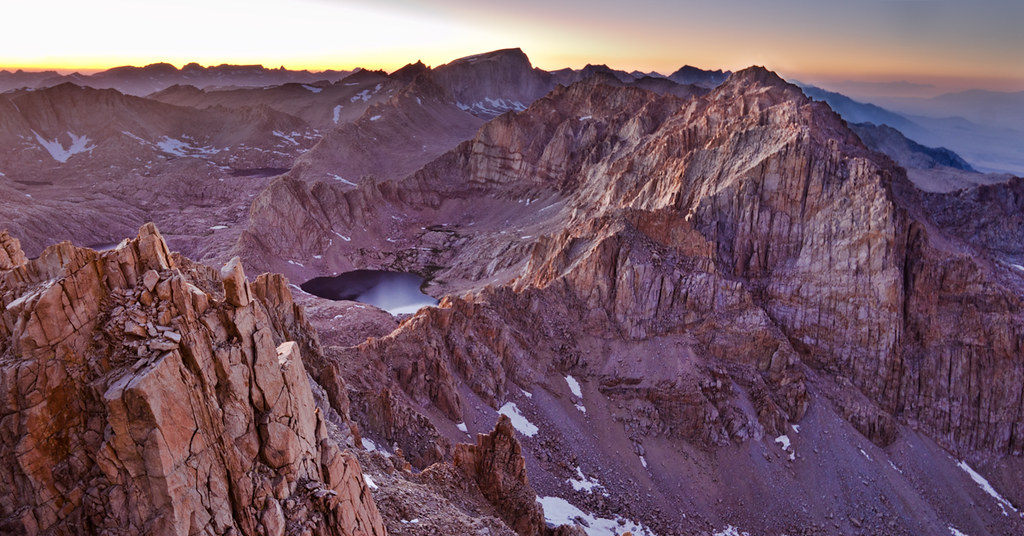
1. From the Summit, 2 RAW shots f/8 blended in CS5. I dorked the exposure so the left sky is blown. Also feels a little soft. Anything else?
6071757303_e131a6af4e_b.jpg


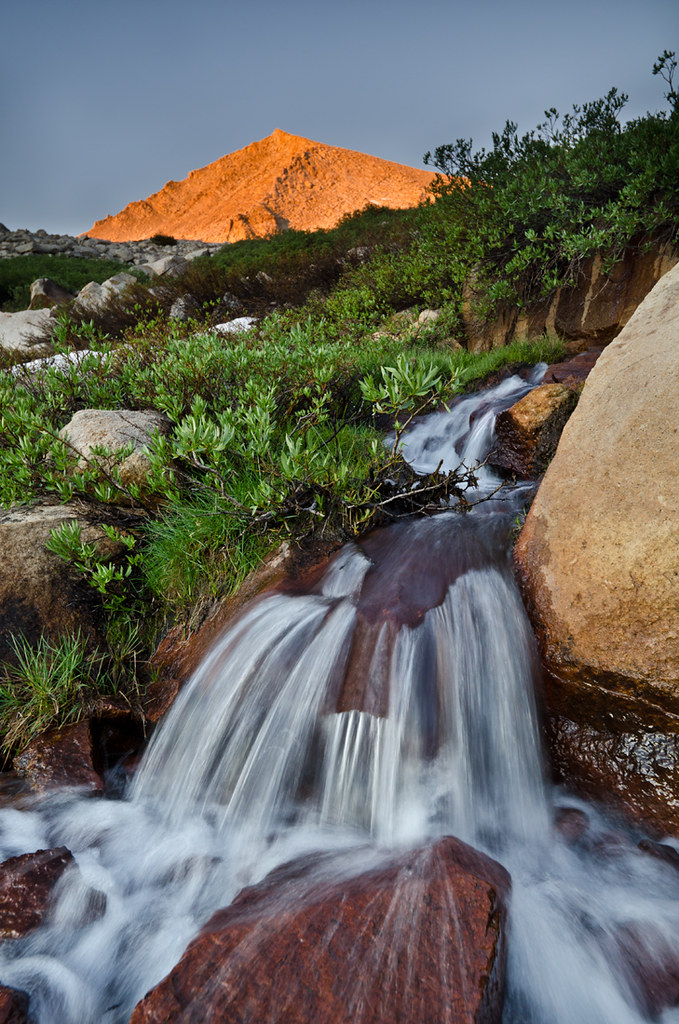
2. Long Lake Sunrise 1 f/8 single RAW edited in lightroom.
6071757717_1b30f50635_b.jpg


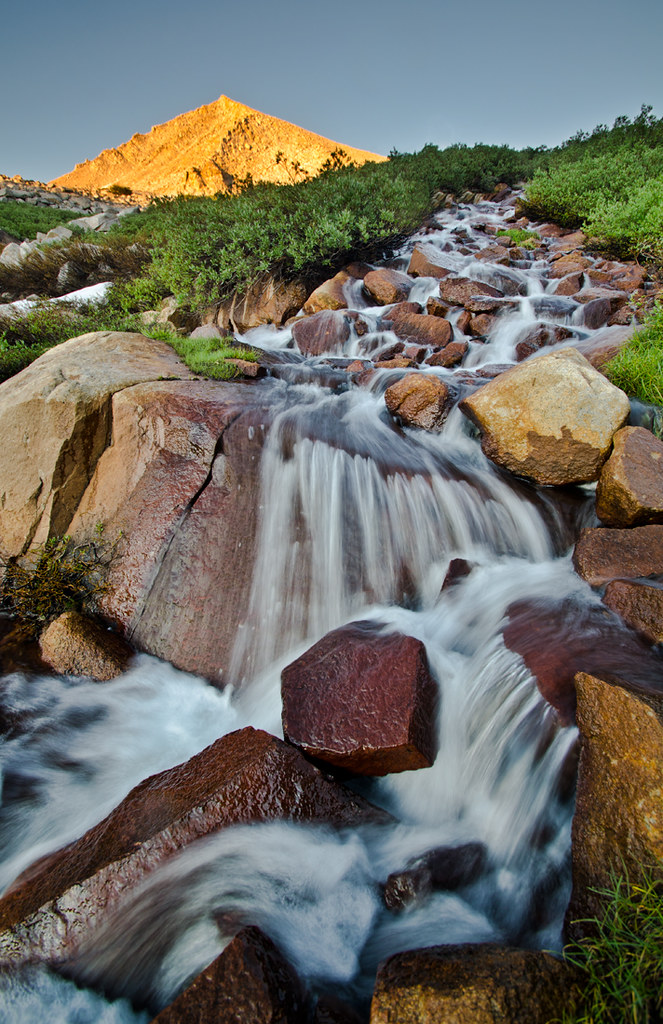
3. Long Lake Sunrise 2 f/8 2 RAW files blended in CS5
6072300786_d11f8967fc_b.jpg
 
that first one if fantabulous
 
This isn't a photo gallery or C&C forum section. It's a discussion forum section:

This is the forum for more advanced discussion of photography, such as exposure methods, lighting, HDR, and other techniques and controls!
 
This isn't a photo gallery or C&C forum section. It's a discussion forum section:

This is the forum for more advanced discussion of photography, such as exposure methods, lighting, HDR, and other techniques and controls!

I swear I saw some other photos for review type threads in this section. And I swear last time I posted in the beginner critique section I got flak for not being a beginner :p so where fine sir should I post?
 
will do thanks. would a mod mind moving this then?
 
i would like to see the water brighter to match the intesity of the background
 
i would like to see the water brighter to match the intesity of the background

Ditto. One the first one, Exactly what is it that we're supposed to be looking at? I see its a mountain, thats it. There seems to be no clearly defined subject. Maybe crop in to make the small lake stand out more? That way you could also eliminate some of the blown sky on the left.
 
how did you achieve the motion effect in the second and third photo? was it just a longer shutter speed, or did you use a filter of some kind

i am inclined to think the first one, but i don't know very much about filters so i am curious.. sorry for noobity.


and the first photo is amazing, although the mountain to the right seems a tad bit OOF... maybe its just me
 
how did you achieve the motion effect in the second and third photo? was it just a longer shutter speed, or did you use a filter of some kind

i am inclined to think the first one, but i don't know very much about filters so i am curious.. sorry for noobity.

and the first photo is amazing, although the mountain to the right seems a tad bit OOF... maybe its just me

On #1 it may be a bit OOF, I was extremely altitude sick while taking it so wasnt paying as much attention as normal.

#2: its a single RAW file with adjustments in lightroom. The light was just right that I could get it all in one exposure (although I need to lighten the foreground a bit).
#3: this shot was maybe 10 minutes later and the glow on the mountain was bright enough I had to bracket it, a long exposure for the foreground and then a shorter one for the mountain (blended together in photoshop). I could have done the same thing with a graduated neutral density filter, but Lee is still backordered....and so I'm still waiting :p
 
i would like to see the water brighter to match the intesity of the background

Ditto. One the first one, Exactly what is it that we're supposed to be looking at? I see its a mountain, thats it. There seems to be no clearly defined subject. Maybe crop in to make the small lake stand out more? That way you could also eliminate some of the blown sky on the left.

Maybe frame the picture so the lake isn't in the center.
 
i would like to see the water brighter to match the intesity of the background

Ditto. One the first one, Exactly what is it that we're supposed to be looking at? I see its a mountain, thats it. There seems to be no clearly defined subject. Maybe crop in to make the small lake stand out more? That way you could also eliminate some of the blown sky on the left.

Maybe frame the picture so the lake isn't in the center.

Nos 2 and 3 maybe landscape orientation would work better. I like the depth of color in 2
 
These are wonderful. I love #3, well done on the blend ;) The framing is good with the water flowing down and into the lower left corner. Bravo!
 
how did you achieve the motion effect in the second and third photo? was it just a longer shutter speed, or did you use a filter of some kind

i am inclined to think the first one, but i don't know very much about filters so i am curious.. sorry for noobity.

and the first photo is amazing, although the mountain to the right seems a tad bit OOF... maybe its just me

ah, thanks for the clarification ^^ would a grad. neutral density filter result in that blurred motion effect seen in the water?
On #1 it may be a bit OOF, I was extremely altitude sick while taking it so wasnt paying as much attention as normal.

#2: its a single RAW file with adjustments in lightroom. The light was just right that I could get it all in one exposure (although I need to lighten the foreground a bit).
#3: this shot was maybe 10 minutes later and the glow on the mountain was bright enough I had to bracket it, a long exposure for the foreground and then a shorter one for the mountain (blended together in photoshop). I could have done the same thing with a graduated neutral density filter, but Lee is still backordered....and so I'm still waiting :p

ah, thanks for the clarification ^^ would a grad. neutral density filter result in that blurred motion effect seen in the water?
 
ah, thanks for the clarification ^^ would a grad. neutral density filter result in that blurred motion effect seen in the water?

Well the blurred water is from the long shutter speed (small aperture), the GND comes in by letting you get that long shutter speed in the foreground by making that bright mountain in the back darker so its not blown out. Its just a way to compress your dynamic range without putzing with HDR in post processing.
 

Create an account or login to comment

You must be a member in order to leave a comment

Create account

Create an account on our community. It's easy!

Log in

Already have an account? Log in here.

Back
Top Bottom