What's new

Small detail over a larger area

aknorth

TPF Noob!
Joined
Jul 15, 2016
Messages
2
Reaction score
0
Can others edit my Photos
Photos OK to edit
Hello everyone thank you in advance for helping me with this problem. I am relatively new photography there is a lot I don't know. Here is the challenge

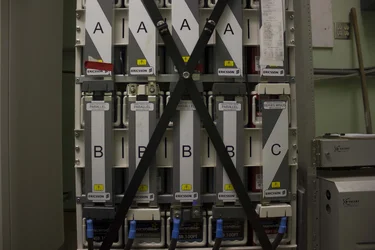
For work we are capturing pictures of data equipment racks(Approximately 2' wide 7' tall) . These often can have very small text that need to be readable in photos however we want to try to have just one large image of the entire rack. Attached is an example of one picture. We aren't adverse to having to stitch together images but I am unsure of the best approach of being able to get the detail we want but in one cohesive image.

Any tips or pointers in the right direction would be fantastic thank you.
 

Attachments

  • example.webp
    example.webp
    943.1 KB · Views: 189
What software are you using for post production processing?
 
Some cameras have the ability to take a 'panoramic' shot and do the stitching in-camera.
 
I would use my 10mm lens and do 3 shot vertical panoramas with Photoshop (or Lightroom).
 
The one question that has to be asked is:

What size will the finished image be? Is this to display on a web site, or printed on paper/advertising board?

Either way having the text readable is entirely dependant on how big your finished image is displayed at and not the resolution at which you take it. It's easy to capture the detail, but people will not read it if you display the image on a web site. What I'm saying is that if you want to capture small detail in an image and make it visible you have to display the finished image LARGE or they simply won't see it.
 
FWIW - the photo you attached is under exposed quite a bit.

Like Tim alludes to, a panorama shot would make the print smaller and harder to read unless the image is quite large.
Lots of people still don't have large computer display screens.
 
I would ask the purpose of the photos in the first place. Depending on the purpose you may want to break this up into one overall photo of each individual rack and then photos of each portion of each rack that details the written information.
 
Thanks everyone for the replies! For software I have access to Lightroom, Photshop CC2015, and PTIGui(This probably won't help much haha) These images will be zoomable and viewable on a computer, the idea is that someone remote can view the images if they are not able to physically access the site. The camera we are using is a Canon Rebel T2i.
 
Whenever I've done this kind of thing before for work I've always used multiple images. Sure you could stitch them into one shot but that can have its own issues with alignment, lighting and angles.

If you are just wanting to record the data then it's probably easier to take an overall, then provide "blow ups" of particular sections that are readable. I have combined ones I've done with an overview picture, schematics, CAD drawings or whatever in a nice .pdf format before.

To get repeatable accurate stitching you would probably be looking for a tripod and some kind of custom rail setup (with measurements) combined with a level. You'd also need to work out depth of field to set up a standard distance for focus and a lens that would give you the right resolution. If you are close you may also need to look into focus stacking in extreme cases where you are very close but have multiple planes that need to be in focus. And if it's multiple staff taking the images you might need to train them all how to use it.

Or you could go for a phase one 100MP camera, or maybe a 50MP 5DRS with a tilt shift lens woud do. Depends what it's for and what resolution you need.

The 7' tall thing kinda suggests to me that you'll probably need to move the camera in between shots and not just pivot it around one point though. You'll run into barrel distortion and depth of field issues with panoramas if you do.
 
Thanks everyone for the replies! For software I have access to Lightroom, Photshop CC2015, and PTIGui(This probably won't help much haha) These images will be zoomable and viewable on a computer, the idea is that someone remote can view the images if they are not able to physically access the site. The camera we are using is a Canon Rebel T2i.

Ok in that case I'd suggest the easiest route would be taking an overview image of the full cage and linking to a readable image of 2 or 3 rails. That way the site guy can shoot one overall, then a few images like you have above and you can make it clickable so you click on the rail and link to the relevent blow up. That would probably also be quicker than linking to a massive image if you only need spesific data.
 

Create an account or login to comment

You must be a member in order to leave a comment

Create account

Create an account on our community. It's easy!

Log in

Already have an account? Log in here.

Back
Top Bottom