What's new

Some C&C wanted - second model shoot

ceejtank

No longer a newbie, moving up!
Joined
Sep 28, 2011
Messages
764
Reaction score
118
Location
Weymouth, MA
Can others edit my Photos
Photos NOT OK to edit
picture links arent working- so removing sorry guys
 
Last edited:
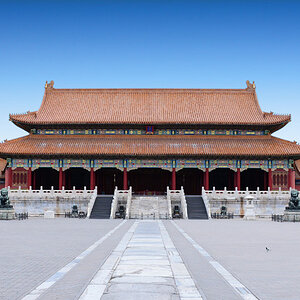
I like the first shot. Unless the buildings to the left of frame are important I would have cropped or angled to not include them but that's just my preference.

The second shot I feel the model is really underexposed. It looks almost like you used a naked light. A modifier to soften the light would allow for brighter light on her without the hot spots. If I were to light this I would also want the light closer to the axis of the camera to move the shadow of her arm so it didn't create a racing stripe across her chest.

Edit: Just saw you have 3 speed lights and with this info I would add just a hint of fill on camera right.
 
Thanks! Appreciate that. Yeah. I was using a speedlight with no modifier on it. It was windy so I kept it off. I will definitely keep that in mind for next time! It is a little underexposed, but I was going for kind of moody. I 100% appreciate this - and will keep it in mind (especially the shadow comment and modifier) for my next attempts. I appreciate the feedback! :)
 
pic links arent working - so removing. sorry
 
Last edited:
Not trying to argue or anything too. Im 100% agreeing with what youre saying. Now that youre pointing it out i can see how it could have been executed much better. And thats why i posted these. I appreciate your feedback :)

Sent from my SM-G935V using Tapatalk
 
@zombiesniper i actually used 2 for some shots that day.. heres an example (no need to c&c this one.. just showing you) but fir that one i turned one off to try and get that moody lighting.
2986cd55236f2b75a493be0914c29c57.jpg


Sent from my SM-G935V using Tapatalk

This shot is MUCH stronger than the first two. Awesome shot. Would like to see maybe a touch more light in her face, but I love the shot.
Thank you so much. As mentioned i am very new to model photography. I know my model shots are good but not great by any means. So any feedback for an improvement for next time is greatly appreciated.

Sent from my SM-G935V using Tapatalk
 
Links to Google accounts look like this to many TPF'ers...
POSTING FROM A GOOGLE ACCOUNT.webp
 
yup, can't see nada
 
Trever1t said:
yup, can't see nada

Exactly. We had this issue last week, and the week before, also with a Google account. I am not sure what's up with that either...I tried to log in to my Google account several hours ago, and it wanted me to add a phone number to secure my account additionally, but that did NOT work, and it would **not** send me the SMS text message with the code. I just said "**** it, Google."

I've grown digusted with both Yahoo, and with Google, and their password and security paranoia, etc.,etc..I seems as if Google is trying to really muscle in to more and more niches, especially on Android devices.

None of this has anything to do with the OP,and no blame should be attriubuted to the OP, but it's become more and more a PITA to deal with Google's substandard way of allowing people to actually share stuff without major hassles.

Next up: DropBox has changes its TOS, and is ready for a nose dive.

 
Last edited:
I'm going to make a general comment in regards to model photography since you're new to it.

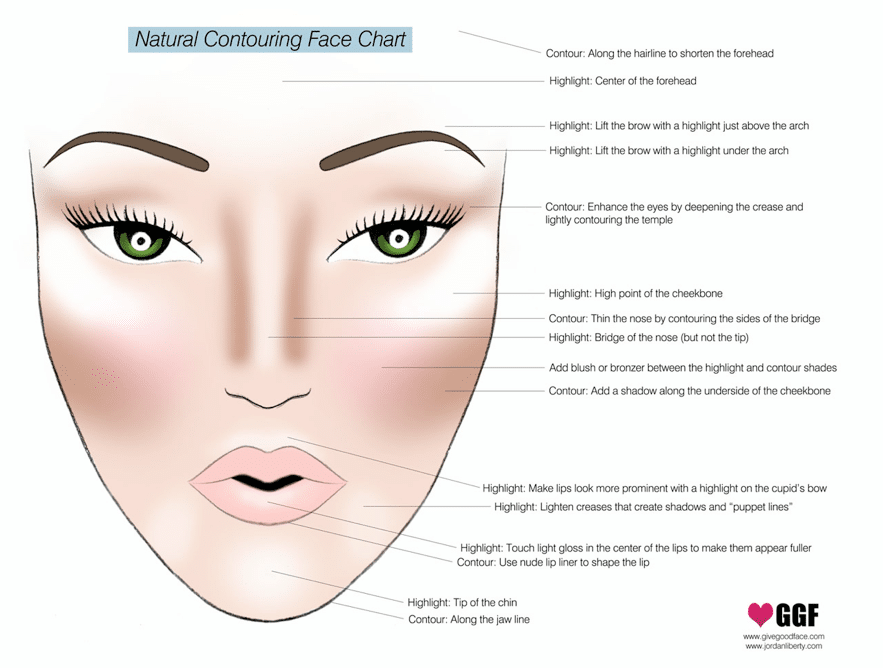
With model photography, keep in mind that this person is a model because they have nice features that make them beautiful. When photographing a model, you want to find ways of enhancing and showcasing these features by sculpting and highlighting them with your light. If you position your light (or position the model in the case of natural light) in a way so that the light is coming from an above angle, it will sculpt and highlight their cheekbones and other facial and body features. If you find that the higher lighting angle causes some darkness in the eyes, counter it with a reflector positioned below the model's face, or have the model point their chin a bit more towards the light source. Most women already use a makeup technique called "contouring and highlighting", which mimics this lighting effect to enhance their features. Applying this technique to model and portrait lighting will do a lot to improve your photos of people, especially the models, and will also reduce the amount of skin retouching needed in post production. If you look through fashion magazines like Vogue, Elle, W, etc, you will very quickly notice a contouring and highlighting effect often used in the photos of models throughout the magazines. You will also notice the ways in which very experienced model photographers photograph models. Pay attention to the angles they shoot from and the lighting they use. It's one thing to just photograph a model that is beautiful, and an attractive model will definitely improve the look of most photos, but finding ways to really bring out their beauty will take the photos to the next level.

If you pay attention to the way light falls on people around you in every day life (I can't help doing it, but often times it's when someone is speaking to me and I lose track of what they're talking about because I'm staring blankly at their face), look for this lighting pattern and you will begin to notice how nice it makes them look. This will also help train your eye to identify and use natural light or available light situations for times when you can't use your strobes and available light is your only option. This website has tons of reference and inspiration for model photography: Fashion Editorials

This diagram gives an idea of the general look created by highlighting and contouring:
tyd54f8_by_danostergren-dauzkxw.png


I hope this is helpful.
 
Last edited:

Create an account or login to comment

You must be a member in order to leave a comment

Create account

Create an account on our community. It's easy!

Log in

Already have an account? Log in here.

Back
Top Bottom