What's new

Surprise stalker

Devinhullphoto

TPF Noob!
Joined
May 29, 2013
Messages
413
Reaction score
44
Location
Mansfield, Ohio
Can others edit my Photos
Photos OK to edit
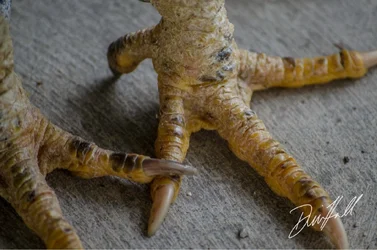
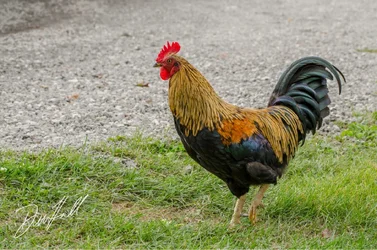
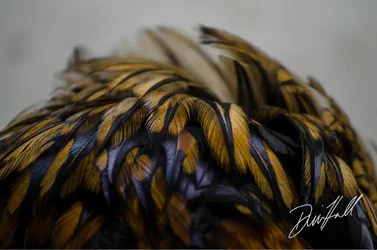
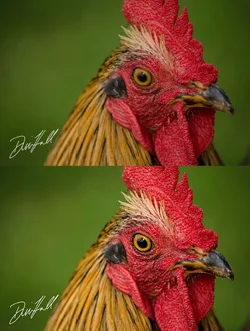
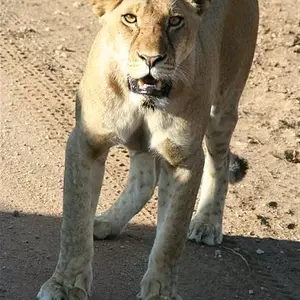
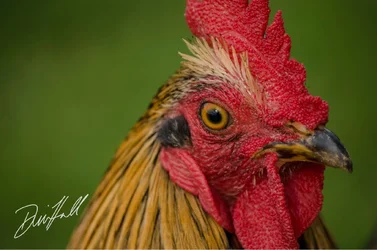
Went to a park yesterday and a chicken came out of nowhere and followed me around. So today I went back with my camera and he quickly found me. Here he is. I named him Michael.
 

Attachments

  • $image-3588283147.webp
    $image-3588283147.webp
    114.8 KB · Views: 110
  • $image-1593778498.webp
    $image-1593778498.webp
    141.8 KB · Views: 91
  • $image-2461693612.webp
    $image-2461693612.webp
    300.5 KB · Views: 94
Devin, pretty cool to get chicken stalked, lol!

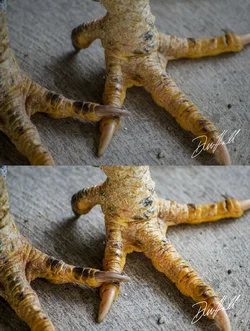
Do you calibrate your monitor? These seem a little underexposed.... and need a little selective sharpening for impact also.

Yours on top, my take on bottom! What do you think?

$image-1593778498111.webp$image-3588283147111.webp
 
Devin, pretty cool to get chicken stalked, lol! Do you calibrate your monitor? These seem a little underexposed.... and need a little selective sharpening for impact also. Yours on top, my take on bottom! What do you think? <img src="http://www.thephotoforum.com/forum/attachment.php?attachmentid=56490"/><img src="http://www.thephotoforum.com/forum/attachment.php?attachmentid=56491"/>
i do not calibrate my monitor. I'm in the process of saving up for an iMac and when I get that I'll also be getting the stuff needed to do so. Since my current laptop is on its last leg I'm not really worried about it yet but underexposure is something that I always seem to have a problem with. I do like yours better and see a clear difference. Thanks!

When (not to sound dumb) say selective sharpening, how would you do that in Lightroom 5?
 
Devin, pretty cool to get chicken stalked, lol! Do you calibrate your monitor? These seem a little underexposed.... and need a little selective sharpening for impact also. Yours on top, my take on bottom! What do you think? <img src="http://www.thephotoforum.com/forum/attachments/nature-wildlife/56490-surprise-stalker-image-1593778498111.jpg"/><img src="http://www.thephotoforum.com/forum/attachments/nature-wildlife/56491-surprise-stalker-image-3588283147111.jpg"/>
i do not calibrate my monitor. I'm in the process of saving up for an iMac and when I get that I'll also be getting the stuff needed to do so. Since my current laptop is on its last leg I'm not really worried about it yet but underexposure is something that I always seem to have a problem with. I do like yours better and see a clear difference. Thanks!

No problem... let me know if you need some help with post. The underexposure is probably due to your monitor being on the bright side... hope the Imac will solve that issue.
 
No problem... let me know if you need some help with post. The underexposure is probably due to your monitor being on the bright side... hope the Imac will solve that issue.
I'm always up for learning post processing more. I still haven't found what I like to do and how to use Lightroom to its fullest.

I edited my last post. Not sure if you saw my question.
 
No problem... let me know if you need some help with post. The underexposure is probably due to your monitor being on the bright side... hope the Imac will solve that issue.
I'm always up for learning post processing more. I still haven't found what I like to do and how to use Lightroom to its fullest.

I edited my last post. Not sure if you saw my question.

Didn't see it initially! I do all my post in Photoshop! Since I don't turn out thousands of images, or need to database my images... I don't bother with Lightroom. It is a great tool... but I don't know it that well.

This may have an answer for you lightroom sharpening tutorial - YouTube... and we do have some excellent LR users here that will hopefully chime in.

I would do a touch more sharpening overall... than what you did in the images above... as a minimum.
 
Didn't see it initially! I do all my post in Photoshop! Since I don't turn out thousands of images, or need to database my images... I don't bother with Lightroom. It is a great tool... but I don't know it that well. This may have an answer for you lightroom sharpening tutorial - YouTube... and we do have some excellent LR users here that will hopefully chime in. I would do a touch more sharpening overall... than what you did in the images above... as a minimum.

I usually don't mess with Sharpness. I guess I should. Ha
 
Didn't see it initially! I do all my post in Photoshop! Since I don't turn out thousands of images, or need to database my images... I don't bother with Lightroom. It is a great tool... but I don't know it that well. This may have an answer for you lightroom sharpening tutorial - YouTube... and we do have some excellent LR users here that will hopefully chime in. I would do a touch more sharpening overall... than what you did in the images above... as a minimum.

I usually don't mess with Sharpness. I guess I should. Ha

It is a very necessary post skill! Some people turn up the sharpness in their cameras... but I think that can be limiting. I prefer to set the camera to neutral center setting for sharpening, and sharpen in post. Give you much more control! If you look at the eye the rooster shot I edited, and compare it to your original... you can definitely see the difference sharpening makes. Of course, you have to be careful not to over sharpen also.. that can be messy.
 
It is a very necessary post skill! Some people turn up the sharpness in their cameras... but I think that can be limiting. I prefer to set the camera to neutral center setting for sharpening, and sharpen in post. Give you much more control! If you look at the eye the rooster shot I edited, and compare it to your original... you can definitely see the difference sharpening makes. Of course, you have to be careful not to over sharpen also.. that can be messy.

The eye was what made me realize I've been a slacker. I thought it looked nice before cause you can see all the tiny details but your edit brought them out.

Now I gotta replicate what you did cause a coworker wants a big print for her kitchen an I want it to look its best.
 

Create an account or login to comment

You must be a member in order to leave a comment

Create account

Create an account on our community. It's easy!

Log in

Already have an account? Log in here.

Back
Top Bottom