What's new

T3i custom white balance

duhast

TPF Noob!
Joined
Mar 5, 2013
Messages
240
Reaction score
39
Location
SoCal
Can others edit my Photos
Photos OK to edit
Still trying to learn.

Reading the Dummies book but this detail wasn't there. Am I correct that custom white balance cannot be set in monochrome picture style (manual mode), but after being set in non-monochrome style, will still apply to monochrome? I followed the instructions (in mono), set AWB, took pic of white card, went to 'select picture' and it wouldn't let me do that. When I switched back to 'non-mono', it let me select it and set it to 'custom white balance'.

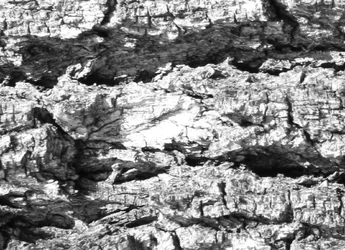
Second question, here's a small detail of 2 test pix taken in monochrome with the custom white settings. I am looking at the hightlight area in the center. The first is with the EV at 0, the next is EV -1. So, could I then use the custom white balance, and set the camera to compensate by shooting custom EV -1?
$#1.webp$#2.webp
 
White balance has to do with color. You would not need it in B&W

I recommend that you read up on what white balance is.
Introduction to White Balance

As for your second question again it has NOTHING to do with white balance. Your first image is simply just overexposed and thus lacking detail in the hi-lights.
 
Thanks...
 
Would it be valid to do 2 shots of the card, one white, one 18%, and see if they match each other and match the 18% side?
 
I get the impression you are worrying too much about white balance issues and are making it more difficult than it is.

For me, when I remember, I shoot a WhiBal card for my JPG output. Unfortunately, much of the time I am shooting under screwy florescent lights in some of the areas at church and 2 shots, 1 second apart in the same setting/lighting with same subjects, the WB is wildly different. So any in-camera WB is pretty much useless. It has to be done in post. What I find myself doing most often is to identify something white in a photograph or 'group' of shots and set WB to that in Lightroom. At worst, it's pretty close to what I think is right. I simpy tweek the WB sliders and go from there. Done.
 
I get the impression you are worrying too much about white balance issues and are making it more difficult than it is.
LOL....quite possible.

Actually, I think what I'm trying to do is deal with what I'm trying to re-create with the new digital camera. That is, sort of replicate the process/procedure of shooting in-camera B&W using (as much as possible) an adapted Zone System. It's what I learned in college years ago and still sort of how my brain reacts to the thought of shooting photos. What I'm still getting my head around is how all the film concepts/procedures translate to a digital camera. I'm shooting RAW, though I do like the monochrome picture style so that I can see the image B&W...
 
Duhast, when changing technologies, you need to forget a few things and relearn them in a new context. The key thing in digital is to ensure you've got as much information in the RAW as you can get. Black, has a value of 0,0,0. White has a value of 255,255,255. You want as much of your image to have values on the right side of the histogram (towards the 255 side), without having ANY in the 255. Because anything at 255,255,255 is pure white, and will have no detail. Noise tends to show up in the dark areas, and will typically have values of 1-20 in any of the colour channels. Boosting the dark areas in post-processing, will also boost noise. Once you've captured the image in the RAW using the "exposure to the right" technique, you can now redistribute the pixel values using image-processing software, to place them where you want them. This will also serve to reduce the noise effects at the low end of the histogram.

The second thing is that all the usual techniques we learned with B&W film photography (using the A filter to darken blue, using the O to lighten the foilage, etc), can be reproduced using post-processing software, and in a much more controlled way than was ever possible with film and filters. Just about the only filter effect you cannot reproduce well in post is the use of the polarizer - that still needs to be done at the time of image capture.
 
So, pgriz, are you saying that I should be looking to place my high tones with detail (digitally, I thinks that's zone 7) and let the low tones fall where they will and massage them in post?
 
Yes, you got it.

Zone 7 would be around 235-240, but now we are also reliant on well-calibrated monitors that show the full range of greys. I've loaded the Magic Lantern utility on my T1i and one of its features (among many) is the ability to read the luminance value of the spotmeter directly on live-view screen. Now, I've checked this by following the images through to the final display on my monitor, and found that the utility is pretty accurate. So now I can place my spotmeter over the specific highlight where I want some detail, and adjust the exposure until that reads in the 235-240 region. This allows me to know that I've got the highlight captured with enough detail. Once it's on my computer in RAW format, I can decide whether the overall histogram should be shifted right or left (brighter or darker), and using the curve tool, I can redistribute (to an extent) the rest of the pixels. I've found that my camera has only about 3 stops of latitude on the upper side and 5-7 on the lower side. So I MUST be sure not to overexpose. At the lower end, boosting the darks will bring up some dark detail, but at a cost of also boosting the noise that is hiding in the dark values. Shooting at low ISO values will give less noise. Shooting at higher ISO values will give you an image, but with increased noise in the dark regions.
 

Create an account or login to comment

You must be a member in order to leave a comment

Create account

Create an account on our community. It's easy!

Log in

Already have an account? Log in here.

New Topics

Back
Top Bottom