What's new

The 3 Amigos

goodguy

Been spending a lot of time on here!
Joined
Dec 5, 2012
Messages
5,555
Reaction score
1,121
Location
Toronto Canada
Can others edit my Photos
Photos OK to edit
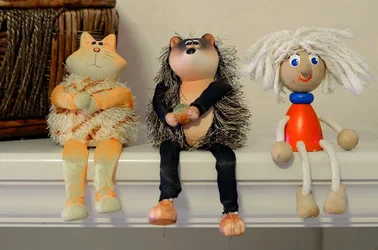
Shot with my 50mm 1.8 lens
F4.5
1/2 sec
ISO 200
I am extremly happy with the work Nikon did on my body, pics are now Soooo much better.

1-3_zps9cade3e8.jpg
 
It looks very sharp, but you need to adjust your white balance.

I'm not sure where it is at on the menu for the D7000. I would check first under the shooting menu.
 
It looks very sharp, but you need to adjust your white balance.

I'm not sure where it is at on the menu for the D7000. I would check first under the shooting menu.

I am totally clueless on what proper WB is and should look like.
I adjusted a bit this photo on the computer and that also might be why this picture is not so well balanced with its light.
But I am glad that the focus is good and the photo is sharp, I have manually focused this one.
 
It looks very sharp, but you need to adjust your white balance.

I'm not sure where it is at on the menu for the D7000. I would check first under the shooting menu.

I am totally clueless on what proper WB is and should look like.
I adjusted a bit this photo on the computer and that also might be why this picture is not so well balanced with its light.
But I am glad that the focus is good and the photo is sharp, I have manually focused this one.

Yeah this one is nice and sharp. Regarding white balance, basically your photo is a bit on the yellow side, in other words things that should look white are actually yellow and in your case it's likely due to the colour of the artificial lighting. You can set your white balance in your d7000 under the shooting menu to suit the lighting conditions youre shooting in. If you shoot RAW, you can adjust the white balance later on in either photoshop or Lightroom or whatever other RAW editing software you're using. And as a last resort if you're shooting just JPEG, you can use software to try to make whites look whiter. I used PSE to edit your JPEG to give you an example. Basically I reduced saturation for yellows only, especially on the back wall. It didn't give the best result given I was only working in JPEG but the whites do seem whiter. Check it out below:
$1-3_zps9cade3e8.webp
 
It looks very sharp, but you need to adjust your white balance.

I'm not sure where it is at on the menu for the D7000. I would check first under the shooting menu.

I am totally clueless on what proper WB is and should look like.
I adjusted a bit this photo on the computer and that also might be why this picture is not so well balanced with its light.
But I am glad that the focus is good and the photo is sharp, I have manually focused this one.

Yeah this one is nice and sharp. Regarding white balance, basically your photo is a bit on the yellow side, in other words things that should look white are actually yellow and in your case it's likely due to the colour of the artificial lighting. You can set your white balance in your d7000 under the shooting menu to suit the lighting conditions youre shooting in. If you shoot RAW, you can adjust the white balance later on in either photoshop or Lightroom or whatever other RAW editing software you're using. And as a last resort if you're shooting just JPEG, you can use software to try to make whites look whiter. I used PSE to edit your JPEG to give you an example. Basically I reduced saturation for yellows only, especially on the back wall. It didn't give the best result given I was only working in JPEG but the whites do seem whiter. Check it out below:
View attachment 39046

Oh thank you I see the difference, what a big difference that is.
Thank you for the explanation, I really need to start shooting in RAW but I am a bit afraid, I am a conservative person and tend to stick to what I know but I know RAW is the way to go so what I might do for now is shot RAW+JPEG and then slowly move to RAW only.
I think my D7K lets me put JPEG on one card and RAW on another so I will do that.

BTW do you agree Nikon did a nice job aligning my camera ?
I believe you saw my pics before and how fustrated I was, now I am happy again with my camera :)
 
If sharpness was what you were after, than I would say Nikon did its job.

Just my 2 cents: get as much right in camera as you possibly can. White balance can be corrected in post, but it doesn't look as good or as natural, IMO. Of course, there are situations when we just don't have the time to make these adjustments. The photo must be captured now or never, and in those situations, just shoot and try and correct in photoshop. But if you can pause and get it right in the camera, than do so. It will help your final images look their best and it will help you learn your camera.

Good luck!
 
I am totally clueless on what proper WB is and should look like.
I adjusted a bit this photo on the computer and that also might be why this picture is not so well balanced with its light.
But I am glad that the focus is good and the photo is sharp, I have manually focused this one.

Yeah this one is nice and sharp. Regarding white balance, basically your photo is a bit on the yellow side, in other words things that should look white are actually yellow and in your case it's likely due to the colour of the artificial lighting. You can set your white balance in your d7000 under the shooting menu to suit the lighting conditions youre shooting in. If you shoot RAW, you can adjust the white balance later on in either photoshop or Lightroom or whatever other RAW editing software you're using. And as a last resort if you're shooting just JPEG, you can use software to try to make whites look whiter. I used PSE to edit your JPEG to give you an example. Basically I reduced saturation for yellows only, especially on the back wall. It didn't give the best result given I was only working in JPEG but the whites do seem whiter. Check it out below:
View attachment 39046

Oh thank you I see the difference, what a big difference that is.
Thank you for the explanation, I really need to start shooting in RAW but I am a bit afraid, I am a conservative person and tend to stick to what I know but I know RAW is the way to go so what I might do for now is shot RAW+JPEG and then slowly move to RAW only.
I think my D7K lets me put JPEG on one card and RAW on another so I will do that.

BTW do you agree Nikon did a nice job aligning my camera ?
I believe you saw my pics before and how fustrated I was, now I am happy again with my camera :)

There is nothing complicated about shooting RAW. You can do what I do and set your d7000 to shoot both JPEG and RAW. For quick photo access and just showing off your pics you can use the JPEGS but if you stumble on that special photo that you just really like you have the option to access it in RAW and make it even that much better. It also all depends on how you preceive post processing, for me it's half the fun in photography so I enjoy it and often find myself correcting a dozen photos one by one in one sitting. Just throw in a large memory card in slot 2 and set slot 1 to record JPEGS and slot 2 RAW, take it from there.

Yup, looks like Nikon did a fine job on your camera, the sharpness is there for sure, enjoy it.
 

Create an account or login to comment

You must be a member in order to leave a comment

Create account

Create an account on our community. It's easy!

Log in

Already have an account? Log in here.

Back
Top Bottom