What's new

The look ...

jaypix

TPF Noob!
Joined
Mar 11, 2012
Messages
122
Reaction score
13
Location
Northern France
Can others edit my Photos
Photos OK to edit
... $Oph.Bou-08.webp
 
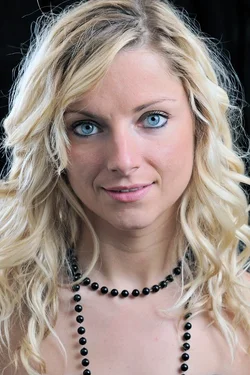
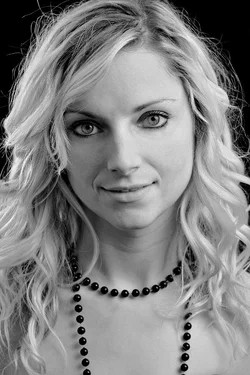
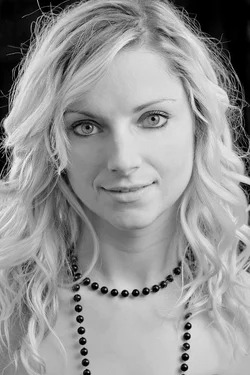
I like this photo. . . but it does not really showcase her. I feel that lighting in general can negatively enhance lines, wrinkles, and darkspots. I would love to see this with her laugh lines lightened and her under eyes also touched up.
 
I don't really think her necklace fit in.
 
Nice.. but a softer look/lighting would make it better.
 
Last edited:
Was she originally a he, by chance? The facial features come off as somewhat masculine.
 
o hey tyler said:
Was she originally a he, by chance? The facial features come off as somewhat masculine.

Lol! Tyler there's no Adams' apple.
She might've had dark hair, perhaps Mediterranean would account for the facial hair.
 
I think this is a really nice portrait of a real person. She has gorgeous eyes, attractive proportions, and the light is pretty good. Yes, a softer light would have smoothed out her skin, but the image comes across as "real" to me. There may be wrinkles and laugh-lines, and other blemishes, but they are hers. The current practice of changing people into something they are not (by photoshop and other tools), undervalues who those people are.

 
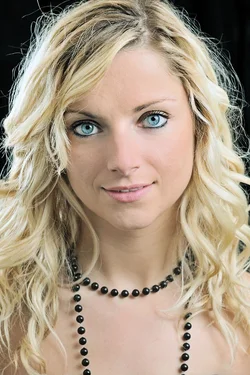
Now the necklace matches.. :-) Two different ways you could go with it...
Darker grungy look ish

$Oph-1.webp


Lighter softish look

$Oph-2.webp
 
ehh...the softish look looks funny on here, different in my photoshop...but you get the idea.
 
Nice, but why not 5 or 10 to look at?
 
Thanks for the post-processing suggestions, all of which very interesting and educational ...
 

Create an account or login to comment

You must be a member in order to leave a comment

Create account

Create an account on our community. It's easy!

Log in

Already have an account? Log in here.

Back
Top Bottom