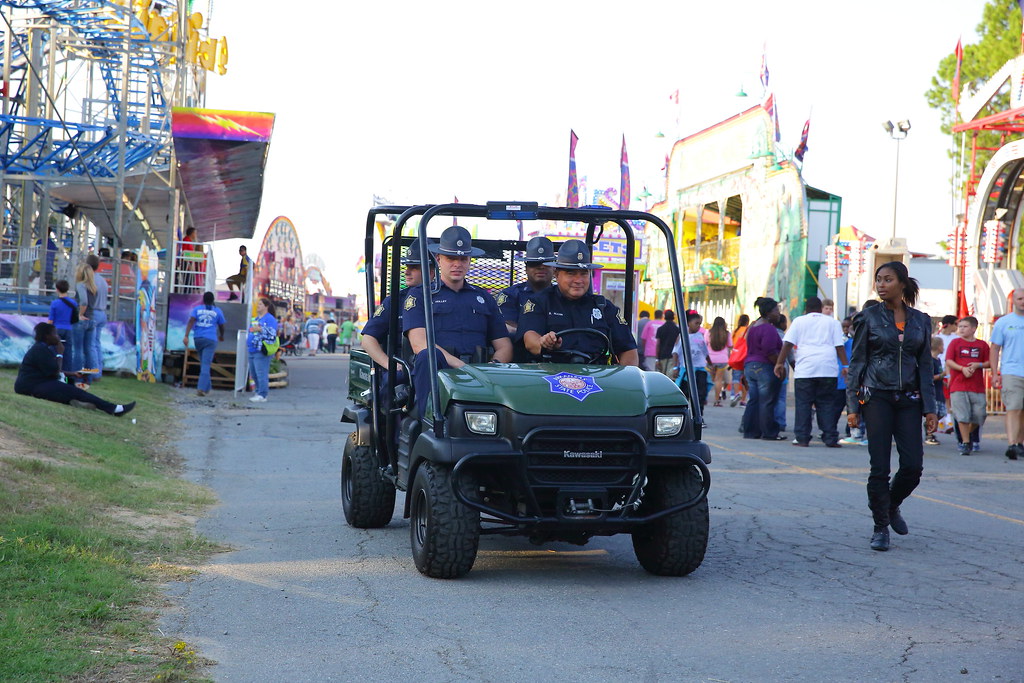
xzoup TPF Noob! Joined Dec 20, 2011 Messages 56 Reaction score 0 Location Arkansas Can others edit my Photos Photos NOT OK to edit Oct 16, 2013 #1 10-11-2013 AR St. Fair #2 145 by carricof, on Flickr
The_Traveler Completely Counter-dependent Supporting Member 📸 Joined Dec 11, 2006 Messages 18,743 Reaction score 8,049 Location Mid-Atlantic US Can others edit my Photos Photos NOT OK to edit Oct 16, 2013 Banned #2 I think this would be better with serious cropping and post-processing. You would get more and better help if you allow editing.
I think this would be better with serious cropping and post-processing. You would get more and better help if you allow editing.
Geaux No longer a newbie, moving up! Joined Feb 21, 2010 Messages 2,522 Reaction score 464 Location New Orleans, LA Can others edit my Photos Photos OK to edit Oct 16, 2013 #3 There's only one person with their head turned... blown out sky, centered subject, and overly snapshotish. Just not feeling it. Ok, so what's your feelings on the image? What makes it a good image to you, personally and what feeling is being conveyed?

There's only one person with their head turned... blown out sky, centered subject, and overly snapshotish. Just not feeling it. Ok, so what's your feelings on the image? What makes it a good image to you, personally and what feeling is being conveyed?
F fotofinish Imagist professionale Supporting Member 📸 Joined Jul 21, 2013 Messages 124 Reaction score 10 Location Sydney, Aus Can others edit my Photos Photos NOT OK to edit Oct 16, 2013 #4 Agreed. Interesting shot with much promise which could be realised with some editing/cropping. The_Traveler said: I think this would be better with serious cropping and post-processing. You would get more and better help if you allow editing. Click to expand...
Agreed. Interesting shot with much promise which could be realised with some editing/cropping. The_Traveler said: I think this would be better with serious cropping and post-processing. You would get more and better help if you allow editing. Click to expand...