What's new

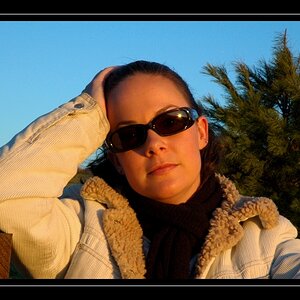
Two shots of my girlfriend from today....

cgipson1

TPF Noob!
Joined
Aug 18, 2011
Messages
17,142
Reaction score
4,350
Can others edit my Photos
Photos NOT OK to edit
Comments welcome! I am working on the white background.. trying to get it down better! Also playing with a new softbox.. I am liking the light it is throwing!

Loni-and-Raja2-.jpg


Loni-Red-Shirt.jpg
 
Last edited:
Bump... No comments? :)
 
You deleted the whites in the background? Very apparent. The white around her hair above the cat is gray. There is something unnatural with you processing. Did you us vibrant or saturation slider?
 
You deleted the whites in the background? Very apparent. The white around her hair above the cat is gray. There is something unnatural with you processing. Did you us vibrant or saturation slider?

Hey Robin.. I used a white background.. but didn't quite get the level of white I was hoping for... so I did lighten the background slightly. Yes.. I did add a SMALL touch of saturation.. not much at all.

I also just realized you can actually see the hairlight behind her on the 2nd shot.... didn't notice that earlier! I need to work on those some more! :) Thanks!
 
In the first one, the background isn't bright enough to be white, and it has a redish hue to it. Her hair could use some more light as well, maybe it's just my screen, but it's hard to see much detail in the dark blob that is her hair.

In the second one, the background look better. The hue seems to be gong and it's brighter...although not quite fully white yet. Again, the hair looks dark.
 
Do you have a hand held light meter? Also, what are you working with for lighting?
 
I agree with Big Mike... the hair could use some light. Did you use separate lights to illuminate the background? Try making those a couple stops higher than the lights for the model (girl friend). If you have the space, you will need to move the model forward to eliminate any bounce back that will occur off the backdrop.
 
In the first one, the background isn't bright enough to be white, and it has a redish hue to it. Her hair could use some more light as well, maybe it's just my screen, but it's hard to see much detail in the dark blob that is her hair.

In the second one, the background look better. The hue seems to be gong and it's brighter...although not quite fully white yet. Again, the hair looks dark.
I had my one Monolight on a 64" umbrella softbox.. and had three speedlights on the background. Hairlight high on a boom over her head (had the power too low on the speedlight).

Background was well lit.. but the bounce back was terrible on my girlfriend.. and I didn't have enough room to move her forward any more. So I shut the flashes down.. too much! I have a Sekonic 358.. which I should have been using on the background with a gray/white card.. and didn't! Bad mistake. I was lazy.. it was downstairs! I had used it the day before.. and thought I had the setup down.. no dice! I have two more monolights on order.. just haven't arrived yet. They will simplify getting the background right.. and I want to put together some standing flags to put around the background lights.

Question... what "white" should I go for on the background? a full 255? or something a bit less?

Thanks for the help.. and the C&C! I thought white was going to be easy.. ha! Not yet, it isn't!
 
Do you have a hand held light meter? Also, what are you working with for lighting?

yep.. have a meter.. just didn't use it on these shots.. thought I had it down! lol! Right now.. I have one 300 watt second mono... two 150s on order. 2 SB-900's, 1 SB-700, and two Yongnou 560's I picked up for a little extra light when I need them.

I just need more room! That is the hard part....
 
I agree with Big Mike... the hair could use some light. Did you use separate lights to illuminate the background? Try making those a couple stops higher than the lights for the model (girl friend). If you have the space, you will need to move the model forward to eliminate any bounce back that will occur off the backdrop.

Thanks for the advice.. space was a large part of the problem. Background splash was really bad.. and I couldn't move forward any more. So I shut down the flashes (too much!)! Learned a lot though.... lol!
 
In all honesty Charlie, I think you were trying too hard. So many lights. I can barely get 1 right. Can't imagine 5.
 
In all honesty Charlie, I think you were trying too hard. So many lights. I can barely get 1 right. Can't imagine 5.

Well, I'd partially agree. With the 64" softbox, four lights were probably enough. He won't learn how to sculpt with light by not trying though. I think he has stated a couple times in responses that he realizes he took some shortcuts. He does seem willing to take suggestions and try again, which is good.
 
In all honesty Charlie, I think you were trying too hard. So many lights. I can barely get 1 right. Can't imagine 5.

hahahaha... I should stick to bugs! :)
 
In all honesty Charlie, I think you were trying too hard. So many lights. I can barely get 1 right. Can't imagine 5.

Well, I'd partially agree. With the 64" softbox, four lights were probably enough. He won't learn how to sculpt with light by not trying though. I think he has stated a couple times in responses that he realizes he took some shortcuts. He does seem willing to take suggestions and try again, which is good.

I won't stop until I get it.. stubborn that way! :)
 

Create an account or login to comment

You must be a member in order to leave a comment

Create account

Create an account on our community. It's easy!

Log in

Already have an account? Log in here.

Back
Top Bottom