What's new

underexposing test

@Scott Whaley granted there are choices to be made when considering whether to clip highlights or blacks, or creative choices as in the OP. However as a matter of practice I prefer a full data file. You can't generate image without data, in the highlights or shadows. As 480Sparky mentioned above 0.0.0 is black period, there is no detail to recover. Maybe its my imagination but I find that colors benefit more from a properly exposed image rather then one that's been raised post, especially on skin.
 
That's something I know nothing about since I don't do portrait photo. I'll leave that to you that do.
 
I just wanted to make little bit dramatic ,i don't have any program for editing,just trial version of Nik silver.
 
I just wanted to make little bit dramatic ,i don't have any program for editing,just trial version of Nik silver.

You did great. It was dramatic and it caused some drama in here as well so you're on the right track, keep playing around and have fun doing it!
 
I just wanted to make little bit dramatic ,i don't have any program for editing,just trial version of Nik silver.
On Linux I variously use a combination of Darktable (wannabe-clone of Lightroom), rawtherapee, and GIMP. Lately I've been leaning towards opening my raw files in rawtherapee and then sometimes exporting tweaked results to GIMP for additional tweaking.

Not sure what's for Windows or Apple. I've used Canon's raw editor a bit when I've needed to export pictures quickly while at work, but just for quick and dirty adjustments, and admittedly I don't really know what I'm doing with it.

Darktable seems to offer the most manipulation potential but it wants to be a whole-universe package, with importation into its own filenaming format etc, which is overkill for just basic manipulation. Rawtherapee does a better job of respecting my existing directory structure and filenames.
 
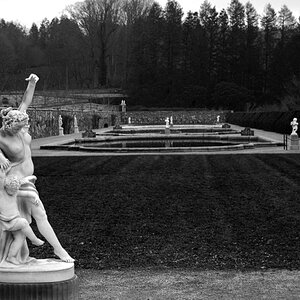
I don't get an underexposed feel from this. I'm running my cursor over the brightest highlights using the Mac's utility app Digital Color Meter. I use it in LAB mode. The brightest highlights are 92. 100 would be so bright that there's no data or detail. It looks like Wannabe captured pretty close to a full range of luminosity. I see a lot of midtones and detail in the image. The statue has the greatest contrast, as it should if as main subject the eye should go there.

It seems as though Wannabe exposed to the right and just avoided blowing out highlights.
Nicely done Wannabee.
 

Create an account or login to comment

You must be a member in order to leave a comment

Create account

Create an account on our community. It's easy!

Log in

Already have an account? Log in here.

New Topics

Back
Top Bottom