What's new

Wedding I did!

Casey carson

TPF Noob!
Joined
Jan 3, 2015
Messages
42
Reaction score
3
Can others edit my Photos
Photos OK to edit
I always like to hear what everyone thinks! Helps me learn how to be better!
 

Attachments

  • image.webp
    image.webp
    229.1 KB · Views: 205
  • image.webp
    image.webp
    457.6 KB · Views: 209
  • image.webp
    image.webp
    502.8 KB · Views: 219
Nicely done. Were you the primary or 2nd shooter?

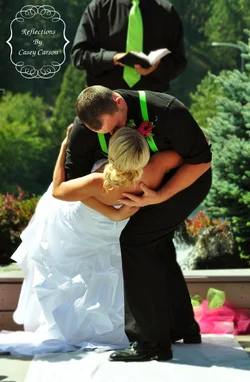
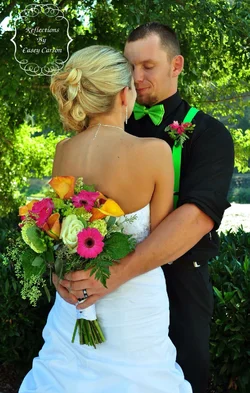
The skin tone has a strong yellow and green cast to it. They seem to be slightly under exposed. Generally you'd like to see more of the bride's face since it's her wedding day and everyone are just guests (including the groom :D ). Then again, these are just my personal opinion. We all shoot differently :)
 
Nicely done. Were you the primary or 2nd shooter?

The skin tone has a strong yellow and green cast to it. They seem to be slightly under exposed. Generally you'd like to see more of the bride's face since it's her wedding day and everyone are just guests (including the groom :D ). Then again, these are just my personal opinion. We all shoot differently :)


I was the only shooter!!!! And I have a lot more with her face these were just a couple of my favorite. And I see what your saying about the green and yellow tones I'll work on that!
 
Yeah you have to watch out for that when there are a lot of trees around, especially for lighter skin. In this situation, I usually just run the white balance on the cool side (5000-5200k on Nikon DSLR) and add a bit of red tint (20+ in Lightroom).
 
Last edited:
Yeah you have to watch out for that when there are a lot of trees around, especially for lighter skin. In this situation, I usually just run the white balance on the cool side (5000-5200 on Nikon DSLR) and add a bit of red tint (20+ in Lightroom).

Thanks that helpful!!!!
 
I think all of these could have benefited a little from some fill flash.
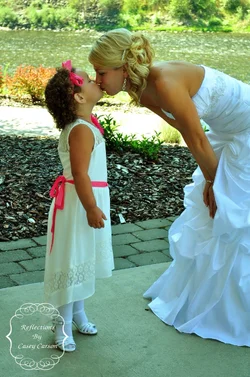
especially the pick of the bride and little girl.
did you selectively blur the background in the B&G kissing shot? it looks like there was a lot of selection done around them. its easy to see on the full size image.
i would revisit the skin tones, as they seem a little yellowish.
could be the contrast or saturation is a bit too high as well.

overall, some nice shots.
framing was good, focus was good, DOF was good.
 
Nice photos. They all could have used a little bit of fill from a flash at a low power or a reflector. That would have made them awesome. The white balance could use a tweak. Other than that, nice work.

Just an aside here. It is always best to have an assistant work a wedding with you. To hold reflectors or speedlights. I never shoot a wedding or quinceanera without either my wife or one of my daughters helping me.
 
As already mentioned, the white balance is off on them. One thing that kind of got my attention was that you only have half of the bride in the 3rd picture... As in, half of her is missing lol This is something that I'm very picky with, I know that sometimes it's hard to do so but it could have been something easy to do here since it was a posed shot.

On the first picture, I would have shot at a different angle, this could have been a very strong picture if you had both of their faces in it. You could have taken a few steps to the left.

Also, FLASH! I don't like that the subjects are under exposed! A fill flash or even a reflector could have worked wonders!

Other than that, I can't wait to see more :)
 
A bit on a side track, but that watermark is HUGE. It's very distracting. If you want a watermark, try something like a white or black signature in one of the corners.
 

Create an account or login to comment

You must be a member in order to leave a comment

Create account

Create an account on our community. It's easy!

Log in

Already have an account? Log in here.

Back
Top Bottom