What's new

What can I do to make this a good photo?

Redtech

TPF Noob!
Joined
Apr 17, 2014
Messages
65
Reaction score
13
Location
Southern Illinois
Can others edit my Photos
Photos NOT OK to edit
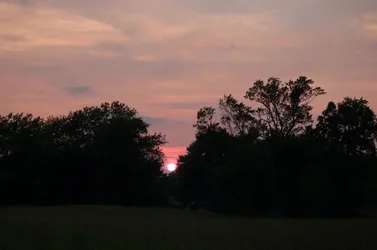
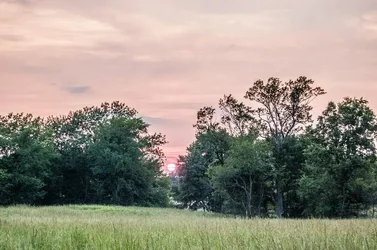
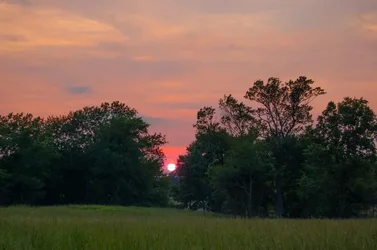
The trees were really dark. I got some of the shadows out of there and boosted the saturation and vibrance a bit. Is there any hope for this pic, or was it just a bad shot?
$DSC_8776.webp
 
Can you bring the shadows up a bit more?
 
Is it in raw? Can you do a single exposure hdr conversion?
 
No. not in Lightroom. I do have Photoshop. It's intimidating for me though. Should I try that dodge tool? You can sort of paint certain areas, right? I'll try that.

Other than the trees being to dark, is the grass also too dark?
 
You can use shadows/blackouts for dramatic effect sometimes. Post the same image without editing so we can have a comparison.

This is one I've done and chose to leave the shadows there.
Perspectives/Artistic - Matt Ragan
 
I do have it in raw. I'll have to google what you're saying. :blushing: Thanks.

I don't know if Lightroom can do that. You might need a photomatix trial, or photoshop.
 
It looks like it was getting dark enough that you weren't getting much light in the foreground. It almost seems more of a silhouette, but except for the right side the trees seem to be a mass and you don't have much in the way of branches against the sky. I might have thought about trying a vertical shot, or another time you might move around and try a different vantage point. You could try making copies and enhancing the color and/or contrast or maybe crop to see what you could do with it.

Maybe taking more than one shot and varying your settings might have helped get a good exposure; I'm wondering if the meter was reading the sun that you're facing into and you might have needed to adjust the amount of light coming into the camera.

To me the saturated colors look unnatural; some adjustment to enhance color can work but when photos are saturated then I feel like the color is overpowering the image.
 
For bringing up shadows you can try using the Gamma control in CS6. It's in the Contrast tab
 
Last edited:
Have you tried cropping down the middle in a portrait layout? It's late in the day, the light is low, so dark shadows won't ruin the picture. If you cropped down the middle, you could brighten the trees a tiny bit and focus on the contrast of bright sun, red sky, the darkness of the foreground and the V-shape of the trees. Turn it into an artistic interpretation using stark contrast and line, instead of trying to reproduce the colors you saw.
 
Last edited:
Is there any hope for this pic, or was it just a bad shot?

There are no "bad shots" in photography there are only badly planed and badly executed shots.

Asking what you can do to make this a good photo tells me you did not have a vision of what you wanted your image to look like when you finished it. Taking a photo and then trying to make it into something in post is a bad approach. Figure out what you want it to look like first and then take the steps to get it there.
 
No. not in Lightroom. I do have Photoshop.
With Photoshop you have Adobe Camera Raw (ACR) - ACR is essentially what Lightroom's Develop module is. There are only minor differences between the 2.

Camera Raw was available starting with Photoshop 7, long before Lightroom was first available.
Photoshop CC is Photoshop 16. CC Camera Raw and LR 5 both use ACR 8.

You can use the Color Range feature in Photoshop to isolate the sky so it does not get edited along with the tress/land. In other words do a local edit to the land/trees as opposed to a global edit that affects the entire image.

http://www.bing.com/search?setmkt=en-US&q=Photoshop+color+range+feature

Note: Ps Elements does not have the Color Range feature and Elements has a de-featured consumer grade version of ACR.
 

Create an account or login to comment

You must be a member in order to leave a comment

Create account

Create an account on our community. It's easy!

Log in

Already have an account? Log in here.

Back
Top Bottom