What's new

What's your best noise reducer?

dtornabene1

TPF Noob!
Joined
Dec 8, 2008
Messages
320
Reaction score
0
Location
Chicago, IL
Can others edit my Photos
Photos OK to edit
It seems as though there are really two at the top, Dfine and Noise Ninja. What does everyone think? Are these the best or is there something better out there? If you like one more than the other, tell me. Not something I can read on the Website, something from use.
 
I recently purchases Noiseware Professional by imagenomic. I bought it based on other users recommendation, and it is fantastic.

You can download most programs for free to demo them, but they put a watermark grid over your pictures.

Noiseware was well worth the price.
 
Neat Image is the other one many people here use. I say it's almost on par with Noise Ninja which I prefer.
 
I have:
Noise Ninja
Noise Ninja Pro
Neat Image
Dfine
Imagenomic Noiseware Pro

Noiseware pro gives me consistently better results with less loss in detail than any other one.
 
Noiseware's preservation of detail is really top notch, it does wonders for my ISO 3200 shots.
 
The noise reduction in LR2 is actually pretty decent. I use this for minor noise reduction and Imagenomic Noiseware Pro for more serious needs.
 
Wow! This seems pretty overwhelming. Noiseware is getting a serious nod. Thanks to all who have taken the time to post so far.

-Nick
 
I've seen several in depth comparisons between Noise Ninja, Neat Image, and Noiseware, and they all found that there were photos where each did a slightly better job than the others. I downloaded the trial versions of all three, and used them for a while. I went with Noiseware Pro because I liked the controls and interface the best.

I bought Noiseware Pro, but actually I've only used it maybe a dozen times in the last year even though over half of all of my photos are shot at ISO 1600 or higher. Shooting raw and exposing to the right is the absolute best way I've found to reduce noise, and there is zero detail loss. I find I usually don't need to use extra noise reduction software (beyond what's available in LR or ACR) until I start pushing the ISO up to 6400+.
 
Actually, the best way to get high ISO and little to no noise is to get a D700/D3... lol

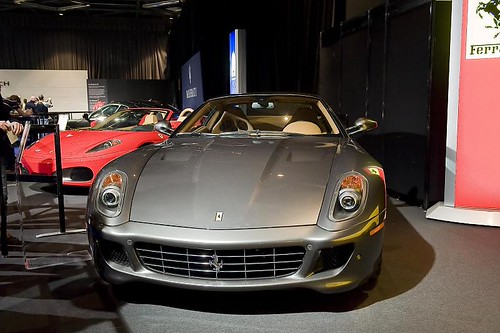
ISO 3200 shots in a low light environment where my D200 would be completely useless on a D700 even shows no need for any noise reduction. These pics are 99% SOOC and the only thing that I did was increase sharpness (something not good if you are trying to show a low noise pic as increasing sharpness also increases your ability to see the noise better!):

3207323638_f78f94c03b.jpg

Camera: Nikon D700
Exposure: 0.033 sec (1/30)
Aperture: f/5.6
Focal Length: 35 mm
ISO Speed: 3200

Now, the place where the most noise in this pic would show is the top left area... the grey background or where the velvet curtains transition to the lit areas, those sections, traditionally would give you the most visible noise.

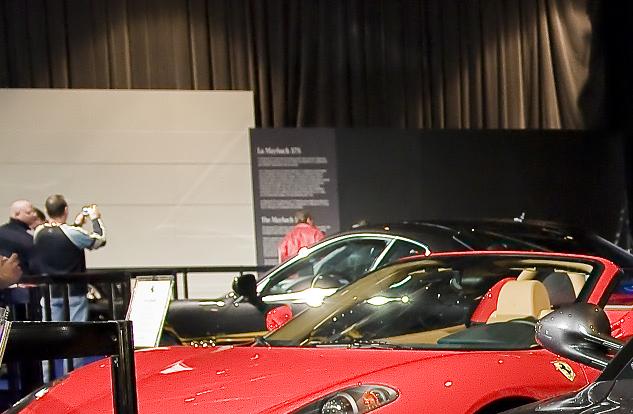
A 100% crop shows what is there... of course there is some noise but it is extremely minor. There is about the same amount of noise there that my D200 would have at ISO 400.:
3206477953_9e3eac1b5c_o.jpg
 
Jerry, that is an amazing demonstartion of what the higher lines of cameras, with full frame sensors, can do. Do you think the Canon MARK series would perform the same?

and since I am not buying a Mark series lol, and I am going to shoot in Gyms with an ISO up to 3200, what does "ksmattfish" mean by "Shooting raw and exposing to the right is the absolute best way I've found to reduce noise, and there is zero detail loss?"

Does exposing to the right mean underexpose and dthen britgen it in PP?
 
According to the popphoto.com reviews, the Canon 5Dmkii equals or exceeds the D700 up to ISO 6400. I haven't done any research on the D3 vs. the 1Ds.
 
what does "ksmattfish" mean by "Shooting raw and exposing to the right is the absolute best way I've found to reduce noise, and there is zero detail loss?"

Does exposing to the right mean underexpose and dthen britgen it in PP?

No.... it means overexposing the image (pushing the tonal data to the right side of the histogram) without blowing highlights. You then bring the image back to center in pp. In a 12 bit RAW file there are 4096 tonal variations that are recorded. About 3200 of the variations are recorded between the center(midtones) to far right(highlights) of the histogram. This only leaves 800 tonal variations from the center (midtones) to the far left (shadows). Exposing the image to the right allows for better retention of data.

Try here :

Expose Right


Edit : I see gradient noise all over the red ferrari, still awesome for 3200, but it's there.
 

Create an account or login to comment

You must be a member in order to leave a comment

Create account

Create an account on our community. It's easy!

Log in

Already have an account? Log in here.

Back
Top Bottom