What's new

WHY DO MY PHOTOS LOOK LIKE THIS

If you can get a sharp photo using manual focus then you have an AF problem.

Note that this does not mean that the AF is broken, it means more likely that you've used it incorrectly.

How have you got the AF on the camera currently setup? Go through your motions, settings and process for taking a photo and we'll be able to see what steps and settings you have and give suggestions as to where you can make improvements.

Well, shooting this kind of thing I would obviously flip to autofocus on the lens (IS is always on). Look through view finder, depress shutter half way to AF, then fire when focus is confirmed.

Often times I like a little fill flash but I'm finding that the photos turn out better if I just use ambient light unless I'm in a studio environment. So with flash I usually have it turned to a super low power with a soft box in front of it to shoot a wide beam.

Hope this is enough info? I honestly seem to only have problems when shooting still photos. With video (manually focusing in live view) I obviously don't have focus issues. I'm leaning towards it being a lens problem because I haven't noticed this until I bought this new lens, I shot with a 50mm 1.6 a lot and thought it was crystal clear, even wide open.

Primes are usually more sharp wide open than zoom lens. Please let me know how this turns out for you because I have been weighing options and the 17-55 was on my 'radar.'
 
That was auto focus, most likely on her right eye.

As mentioned above, 1/100th is often too slow a shutter speed to stop motion...even if your subject is posed. I generally try for 1/160th but will settle for 1/125th if I have to.

Also, did you select the focus point(s) to use or did your camera just 'decide on its own' of where to focus? To me, it looks as if her elbow is the focus point, as it is the nearest object to the camera. Also, since you are shooting wide open at f2.8, the depth of field is quite shallow. Perhaps 3" or less, based on the picture. Shooting with a narrower aperture in the f5.6 range or smaller will give a larger DOF. Or, if you want the small DOF, you have to manually select, for example, the center focus point only, focus THAT on her eye, then shoot.

Oh, and one more thing...you're shooting in AI Servo AF mode? I, like many others before me, have learned the hard way that single-shot AF mode doesn't work for anything that can move.
 
This was a flash photo, camera motion is not an issue.

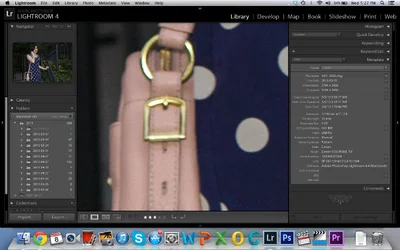
This is either missed focus or a bad lens. Probably missed focus. The buckles on the purse appear to be quite sharp.
 
If you're using any kind of flash, there's no need to set your camera at f2.8 unless you're going for depth of field shot. I find it better to lower the aperture to like f5.6 or lower, depending on where I feel the lens has its sharpest quality but keeping in mind what kind of picture I'm taking. With a high aperture, I find I'm playing with the focusing plane depending on the focus point. If you arbitrarily picking the focus point with f2.8 based on the zone autofocus of the camera, that's like playing lottery. I looked hard, but I can't find the focus point of your picture, but I'm a semi noob myself. Just a few millimeters in front or behind the focus point for an aperture higher than f2.8 and you won't get a sharp picture for your entire subject. High aperture is great for low light, but it's abysmal for general purposes because you need to concentrate on the narrow area of your composition that's within the focus point.
 
This was a flash photo, camera motion is not an issue.

This is either missed focus or a bad lens. Probably missed focus. The buckles on the purse appear to be quite sharp.

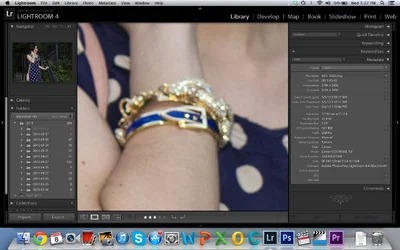
Here are shots of buckle and bracelets. Both soft :( $Screen Shot 2013-05-08 at 5.27.02 PM.webp$Screen Shot 2013-05-08 at 5.27.20 PM.webp
 
Zoom in far enough on any image and it'll get soft. The purse buckles aren't nearly as soft as her face.
 
Open the images in Canon DPP. It has an option to show you which focus points were used (Apple's Aperture has the feature as well... Lightroom doesn't support showing focus points.)

If you're questioning whether your camera and lens can focus, here are a few tasks for you to perform.

Take something with a fine but easily recognizable pattern... like a sheet of newspaper. Mount it on the wall.

Put the camera on a tripod.

Focus on the newsprint.

Snap a photo and inspect the results (make sure the tripod wasn't shaking... use a remote release or the self-timer if you must.)

Switch the camera to "live view" mode and refocus and shoot.

Compare results.

You can download and construct a focus test target to check the accuracy of the camera & lens combo.
 
It looks like your focal point is off and what aperture did you shoot at?
 
If you can get a sharp photo using manual focus then you have an AF problem.

Note that this does not mean that the AF is broken, it means more likely that you've used it incorrectly.

How have you got the AF on the camera currently setup? Go through your motions, settings and process for taking a photo and we'll be able to see what steps and settings you have and give suggestions as to where you can make improvements.

Well, shooting this kind of thing I would obviously flip to autofocus on the lens (IS is always on). Look through view finder, depress shutter half way to AF, then fire when focus is confirmed.

Often times I like a little fill flash but I'm finding that the photos turn out better if I just use ambient light unless I'm in a studio environment. So with flash I usually have it turned to a super low power with a soft box in front of it to shoot a wide beam.

Hope this is enough info? I honestly seem to only have problems when shooting still photos. With video (manually focusing in live view) I obviously don't have focus issues. I'm leaning towards it being a lens problem because I haven't noticed this until I bought this new lens, I shot with a 50mm 1.6 a lot and thought it was crystal clear, even wide open.

Another tip for better focus: AI servo + Back Button Focus. Google it, learn it, love it.
 
You were just struck by her beauty and it made your heart race and you flinched. ;)

I think they've got you going in the right direction, but this could have happened too.
 

Create an account or login to comment

You must be a member in order to leave a comment

Create account

Create an account on our community. It's easy!

Log in

Already have an account? Log in here.

New Topics

Back
Top Bottom