What's new

Why I don't erase/format a memory card......

480sparky38 37

Chief Free Electron Relocator
Joined
Mar 8, 2011
Messages
25,393
Reaction score
9,148
Location
Iowa
Can others edit my Photos
Photos NOT OK to edit
....... right after uploading to my hard drive:

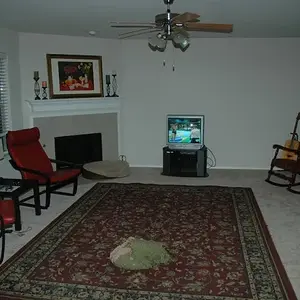
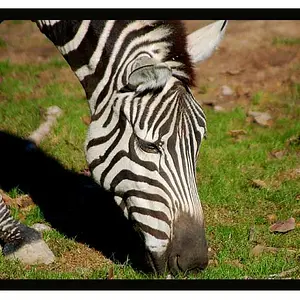
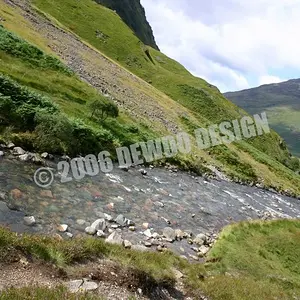
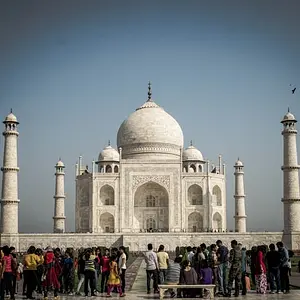
About a week after transferring roughly 300-odd photos, I discovered some had became corrupted. They all (approx. 30 of 'em) looked like these:

TransferErrors.png


That's part of the reason I have multiple cards, and don't erase images / reformat until I need the card again. Had I done so right after transfering, I may not have been able to restore them from the card.

.
 
If you had redundant backup you should be able to do the same thing.
 
After transferring the the images over to the HDD you could view the files in the folder as thumbnails. That would allow you to quickly scan a large number of pics to look for corruption.
 
After transferring the the images over to the HDD you could view the files in the folder as thumbnails. That would allow you to quickly scan a large number of pics to look for corruption.

I ran through them, rating them all, the same time I transferred them. Never saw an issue then. Just last night I noticed the corruption.
 
Once I verify my upload (and backups) were successful, the card gets reformated to minimize the chances of corruption when new image files are written to the card.

The memory card FAT table on the card controller really should be reset/rewritten after each upload.
 
After transferring the the images over to the HDD you could view the files in the folder as thumbnails. That would allow you to quickly scan a large number of pics to look for corruption.

I ran through them, rating them all, the same time I transferred them. Never saw an issue then. Just last night I noticed the corruption.

So you reviewed them after copying them and they were fine and then became corrupted later?
 
At least the are pretty corruptions!

Not sure how true it is but I have read formatting in the card in a camera vs doing it in the computer reduces the chance of corruption. My guess is the camera formats it the way it likes it?
 
Yeah, I reformat in-camera. But I wait a week or two instead of doing so right after uploading.
 
I typically wait until I am 'done' with all post processing on a set of photos (may be several days worth) before I erase the originals on the memory card - in camera, of course. That's =IF I REMEMBER= to erase them! (getting old is killing my memory).

Like the OP, I have multiple memory cards. I just picked up my #3 card, another 16mb. That way, I can cycle-through the cards, one 'set'/'shoot' each and have a backup in case I inadvertently delete something during post that I want to get back. I also shoot RAW+JPG these days, and download both, so I may just grab the JPG if I'm in a hurry.
 
....... About a week after transferring roughly 300-odd photos, I discovered some had became corrupted. They all (approx. 30 of 'em) looked like these:...

They turned out great!! :lmao:

Obviously not what you were after, but I quite like them!

Now, how to go about corrupting one of my cards........
 

Create an account or login to comment

You must be a member in order to leave a comment

Create account

Create an account on our community. It's easy!

Log in

Already have an account? Log in here.

Back
Top Bottom