What's new

Why the pictures are different in the viwer and ps raw

Onera

TPF Noob!
Joined
Feb 6, 2013
Messages
26
Reaction score
0
Can others edit my Photos
Photos OK to edit
Hello everyone,

I have some annoying experience, and I don't know the answer of my question...

Why the pictures appears so much different in the photo viewer and the adobe raw,

http://s22.postimg.org/z8l43q0n3/why.png

someone knows why it appears different, and how to make the original file looks like the one I'm observing unedited. =)
 
The photo viewer is displaying a JPEG image while ACR is displaying a rendition of the raw file.

Joe

EDIT: I answered that quickly -- are you viewing a Nikon NEF file in ACR?
 
Thanks for reply.

I'm reviewing the images with Windows Photo Viewer, Windows 8, Installed Nikon NEF codec.

Almost all the time images viewed via the Photo Viewer looks better, and I can't figure out, what setting in the adobe raw could lead me to the same effect. I've played with white balance(most logical to me) but couldn't make it.
 
So the files are NEF files.

With the installed codec Photo Viewer is still showing you a camera processed JPEG -- it's embedded in the raw NEF file for previewing purposes. So the difference you're seeing is between the camera's processing of the raw file (Viewer) and ACR's default processing of the raw file.

Joe
 
Thanks again for the reply Joe.

Why the JPEG processed files looks so much better? Also Is there a way to get the exact same effect (raw to jpeg processing) from the one I'm seeing through the viewer =)
 
Thanks again for the reply Joe.

Why the JPEG processed files looks so much better? Also Is there a way to get the exact same effect (raw to jpeg processing) from the one I'm seeing through the viewer =)

Raw conversion software tends to be designed to open the raw file for you with minimal processing applied. Some basic processing has to be done, but as a general rule most raw converters (eg. ACR) will open the file lightly processed and be ready for you to make the adjustments you want to achieve the final result you intend. The software in the camera on the other hand is engineered to processes the file to arrive at a finished end result.

Your camera came with raw conversion software (View NX) that you can use to re-create the camera processed JPEG from the raw file. But if that's what you want then just set the camera to save the JPEG in the first place.

Joe
 
Hi, I am having a similar issue. I shot RAW on my Canon and it looked great on the camera but when I got it on the computer and was sorting through everything in picasa, the images looked much different. Not as clear or properly exposed. Why is this? If I shot JPEG would it make my photos look proper?
 
The rear LCD on the camera cannot show a Raw file. It shows that same 'embedded in the Raw file' JPEG Joe talked about above.

If you look at the photo's histogram on the rear LCD that histogram is also from the embedded JPEG.

By the way, the embedded JPEG is the smallest JPEG the camera is capable of producing, a JPEG Basic.

Raw files have a 12-bit or 14-bit color depth. JPEG is limited to an 8-bit color depth ans is a lossy (the reduced bit depth is lost), heavily compressed file type.
JPEG is designed to be a ready-to-print image file and is not intended to have any editing done to it.

Image Files

Tones & Contrast

Sharpening, Noise & Detail

 
Last edited:
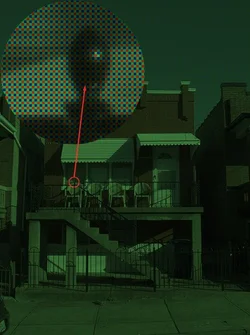
Here's what a raw file actually looks like assuming you could open one without any processing at all.

$really_raw.webp

This is what the sensor in your camera actually records. The inset of the finial on the railing is magnified 500% so that you can see the Bayer array -- the blue, red, and green filters that are positioned in front of the sensor. This is an unprocessed camera image. All digital photos start out looking like this. Clearly that needs some additional processing. There's a lot to do. First you have to get rid of the Bayer array in a process we call demosaicing. Different demosaicing algorithms exist that produce different results. A couple of my raw converters allow me to select the demosaicing algorithm I want to use for a specific photo. Your camera doesn't.

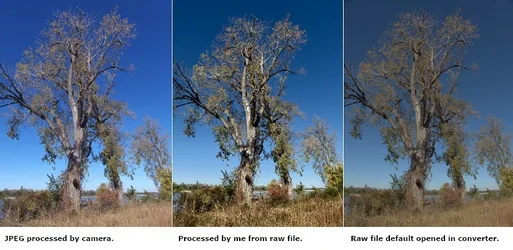
After the photo is demosaiced it has to be further processed for color and tone response. Again multiple algorithms exist to do this job. The software in your camera will do this job to create a JPEG. The controls on the camera like white balance, contrast etc. permit you to have some advanced input into how the camera will process the JPEG if you can assess the scene correctly. Raw conversion software allows you to make those decisions and further adjust the processing of the photo with precision afterwards. Here's an example using a recent photo I took:

$jpeg_raw_raw.webp

On the left you see the effort produced by the camera software. Since I do my own raw processing I ignore all of the camera settings that might have helped the camera do a better job. Most importantly I leave the camera set to auto white balance. Auto white balance doesn't work and so the camera screws up the color. Once it gets the white balance wrong the camera quickly tanks and goes on to screw up the tone response as well. If I set a custom white balance in the field before taking the photo and also modify the camera's contrast, saturation and exposure parameters I can coax the camera to do better, but I can't get it to do as well as I do -- the middle photo.

I processed the middle photo from the raw file. I got the color right and I got a much better tone response than the camera software. When I opened the raw file in my raw converter it looked like the photo you see on the right. That's the raw file open with all the raw converter's controls at their default setting. The raw converter is then ready for me to process the photo. NOTE: Different raw converters will default open a raw file differently. For the sake of this illustration I selected a raw converter that opened the file looking very different than either the camera version or my own. The point is that a raw file has to be processed. That's the photographer's job to do and the raw conversion software is the tool the photographer uses. With a camera JPEG the photographer hands that job over to the camera's processing software. If you're new to this then the camera software may be doing a better job than you can do right now, but that's temporary. The kicker here is that you can learn to do better than the camera software.

Joe
 
Agree with all of the above, you are seeing a jpeg processed file in the LCD. You shoot raw because you want to do the processing yourself in order to have control over it. If you don't want to and/or know how to do so, then shoot jpeg. Or even better, shoot both and once you learn processing you can go back and do it later. Learning to process in raw is something you should learn though, it will give you a lot of control over the final product.
 
Due to displaying JPG image in Photo viewer and Raw file displaying in ACR images, We see difference in both views.
 
Last edited:
Ahhh ok, I thought that my RAW files would come out the same as JPEG on my computer without any processing. Makes sense, I don't know enough about post processing to shoot RAW probably.

Sticking to JPEG for the time being then.
 
Ahhh ok, I thought that my RAW files would come out the same as JPEG on my computer without any processing. Makes sense, I don't know enough about post processing to shoot RAW probably.

Sticking to JPEG for the time being then.

At least consider shooting raw + JPEG and save the raw files in a safe place. As you progress and your skills improve you'll hopefully reach a point where you'll look back and realize that all the JPEGs you got from your camera suck. If you still have the raw files then you'll be able to go back and process those raw files into good photos.

Joe
 
Ahhh ok, I thought that my RAW files would come out the same as JPEG on my computer without any processing. Makes sense, I don't know enough about post processing to shoot RAW probably.

Sticking to JPEG for the time being then.

At least consider shooting raw + JPEG and save the raw files in a safe place. As you progress and your skills improve you'll hopefully reach a point where you'll look back and realize that all the JPEGs you got from your camera suck. If you still have the raw files then you'll be able to go back and process those raw files into good photos.

Joe

Yeah this is a good idea, I have an abundance of memory cards anywho. Haha

You seem very knowledgeable on the subject, thanks for the suggestions and clarifications.
 

Create an account or login to comment

You must be a member in order to leave a comment

Create account

Create an account on our community. It's easy!

Log in

Already have an account? Log in here.

Back
Top Bottom