What's new

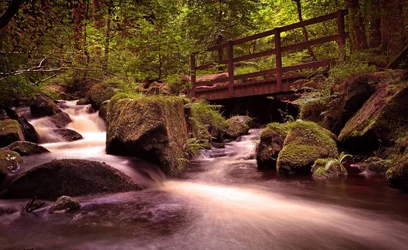
Wyming Brook - critique please?

RocketDog85

TPF Noob!
Joined
Jul 2, 2015
Messages
9
Reaction score
2
Can others edit my Photos
Photos OK to edit
Having problems shooting RAW so this was shot in JPEG.
 

Attachments

  • image.webp
    image.webp
    570.2 KB · Views: 198
Your color balance is leaning heavily towards magenta, water is not purple. Composition isn't bad but the colors are just muddy in general
 
Having problems shooting RAW so this was shot in JPEG.
If your camera will capture a RAW file, then what kind of problems have you experienced?

Either it will or it won't.

Please do not feel that anyone will be critical if your camera simply doesn't do that.
 
I had attempted to reduce the magenta cast, but alas I could not.
 
Last edited:
Having problems shooting RAW so this was shot in JPEG.
If your camera will capture a RAW file, then what kind of problems have you experienced?

Either it will or it won't.

Please do not feel that anyone will be critical if your camera simply doesn't do that.

The problem is opening the CS2 file. I have Photoshop CS4 and 5 on Windows and Mac and neither one will open it despite having the Kate's version of the Camera Raw plugin.
 
*latest. Damn autocorrect! I'm shooting with a new out of the box Canon 6D
 
Use canons software to convert to DNG or tiff or something then process in Photoshop
 
You can open the jpeg in Camera Raw, then do a colour correction using the mid-point and shadow eye-droppers on a curves adjustment layer in CS5. Not sure where the CS2 file came from though, and unless you've mixed up your extensions there shouldn't be a problem opening it in later CS versions, though you won't be able to open a .psd file in Camera Raw.
mod-1.webp
 
The best way to resolve the magenta cast is with the simple, color balance adjustment followed with HSL by sampling the water, reducing saturation and shifting the hue. In this example, the water might be a bit too neutral, but you get the idea. There is a temptation to do everything in curves.

I'd post the settings, but I did it late last night, flattened but was too tired to make the post. There's also some additional magenta boogers that would need further refinement in hsl.

.webp
 
The frustrating thing about Adobe is as soon as they come out with a new version of software, they pretty much drop Camera RAW updates for new camera models in any prior version.

Adobe introduced support for the 6D in Camera RAW update 7.3 (in 2012). But it required a minimum version of CS6.

You can use the Canon DPP to convert it to TIFF (16-bit and lossless, btw the image size will get MUCH bigger because the RAW (.CR2) isn't yet debarred and the TIFF image is.) Or you can use the Adobe DNG converter to convert it to something Photoshop will recognize.

You could also just subscribe to their $10/month creative cloud subscription (I finally caved) and get the latest Photoshop and Lightroom versions. I'd there's a way to buy the upgrade but exactly how you do this seems to be a well-guarded secret.
 
Thanks everyone for the tips. I managed to get the Canon DPP software. It's pretty awful in my opinion, not a scratch on Camera Raw, but I managed to open the CR2 file and make some changes. Is there a way to convert it to a file using DPP that will allow me to open it in CS5's Camera Raw?

Let me know what you think of the new version?

 
DPP only allows you to cover to either JPEG or TIFF. But it does have a batch mode (so you can convert an entire photoshoot all at once rather than one-image-at-a-time.)
 
Thanks everyone for the tips. I managed to get the Canon DPP software. It's pretty awful in my opinion, not a scratch on Camera Raw, but I managed to open the CR2 file and make some changes. Is there a way to convert it to a file using DPP that will allow me to open it in CS5's Camera Raw?

Let me know what you think of the new version?


I would go with Ysarex suggestion above. Personally, I just convert my RAW files upon import into Lightroom to DNG. Not worried that the world is going to end and I won't be able to open them if Adobe falls into a black hole.
 

Create an account or login to comment

You must be a member in order to leave a comment

Create account

Create an account on our community. It's easy!

Log in

Already have an account? Log in here.

New Topics

Back
Top Bottom