What's new

1st photo post

Dorzok

TPF Noob!
Joined
Oct 22, 2010
Messages
10
Reaction score
0
Can others edit my Photos
Photos OK to edit
be gentle.
my buddy fleetwood271's been bugging me to post up some pics but been too embarrassed of what i've been shooting. but i figured i'll never learn if i don't so here goes.

_DSC8402.jpg


_DSC8358.jpg


_DSC8410.jpg


this is the only one i edited. just a simple crop. original follows.
_DSC8403.jpg


_DSC8403-1.jpg


i was farting around with my aperature setting to see what it does. coudn't tell that it was doing anything. anyway, i know nothing of exposure, shutter, or aperature settings anyway so feel free to give me some instruction on how different setting may have helped these.
 
What kind of camera are you shooting with? Most of these do indeed look like "snapshots". #2 looks like the pop up flash was used or some kind of fill light. I like the cropped version of the last one better, less empty space.
 
One of the most interesting shots I have seen in my life was in the movie Alien when Dallas is moving through the tunnels looking for the alien. The camera angles they used made the audience feel very vunerable and enclosed, somewhat claustrophobic. Now Im not telling you to terrorize your viewers but take a shot that will pull in the viewer to something new and interesting. Get them to see what you see in the image.
What do you see in these images? What do you want us to see?
Keep at it. Good Luck. :thumbup:
 
What kind of camera are you shooting with? Most of these do indeed look like "snapshots". #2 looks like the pop up flash was used or some kind of fill light. I like the cropped version of the last one better, less empty space.

Sony a330
kit lens

pretty much were snap shots except i did try to "compose" them and i did mess with the aperature setting but have no idea what it was supposed to do. i guess the last one was what i expected with the background being blurred but still lacks "depth" that i was hoping for. i did focus on the darker shaded part of the plant to "trick" the light sensor other wise the plant in the front would have been very under esposed.
 
I like #1 but it seems as it's out of focus which makes sense reading that you were playing around with your aperature settings. Keep working at it!!
 
You found some interesting subjects and have an eye for composition, so you're off to a good start. Here are some comments on the particulars:

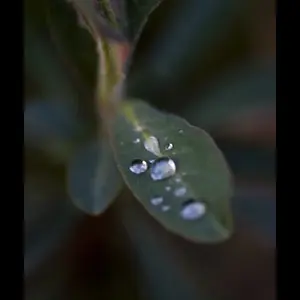
#1 Too much is out of focus, especially on the structure in the middle (I'm ignorant of botany). For a close-up like this, try to use f11 or so and keep the camera parallel to the subject, so parts of it are not further or closer to the lens and thus out of focus. And use a tripod.

#2 I like this a lot, but I think the white canvas at the top and the rope are distracting, so I would crop the top enough to remove all of the canvas and the right enough to remove the rope. If you're interested, this could be a good one for experimenting with conversion to black and white.

#3 is less interesting and needs more contrast, but spend your time on #2 instead.

The crop of the last is good, but the sky is too bright and it needs an even tighter crop. I'd work on this before #3 but after the #2.

Keep posting and read a book on exposure and your camera manual. And have fun!
 
You found some interesting subjects and have an eye for composition, so you're off to a good start. Here are some comments on the particulars:

#1 Too much is out of focus, especially on the structure in the middle (I'm ignorant of botany). For a close-up like this, try to use f11 or so and keep the camera parallel to the subject, so parts of it are not further or closer to the lens and thus out of focus. And use a tripod.

#2 I like this a lot, but I think the white canvas at the top and the rope are distracting, so I would crop the top enough to remove all of the canvas and the right enough to remove the rope. If you're interested, this could be a good one for experimenting with conversion to black and white.

#3 is less interesting and needs more contrast, but spend your time on #2 instead.

The crop of the last is good, but the sky is too bright and it needs an even tighter crop. I'd work on this before #3 but after the #2.

Keep posting and read a book on exposure and your camera manual. And have fun!

good post editing suggestions, but f11??? i know it's a camera setting but i wouldn't know how to determine that this setting (f11) would have been a good starting place for that pic. i understand the composition suggestions of the flower; it was high so i was shooting up at it. just don't know what f11 would have done. based on some other pics that i didn't post i do see how a tripod would be needed even for adjustments to the aperture.
once others post suggestions i wall tackle some basic post editing. right now i want to get an idea of how to better use the camera
thanks for your comments.
 
Wagon - The wagon is my favorite, so I'll start there. If you have an off camera flash, with a diffuser, that could have helped soften the shadows. I agree that the white cover is distracting, though I understand it is a "covered wagon". Maybe if more of the cover was visible, but as is, it's almost like a border, just on the top of the shot. And the rope, though "rustic", draws my attention from the main subject. Here it is without the cover or the rope. I also made a few minor adjustments in saturation, levels, contrast, etc.
Wagon.jpg


Cactus - I like the crop better than the original. On this one I simply added some color and adjusted contrast slightly. I figured since the sky was so white, the added color might make the plant pop a little.
Cactus.jpg


Bud - Increased saturation and a little unsharp mask. I didn't check the EXIF data, but your aperture must have been around 3.5 or so, as the top of the bud is not in focus, but the middle (almost) is. As someone else suggested, an aperture 8 or maybe 11 would solve that.
Buds.jpg


I suggest reading Bryan Peterson's Understanding Exposure. And yeah, I know, I know....some people on here may say that this book is suggested too much. But I found it to be very informative. I loved the way he explained ISO, Aperture, and Shutter Speed.

You mentioned aperture in your original post. In this book, he includes several pictures (of his father I believe), where he has changed nothing but the aperture, so you can see the affect of making these changes.
Actually, the following site give a good way to play with your setting too and to see the difference:
Understanding Exposure - SimCam - Film and Digital Camera Simulator - Photonhead.com

Glad to see your shots on the forum. Keep it up. Have fun.
 
good post editing suggestions, but f11??? i know it's a camera setting but i wouldn't know how to determine that this setting (f11) would have been a good starting place for that pic. i understand the composition suggestions of the flower; it was high so i was shooting up at it. just don't know what f11 would have done. based on some other pics that i didn't post i do see how a tripod would be needed even for adjustments to the aperture.
once others post suggestions i wall tackle some basic post editing. right now i want to get an idea of how to better use the camera
thanks for your comments.

Dorzok, what were you going for when you took these shots? It would be easier to give good advice if we knew what your goals were. You mentioned aperture. Were you trying to be sure the background was blurred and out of focus? If that's what you're after, your aperture should be as large (small number) as your lens, shutter speed, and lighting conditions allow.
If you want the background to be out of focus, use something like f2.8, f4 or f5.6. Then, you want to be quite close to the subject. Lastly, the further your subject is from the background, the more out of focus the background will be.

My only suggestion for the wagon is an off camera flash, or at least a bounce flash. I just thought the shadows were harsh in that shot.

The cactus crop looks better than the original, as previously mentioned. So, how about shooting that one portrait instead of landscape? And with the camera pointed at the sky, a circular polarizer or a neutral density filter would help to some degree.

And remember to ask yourself these three questions each time before you press the shutter button:

1. What is the subject in this shot? Simple question, but do you know before you take the picture?

2. What can I do to draw attention to the subject? Use Rule of Thirds, color contrasts, warm colors, selective lighting, selective focus, leading lines, etc?

3. How can I simplify the shot? Have I eliminated everything that is non-essential and/or distracting?
 
good post editing suggestions, but f11??? i know it's a camera setting but i wouldn't know how to determine that this setting (f11) would have been a good starting place for that pic. i understand the composition suggestions of the flower; it was high so i was shooting up at it. just don't know what f11 would have done. based on some other pics that i didn't post i do see how a tripod would be needed even for adjustments to the aperture.
once others post suggestions i wall tackle some basic post editing. right now i want to get an idea of how to better use the camera
thanks for your comments.

Dorzok, what were you going for when you took these shots? It would be easier to give good advice if we knew what your goals were. You mentioned aperture. Were you trying to be sure the background was blurred and out of focus? If that's what you're after, your aperture should be as large (small number) as your lens, shutter speed, and lighting conditions allow.
If you want the background to be out of focus, use something like f2.8, f4 or f5.6. Then, you want to be quite close to the subject. Lastly, the further your subject is from the background, the more out of focus the background will be.

My only suggestion for the wagon is an off camera flash, or at least a bounce flash. I just thought the shadows were harsh in that shot.

The cactus crop looks better than the original, as previously mentioned. So, how about shooting that one portrait instead of landscape? And with the camera pointed at the sky, a circular polarizer or a neutral density filter would help to some degree.

And remember to ask yourself these three questions each time before you press the shutter button:

1. What is the subject in this shot? Simple question, but do you know before you take the picture?

2. What can I do to draw attention to the subject? Use Rule of Thirds, color contrasts, warm colors, selective lighting, selective focus, leading lines, etc?

3. How can I simplify the shot? Have I eliminated everything that is non-essential and/or distracting?

i must be a natural then because subconsciously those are the questions i think about when i took these.

pic one
subject is obvious and you pointed out well what i thought the problem was but could not identify. was indeed just trying out aperture settings. but when you don't know what you're doing it's tough to know what to expect. i like your explanation. thanks ;)

pic two
subject: wagon wheel
my past picture taking (film) i had a habit of trying to crop the picture in the view finder. tried to take the picture i thought i wanted and composed it accordingly with no intention of any kind of editing (out of my control since a film processing plant was doing the development). when i got the digital i fell into the same habit. the wagon wheel pic was to break that with intention of doing some kind of crop later. the wheel offset was intentional. i agree with you and dude about losing the rope and canvas. subject is the wheel after all. :thumbup: an unexpected treat that i don't even remember seeing is the grass in front. i like that. :D

pic three
subject: rock
again i was playing with aperture. i think maybe it's too busy and not enough contrasting colors to see. maybe it was just a bad setting. but i wanted the rock to "pop" out of the cacti. fail. i now know what i could have done and it might have worked.

pic four
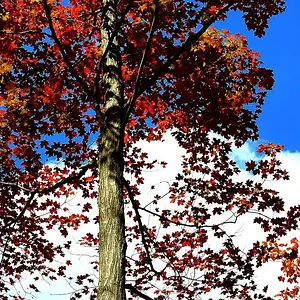
subject: flowers and palm trees
i tried to trick the automatic exposure on this one. i focused on a darker portion at the base of the plant then panned up to center the palms. it washed out the sky but it was a very cloudy overcast day, so the sky didn't look much different than what's in the pic. again i had intende to crop this one, especially since i couldn't get an agle without that building.

as i said these were an exercise in aperture. i proved to myself that i didn't know what i was doing. i knew that you can use aperture to create depth and here i learned how. :thumbup: little number opens the shutter big, big number open the shutter little. large aperture (small number) will blur the distant objects more than a small aperture (big number). use aperture setting accordingly.

one question. hope it doesn't get lost in this big post. if i'm going to play with the aperture should i bother leaving the other settings on auto or does that just defeat the purpose??
 
you can leave the other features on auto. but it all depends whats the effect you want to create
 
As said by others. The trick is not to include as much as possible, but to select details that will capture the imagination. For starters you can focus on individual objects that you find interesting and try to give them a context. There's a quick composition guide on my side www.photorookie.com.
 
As said by others. The trick is not to include as much as possible, but to select details that will capture the imagination. For starters you can focus on individual objects that you find interesting and try to give them a context. There's a quick composition guide on my side www.photorookie.com.
 

Create an account or login to comment

You must be a member in order to leave a comment

Create account

Create an account on our community. It's easy!

Log in

Already have an account? Log in here.

Back
Top Bottom