What's new

2nd go at newborn.. I want to bang my head against a wall! C&C please!?!

mc1979

No longer a newbie, moving up!
Joined
Mar 30, 2011
Messages
270
Reaction score
52
Location
Al
Can others edit my Photos
Photos OK to edit
Well, I had another chance at practicing on a baby the other day. Afterwards, I was so frustrated! It is alot more stressful when you have a grandmother breathing down your neck!
First thing I've learned is that I need to get a better bean bag, I can't stand the wrinkles in the blanket, and I'm still learning LR3, so not good with getting rid of them. And yes, I know...LR is not meant as a full editing software like PS, but it's all I have for now.
Secondly, NOT ALL BABIES WHO ARE LESS THAN 10 DAYS OLD LIKE TO CURL UP IN A BALL! lol.. This baby was only 4 days old and was not wanting to sleep or curl up and get all cozy.
Anyways, this was FREE... I wouldn't dream of charging, I am just trying to get better... but I don't know if it's happening.

So I'm going to post 2 out of the 4 I've edited. I'm ready for your critique and comments.

1.
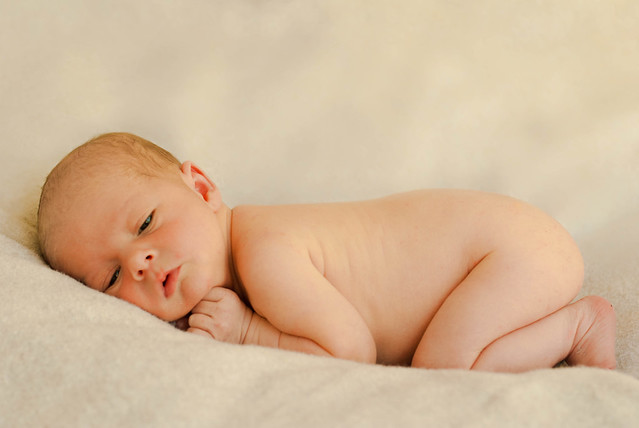
Parker-4 by mchatham79, on Flickr


2.
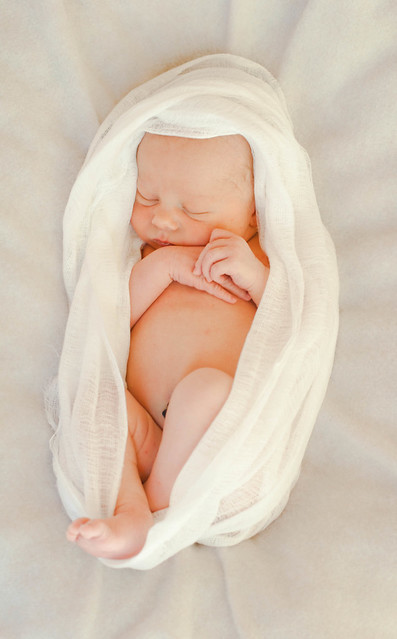
Parker-2 by mchatham79, on Flickr


Ok, the 2 things that bug me about this one, is his umbilical cord is showing a little, and I couldn't edit it out for the life of me.. and the wrinkles in the blanket
 
Anybody?
 
Looks like everybody is pretty much "babied out." lol
There has been a huge series on this lately. No offense.
I wouldn't know where to begin on these since I don't do babies or people.
In my humble opinion though, they both look pretty good.

Number 2.
Bingo
 
Haha , yes I know alot of people have even said that if they see the word newborn they won't even look! But I don't get the opportunity to take them a lot!
 
They are good basic images. It's just the post that is getting you!
I have found with babies that when you have color headaches to stop trying to adjust through the wb and go to the HSL tabs. Under the Luminance raise the luminance of the yellows, oranges and reds. If they are still too saturated on those colors then go to the saturation tab and adjust appropriately.
The umbilical cord-you could clone it out if you had an editing program, but it actually isn't too bad. Might be able to use the spot healing brush.
The only thing that I notice and would do differently-don't use that cheap blanket thing as the background/cover. If you must use the adjustment brush and remove some of the clarity on it so it doesn't look like one of those cheap dollar store nylon/poly blankets.
#1 looks like you have already cropped it and it'll be fine to print.
#2 is going to be a problem at 8x10 by the looks of it. You are going to need an editing program to add in more space at the baby's head and feet to print to an 8x10.
 
Yes I know, hate the blanket and I did use adjustment brush and scaled clarity back as far as it would go! Lol
And you are so right, the post is killing me! I did play around with the colors, luminance, hue, and saturation. And am still in a BIG learning curve with that! It doesn't help that I do not have a calibrator for my monitor too. I actually didn't think 2 came out so bad as far as baby is concerned, but 1 seems a little orange/yellow to me in the face.
I'm just going to have to keep playing with it I guess... But boy is it a headache!
I know I'm going to have to break down and get better editor, I just can't justify the cost right now... Since I'm a newb and still learning, I would dream of charging, so therefore don't have the money to invest, but know I need to if I ever want to get to the point of charging!
This is why I am banging my head! Thanks for your feedback
 
if you want to send it to me I can send it back with the XMP attached so you can see what I'd do with the raw image. info@clakesports.com
 
When the clarity doesn't do it you can also add noise removal, but you need to be able to edit to do it effectively. It's a double process kind of thing when you go adding in the noise removal. Can't do that with the adjustment brush.
Have you looked into Elements 10? It's under $100 I believe.
 
MLeeK said:
if you want to send it to me I can send it back with the XMP attached so you can see what I'd do with the raw image. info@clakesports.com

I'm on my phone now, but wouldn't mind sending to you at all, it will be tomorrow though. But how do I send a raw image to you? I don't have anything installed on my computer that even will open it other than LR.
 
MLeeK said:
When the clarity doesn't do it you can also add noise removal, but you need to be able to edit to do it effectively. It's a double process kind of thing when you go adding in the noise removal. Can't do that with the adjustment brush.
Have you looked into Elements 10? It's under $100 I believe.

With Elements would the option to add room like you advised for print be there?
 
Just attach the raw image to the email and send it as a file. It doesn't have to recognize it to send it. if all else fails zip it up and send me the zip.
When I send it back it will have an XMP file with it and when you then open that image in LR with the XMP in the same folder it will open with my settings applied to it so you can see what I did.
 
MLeeK said:
When the clarity doesn't do it you can also add noise removal, but you need to be able to edit to do it effectively. It's a double process kind of thing when you go adding in the noise removal. Can't do that with the adjustment brush.
Have you looked into Elements 10? It's under $100 I believe.

With Elements would the option to add room like you advised for print be there?
Yes. It's not an "easy button" kind of thing. It's not an "option" per se, it's a matter of increasing the size of the canvas and then cloning/duplicating/stretching the blanket so that it gives you more room.

When you are shooting you have to remember to leave extra room in your images for print. Your camera is only one sized sensor, prints are many different ratios. I mentioned 8x10 because it's the worst. You lose about 2 inches off of the long side of the image when you print to 8x10. It's also the most popular size. People think it's big.
 
Ok, I will give that a try tomorrow night! Looking forward to seeing what you do!
 
MLeeK said:
Yes. It's not an "easy button" kind of thing. It's not an "option" per se, it's a matter of increasing the size of the canvas and then cloning/duplicating/stretching the blanket so that it gives you more room.

When you are shooting you have to remember to leave extra room in your images for print. Your camera is only one sized sensor, prints are many different ratios. I mentioned 8x10 because it's the worst. You lose about 2 inches off of the long side of the image when you print to 8x10. It's also the most popular size. People think it's big.

Let me tell you, sizing, cropping, etc.. Is the biggest headache for me yet! I keep trying to remember to leave room, but can't get it in my thick skull! Lol
Honestly, I feel like a huge dummy when it comes to the whole sizing thing, and no matter how many times I read about it, I just don't get it... Numbers/math were my worst subject in school! This is where I wish I had someone sitting right next to me and showing me this, I learn so much better that way! Thanks for being so helpful!
 

Create an account or login to comment

You must be a member in order to leave a comment

Create account

Create an account on our community. It's easy!

Log in

Already have an account? Log in here.

Back
Top Bottom