What's new

A few from the Pittsburgh Zoo

Joined
Jan 15, 2014
Messages
733
Reaction score
158
Location
N VA
Can others edit my Photos
Photos OK to edit
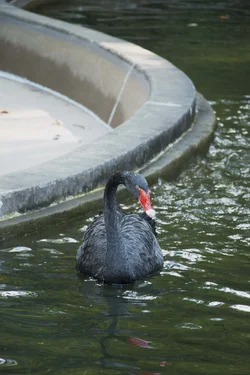
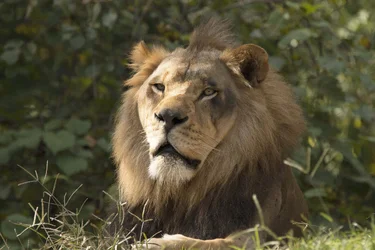
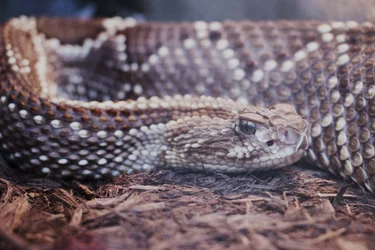
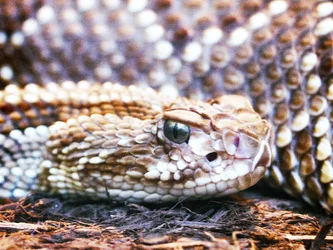
These are a few months old but thought I'd post them. I can't figure out what is wrong with it but #4 just doesn't look "right" to me but I can't figure out if it's me or the photo (still having very slight vision issues). I am still working on getting back into photography after my horrid year. Most (or maybe all) of these were taken with my Tamron 150-600 wide open since it was all handheld. This was the first chance I really had to use the lens. I was more concerned with keeping track of my kids than changing settings, I need to go out alone so I can bring my tripod and really test the lens out. As usual any critique is welcome.

1.
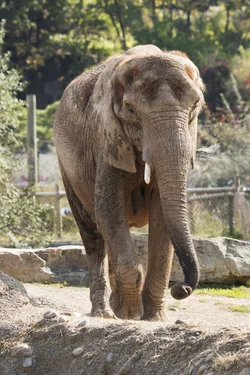
Elephant2-1.webp

2.

BlackSwan1.webp

3.

Lion2-1.webp

4.

Snake.webp
 
Nice set in the fourth it looks like there is a white haze on it is the second one of a black swan?
 
With #4, it looks like there is a glass reflection affecting the right 2/3 of the frame, that might be what you're having trouble with. The right side is lighter than the left.
 
Maybe consider cropping the
With #4, it looks like there is a glass reflection affecting the right 2/3 of the frame, that might be what you're having trouble with. The right side is lighter than the left.
I think you are correct.

I like the shot though, what if you cropped it in closer to the snake's head, then adjust the contrast, etc from there? I like its eye and the shallow depth of field.
 
Maybe consider cropping the
With #4, it looks like there is a glass reflection affecting the right 2/3 of the frame, that might be what you're having trouble with. The right side is lighter than the left.
I think you are correct.

I like the shot though, what if you cropped it in closer to the snake's head, then adjust the contrast, etc from there? I like its eye and the shallow depth of field.

I can definitely try that!
 
Not sure if this is any better or too cropped...
View attachment 132277
Do you have Photoshop? If so under filters look for camera raw, and try the dehaze slider. You might also want to try pulling the highlights down a tad

Sent from my N9518 using Tapatalk
 
Not sure if this is any better or too cropped...
View attachment 132277
Do you have Photoshop? If so under filters look for camera raw, and try the dehaze slider. You might also want to try pulling the highlights down a tad

Sent from my N9518 using Tapatalk
Yes, I do. I'll look for that. I'm still learning PS and can so far only do the basics. I have a book on it but need the time to sit and actually read it and mess with the program without the kids or husband bothering me. Thanks!
 
Not sure if this is any better or too cropped...
View attachment 132277
Do you have Photoshop? If so under filters look for camera raw, and try the dehaze slider. You might also want to try pulling the highlights down a tad

Sent from my N9518 using Tapatalk
Yes, I do. I'll look for that. I'm still learning PS and can so far only do the basics. I have a book on it but need the time to sit and actually read it and mess with the program without the kids or husband bothering me. Thanks!
No worries, happy to help. :)

Sent from my N9518 using Tapatalk
 
Not sure if this is any better or too cropped...
View attachment 132277

Nice. Maybe even a bit more cropped, depending on your preferences. What I was seeing was to use the OOF body of the snake as a background to its eye, if that makes sense. Btw, I didn't say before, I also like the lion shot.
 

Create an account or login to comment

You must be a member in order to leave a comment

Create account

Create an account on our community. It's easy!

Log in

Already have an account? Log in here.

Back
Top Bottom