What's new

A few of my Grandaughter

rgregory1965

No longer a newbie, moving up!
Joined
Aug 15, 2011
Messages
711
Reaction score
84
Location
arizona
Can others edit my Photos
Photos OK to edit
I shot these yesterday.....most difficult subject to date for me.....just would not sit still....lol

Please let me know what you thing and if there is something I can or should do to improve these.

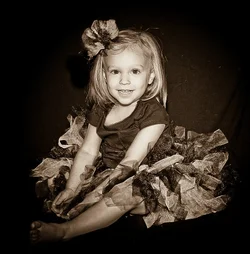
1.

DSC_4097.jpg


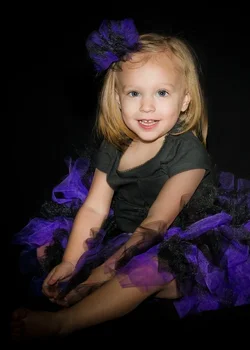
2.
DSC_4133.jpg


3.
DSC_4101.jpg
 
What a cute kid! She looks like a bundle of energy too!

3 is my favorite.

I feel like the color on number 1 could be tweaked, but I'll leave that to the experts.
 
Your so lucky to have such an adorable granddaughter! I don't really care for the composition too much. too much dead space on the left of #1 and too much on the right of #2, and both sides of #3. The smile in #1, however, is priceless. Agree with tirediron about the exposure as well.
 
Fix the exposure and crop a lot tighter and you will have better photos ....she is very cute!
 
Cutie pie alert!!!!!!!!! I would try to lighten them up. The last shot though...I think that could be allowed to stay low-key, and converted to B&W, and made into a very nice, classic-looking child's portrait. On shot #2, I would crop off a bit on the right hand side, and I think it's look a bit better.
 
Here, I did a B&W conversion in Lightroom on shot #3, and applied a sepia tone effect to it.

$DSC_4101_sepia tone.webp

I think it has a cute, classic look to it.
 
she is so cute! fast, lightroom only edit on 3 since yours say ok to edit.. something happened with the whites of her eyes but I can't seem to figure out how to fix in LR n photoshops on my desktop, but anyway, i felt they were underexposed and I played a bit :) $DSC_4101.webp
 
Derrel. I really like the sepia look. I honestly have used it more than I would B&W.
 
Thanks Ron, Yes, I like LR's sepia tone a good bit. One thing that frommrstomommy did differently than I did was to burn down the corner with the girl's extended foot...that was actually one area where I thought my re-work might not have been done 100% 'the best way'...eliminating the toes was, I think, actually a good decision on the nice vertical crop that frommrstomommy offered...I split the difference between totally burning down that corner or leaving it light, so the foot and toes were visible...not sure if that was the best choice.
 
I would suggest in the 2nd photos.. and in general.. shoot through a softbox, and move her away from that backdrop.. it looks like wrinkled old laundry..
The seonc dalso appears to be quite noisy.. what ISO were you shooting at?
 
The kid's adorable, the poses are pretty darn cute, and I mostly like the framing. I'd shoot a little looser, myself, but not bad at all.

As noted, they're underexposed, generally.

The single thing you can do to make them look better is to move the flash off-center, at this point. Right now you've got a paparazzi lighting look going on, which is certainly a thing, but it's only one of several things and it's not the most flattering thing!
 
I like frommrstomommy's crop a lot. That could be because I don't like square crops in almost all cases. That's just a personal thing nothing wrong with them they are just so hard to compose and always leave me wanting more. Like I'm missing something.
 
Thanks for all the ideas....will go back and re-work them some and try again......:mrgreen:
 
Last edited:
Cute kid, but she's growing into the black background. And they are underexposed. A backlight would do a great deal for you, or shooting with some natural natural light in the background would be good.
 

Create an account or login to comment

You must be a member in order to leave a comment

Create account

Create an account on our community. It's easy!

Log in

Already have an account? Log in here.

New Topics

Back
Top Bottom