RebeccaAPhotography
TPF Noob!
- Joined
- Aug 7, 2011
- Messages
- 740
- Reaction score
- 84
- Location
- South Range, WI
- Can others edit my Photos
- Photos OK to edit
Hey guys 
Here's a few shots I took of a few of my favorite christmas ornaments. I get a couple of these every year!! My problems with these is I feel like they are too centered but I just dont really have any other idea on how to do it. I really need to work on my composition! Let me know what ya think.
1)
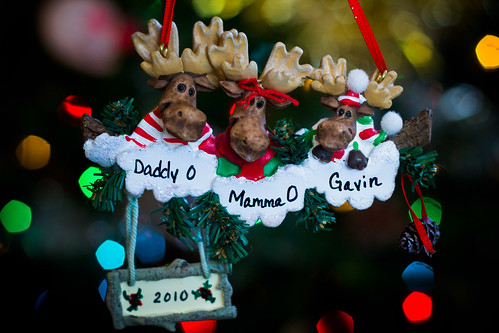
IMG_3885 by Rebecca Andresen Photography, on Flickr
1/200, f 2.2, iso 400
I think with this one i should have closed the aperture a step or 2 or 3 lol. So that the 2010 was in focus also. I also think I should have taken this a slightly a different angle b/c the Gavin moose is oof? and the bokeh behind the DaddaO moose is distracting. I didn't notice it til now.
2)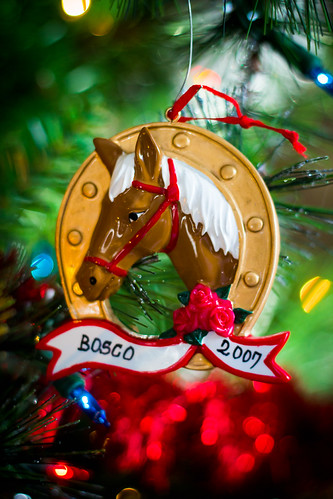
IMG_3871 by Rebecca Andresen Photography, on Flickr
1/200, f2.2 iso 400
3)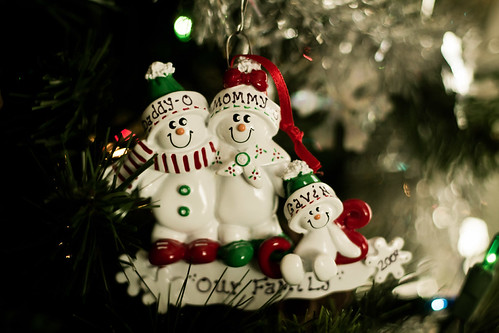
IMG_3861 by Rebecca Andresen Photography, on Flickr
1/400, f 2.2 iso 400
My overall assumption with these are I need to work on my composition. Does anyone have any creative idea's or photos that can show me a more creative way to photograph christmas ornaments? and I should have lowered my aperture by quite a bit to get the whole ornaments in good focus.
Thanks!
Here's a few shots I took of a few of my favorite christmas ornaments. I get a couple of these every year!! My problems with these is I feel like they are too centered but I just dont really have any other idea on how to do it. I really need to work on my composition! Let me know what ya think.
1)
IMG_3885 by Rebecca Andresen Photography, on Flickr
1/200, f 2.2, iso 400
I think with this one i should have closed the aperture a step or 2 or 3 lol. So that the 2010 was in focus also. I also think I should have taken this a slightly a different angle b/c the Gavin moose is oof? and the bokeh behind the DaddaO moose is distracting. I didn't notice it til now.
2)
IMG_3871 by Rebecca Andresen Photography, on Flickr
1/200, f2.2 iso 400
3)
IMG_3861 by Rebecca Andresen Photography, on Flickr
1/400, f 2.2 iso 400
My overall assumption with these are I need to work on my composition. Does anyone have any creative idea's or photos that can show me a more creative way to photograph christmas ornaments? and I should have lowered my aperture by quite a bit to get the whole ornaments in good focus.
Thanks!






![[No title]](/data/xfmg/thumbnail/37/37528-9e874fc2fc9aad7c13c894c1439dcc10.jpg?1734170686)