What's new

A Little Artistic License

smoke665

Been spending a lot of time on here!
Joined
Mar 29, 2016
Messages
17,050
Reaction score
10,444
Can others edit my Photos
Photos NOT OK to edit
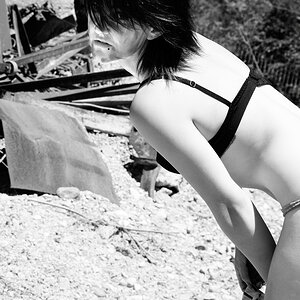
Read about a photographer (Fuzzy Duenkel) this morning that created a look in PS, he called the "Fuzzy Filter", a simple high contrast, low-saturation look.

I also saw this as a chance to try out Dan Ostergren's dodge and burn techniques using a 50% gray fill layer. Noise was added to complete the edit.

I'm sure that many won't like the final product, but I found the "gritty" final image interesting and a great practice that I can use in the future. C&C anyone?

no-image-available-grid.jpg by William Raber, on Flickr
 
Last edited:
I think it calls for just the right subject before it will work to your advantage.
 
I think it calls for just the right subject before it will work to your advantage.

Agreed. Grabbed this one, because I was never happy with the original, and thought a different perspective might be in order. Another subject/image would likely work better with the technique. Still I learned something new, so all is good!
 
I think this effect would work great on pastoral scenes! Lakes, ponds, gardens, etc.., other tranquil scenes. I'm not opposed to this type of effect in any way.
 
I think this effect would work great on pastoral scenes! Lakes, ponds, gardens, etc.., other tranquil scenes. I'm not opposed to this type of effect in any way.

I actually had the same thought. The other thing is, that in my haste to try new things, I think I may have tried to much at one time. Dan's dodge and burn technique worked extremely well, with a lot of flexibility, but I need to practice it by itself to understand how to utilize it to the fullest. Likewise with the other, though simple it still needs practice to understand fully. I was so focused on the techniques that I lost sight of the image.
 
[ SNIP>>>>>>>>> Likewise with the other, though simple it still needs practice to understand fully. I was so focused on the techniques that I lost sight of the image.

Exactly. When learning a new processing technique or method, it's common to just apply it to whatever image is at hand, which makes sense. Knowing when and where the technique will bring maximum benefits is another thing. I really DO LIKE coarse, grainy, impressionistic images, and I think that this method will work great with a whole range of images. Seascapes, brighty day pastoral views, stuff like that, maybe some fruit in bowl type still-life shots, all of those ought to work well with his method.
 
I really DO LIKE coarse, grainy, impressionistic images, and I think that this method will work great with a whole ranmge of images.

The coarse grainy part is something I added to the "witches brew", and not part of the other techniques. I've found that in experimenting with one idea, it tends to lead me in other directions as well.

For those interested in the other techniques, doing a search on our own TPF member Dan Ostergren, and you'll find a wealth of information on his techniques. He's been very good about sharing. As to to the other one. It's fairly simple create a duplicate layer, then completely desaturate it. Open a curves adjustment, grab the middle and move it left about half way. Then move down just a little and pull it down till the curve almost touches the bottom. Then go up and grab the curve to pull it off the top. Lastly use the history brush set to about 20% to gradually add back color where you want. Set the opacity of the layer for the amount of the effect
 
How did you get the texture?
 
How did you get the texture?

Part of the look/texture was from the "Fuzzy Filter", I added noise with Layer copy>Filter>Add Noise>14%, Gaussian, Monochromatic. Then adjusted the opacity
 
How did you get the texture?

Part of the look/texture was from the "Fuzzy Filter", I added noise with Layer copy>Filter>Add Noise>14%, Gaussian, Monochromatic. Then adjusted the opacity
Oh.

I don't have any of those. Maybe I should get PS and learn it.
 
instead of messing around in PS and doing all the processing you could just set your ISO to 128,000 and basically get the same effect with a lot less work. :biggrin-93:
 
with a lot less work.

But this isn't work!! I force myself into doing all these things for FUN!!!! Maybe I should ask my doctor about upping my meds.:048:
 

Create an account or login to comment

You must be a member in order to leave a comment

Create account

Create an account on our community. It's easy!

Log in

Already have an account? Log in here.

Back
Top Bottom