What's new

A little of your time for C&C please.

leixialong

TPF Noob!
Joined
Jun 21, 2011
Messages
55
Reaction score
2
Location
Japan
Can others edit my Photos
Photos OK to edit
Hi Guys.

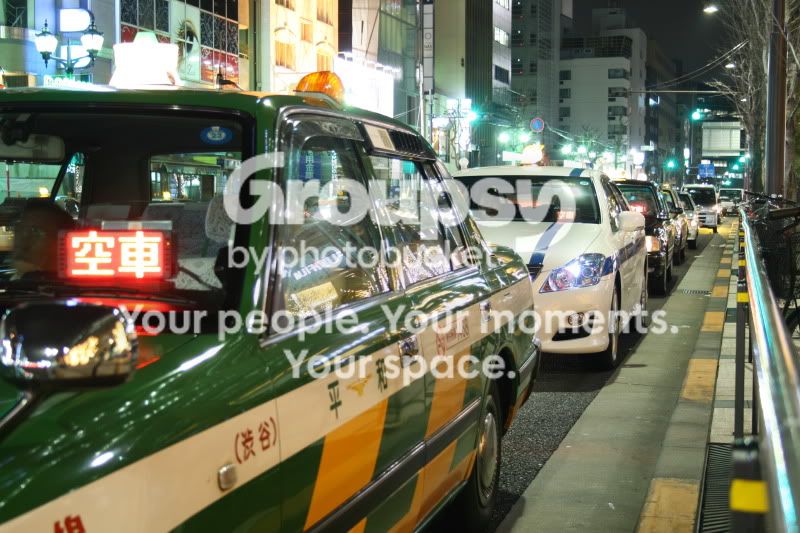
Your thoughts on my pair of unedited photos, thanks.

IMG_4817.jpg


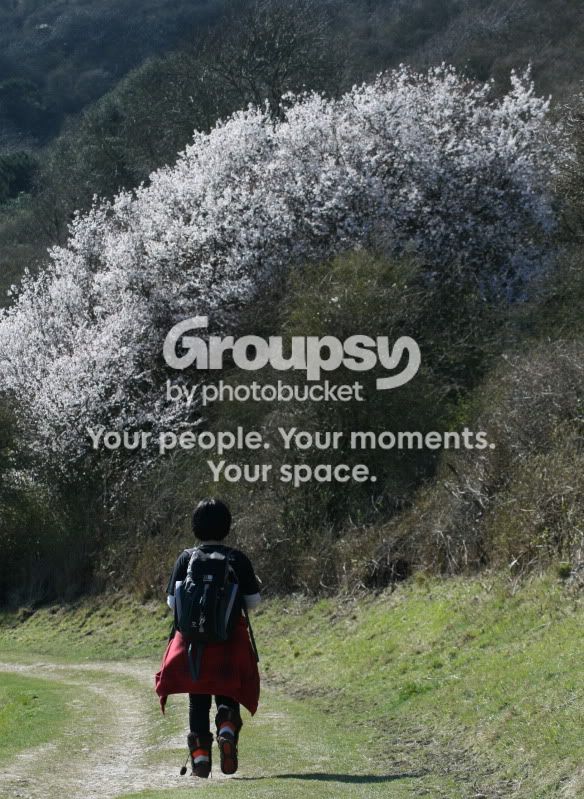
Also.

IMG_5321.jpg


Cheers guys.
 
Unedited? Really? How did you get them out of the camera? Oh, you mean you didn't do it, you let the camera edit them for you?

That aside, #1 is an interesting shot of the city street, japan? #2 does nothing for me.
 
I do not quite understand your opening sentence. I thought I was stating that they are "unedited" as in not touched by photo-editing software. Either my terminology is wrong or you are trying to make me look like a fool. Please do not do that. If my terminology is wrong then please correct me in a less condescending way, I am a relatively new photographer but not an idiot do not talk to me like one.

As for the photo critique thanks, but saying it doesnt do anything for you is not a critique, perhaps you could tell me why it does not do anything for you? That would be very useful to me if you have the time, cheers.
Photo number 1 is in Japan where I live.

Thanks.
 
My apologies then. If you are shooting in jpg format your camera is converting (editing) the information into jpg for you based on your settings within the camera's software. If you shoot in RAW format you must edit that RAW file to get a picture to appear on screen.


I like the first image but I am partial to travel photography, I enjoy looking at scenes and places where I have never been.
As far as the second image goes, I just don't find it interesting. The big bush dominates the scene, lacks color and is drab. The child is dark and out of focus?

My original comments weren't meant to be condescending in the least, rather your statement is one that has been repeatedly vocalized and has no merrit. My personal belief is that the people who say their photos are un-edited are the same ones who do not own, know how or want to put the effort into editing a photo. Not that I am any guru or even a good photographer, but I would at least attemt to edit my photo to a pleasing art form. I try.
 
Hey Lex. Like the first one but the second, I don't know!
I ain't no expert but my guess is the two subjects in the photo are too separated?
I think I might have taken the shot "landscape".
For me it feels too "cropped" sideways, but what do I know?
 
My apologies then. If you are shooting in jpg format your camera is converting (editing) the information into jpg for you based on your settings within the camera's software. If you shoot in RAW format you must edit that RAW file to get a picture to appear on screen.

Editing and converting in this sense maybe not the same but I will bow to what you are saying as you are more knowledgeable maybe than me on this by the looks of things.


I like the first image but I am partial to travel photography, I enjoy looking at scenes and places where I have never been.
As far as the second image goes, I just don't find it interesting. The big bush dominates the scene, lacks color and is drab. The child is dark and out of focus?

Now thats a critique. As it happens I agree with you on every point about that photo except its not a child its my Japanese girlfriend and she is a little short in comparison to the massive blossoming tree. It is indeed drab, maybe my skills just were not at that time (4 months ago) good enough. Maybe now as I am slightly more competent (I shoot and get involved everyday now) I wont make these mistakes again. Thanks.

My original comments weren't meant to be condescending in the least, rather your statement is one that has been repeatedly vocalized and has no merrit. My personal belief is that the people who say their photos are un-edited are the same ones who do not own, know how or want to put the effort into editing a photo. Not that I am any guru or even a good photographer, but I would at least attemt to edit my photo to a pleasing art form. I try.

Ok. Again maybe you yourself were not meant to be condescending but your remarks certainly carried that air. If you remember this is the beginners forum and if you are an experienced or seasoned photographer and hanging around here please remember that others might not yet have the know-how or terminology through no fault of their own other than the fact they are beginners. Please post accordingly and show a little forgiveness in their sometimes less than accurate words. It takes time to get competent and read up on photography and far too many people on this forum seem all to ready to bash a newbie while they seem to be constantly hanging out in the beginners forum, its sad.

Lets hope we get on better in my next post hahaha.
 
No sweat man, and sorry about the child comment. The tree/bush makes her look tiny in perspective

I am no pro, nor would I consider myself a seasoned vet yet. I do have a (very) basic understanding, maybe more than some but not nearly as much as many on this board. My head isn't fat with self worth. I enjoy the hobby tremendously, and am eager to learn as much as I can squeeze into my thick skull. ;)
 
Hahaha yeah she does look tiny in comparison but she is tiny anyway. Funny.
 
#1 is pretty cool. I like the lighting. Always have wanted to visit Japan! I agree with Trever1t for the second photo. It it dark and drab and there isn't really much to it.
 
Your second photo, IMO, has some potential. Can you re-crop so as to make your girlfriend and the path she is on the main subject of the image? A horizontal crop with her on the right and the path leading away to the left might work. A bit of work on the image might bring out some of the details in the shadows.
 
Don't mind the first even though the red sign grabs the most attention. My other problem with it is the line leading directly to a corner on the right; that comes from my art background where we were always told not to have lines leading directly to a corner.

On the second; the right 3/5th is pointless empty space. As the path leads to the left placing the subject on the right third line and leaving more space to the left should work better. Depending on what is to the left landscape orientation might work better.
 
My question would be why are they unedited? Is it because you don't have software to do so or because you haven't had time? Are you of the belief that they need editing? If so, why post an unfinished picture? Are you looking for advice about what editing needs to be done or are you looking for advice on composition?

The first one would be awesome if it was focused on that first green car's windshield so you could see the reflections. I think just the line of cars isn't as cool as it could be, but because it is someplace foreign to me it gains some interest. The second one, I really like, but it needs some work on the colors. White balance looks like it's off to me and it needs to be warmed up a bit, I think. IT'd be better if there was more of the road and less of the unnecessary green above that white tree, maybe?
 
It is smart of you to post photos that you have not yet edited. However, if the photos were recorded on the memory card as JPEG image files, they were extensively edited in the camera before the camera made them available for you to see on the rear LCD.

The image sensor of your 400D (XTi here in America) captures a Raw image data file that has at least a 12-bit color depth every time you release the shutter. That is 12-bits (4096 colors) of color depth per each of the 3 color channels; red, green, and blue (RGB), or 32-bits of color data.

If your camera is set to record JPEG files to the memory card the Raw image data file is edited in the following ways:
  1. All but 8-bits of the color depth recorded at shutter release for each color channel is discarded. 8-bits can only render 256 colors per color channel, so 3840 colors are discarded from each RGB color cannel.
  2. Based on programming decided on by a committee of camera software engineers, not you, the global contrast, saturation and sharpening of each JPEG file is edited. The camera does have some additional, although crude menu settings that let you increase or decrease the amount of those global edits.
  3. The pixels in the image are converted to 16 by 16 pixel, 16 by 8 pixel, or 8 by 8 pixel groups known as Minimum Coded Units (MCU's)
So, it's good you don't do anymore editing because JPEGs have little, if any, editing headrooom left after the camera has edited them.

I used the term 'global edit'. That is an edit that is applied to the entire image. Local edits are often desirable.

Consider when a wide aperture is used to selectively focus a subject (shallow DOF) so the background is blurred. It doesn't make much sense to then apply a global sharpening edit that will reduce that background blur as well as enhancing details of the in-focus subject. Using image editing selection tools just the subject can be selected and locally sharpened so the blurred background is excluded from the shapening edit.

 
Last edited:
It is smart of you to post photos that you have not yet edited. However, if the photos were recorded on the memory card as JPEG image files, they were extensively edited in the camera before the camera made them available for you to see on the rear LCD.

The image sensor of your 400D (XTi here in America) captures a Raw image data file that has at least a 12-bit color depth every time you release the shutter. That is 12-bits (4096 colors) of color depth per each of the 3 color channels; red, green, and blue (RGB), or 32-bits of color data.

If your camera is set to record JPEG files to the memory card the Raw image data file is edited in the following ways:
  1. All but 8-bits of the color depth recorded at shutter release for each color channel is discarded. 8-bits can only render 256 colors per color channel, so 3840 colors are discarded from each RGB color cannel.
  2. Based on programming decided on by a committee of camera software engineers, not you, the global contrast, saturation and sharpening of each JPEG file is edited. The camera does have some additional, although crude menu settings that let you increase or decrease the amount of those global edits.
  3. The pixels in the image are converted to 16 by 16 pixel, 16 by 8 pixel, or 8 by 8 pixel groups known as Minimum Coded Units (MCU's)
So, it's good you don't do anymore editing because JPEGs have little, if any, editing headrooom left after the camera has edited them.

I used the term 'global edit'. That is an edit that is aplied to the entire image. Local edits are often desirable.

Consider when a wide aperture is used to selectively focus a subject (shallow DOF) so the background is blurred. It doesn't make much sense to then apply a global sharpening edit that will reduce that background blur as well as enhancing details of the in-focus subject. Using image editing selectioon tools just the subject can be selected and locally sharpened so the blurred background is excluded from the shapening edit.

KmH

Thankyou very much for that concise clear post, great reading and I now understand what Trever1t was on about earlier in the thread also I now know that little bit more now :-).

I posted them as jpeg as that's what I shot them in. I did not further edit them in any software as they are older photos and I didn't have any software to use at that time. I have since downloaded Picasa and use its features to tidy up basic things in my shots when needed. Right now I am trying to learn root photography as in learning to get my composition right and what to focus on and the like as opposed to editing but I am now slowly picking up basic editing. I try to capture most of what I want "in Camera" so I can develop my skills in the field and have less work in front of a laptop.

Thankyou.
 
Oh sorry guys in response to everyone else.

Thanks for taking the time to have a look :-)

I agree with nearly all that has been said, I agree about the red sign on the taxi and my focus was in the wrong place. I like the comments made about the second photo that maybe it could be made better with some cropping and some probably limited editing, as I now have some free software to do this I shall give it a go.

Any suggestions to what I could do to this second photo.

Cheers.
 

Create an account or login to comment

You must be a member in order to leave a comment

Create account

Create an account on our community. It's easy!

Log in

Already have an account? Log in here.

New Topics

Back
Top Bottom