What's new

"a penny for your thoughts"

harishu

TPF Noob!
Joined
Feb 22, 2014
Messages
34
Reaction score
3
Location
kuwait
Can others edit my Photos
Photos OK to edit
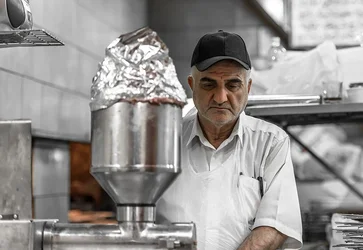
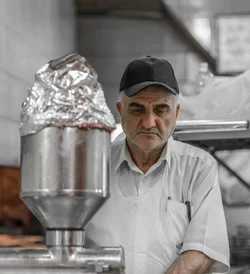
This gentleman was preparing food, but deep in thought, in one of the local restaurants. comments please.
 

Attachments

  • $ff_ND83642_20140208_people.webp
    $ff_ND83642_20140208_people.webp
    67.2 KB · Views: 197
  • $ff_ND83642_20140208_people_edit1.webp
    $ff_ND83642_20140208_people_edit1.webp
    61.7 KB · Views: 160
Last edited:
How old is "elderly"?
 
i was hoping to get some comments on the picture.:wink:
 
Warhorse just wants to make sure you are t calling him old.

For or the record Warhorse, you are not elderly.
 
for my taste the photo is cropped too tight with that bit of unnecessary space on the left. i would like to see the counter and hands in front of him.
He's not looking like he is in his thoughts, he looks like he was posing for you.

Anyway, that's jmho
 
for my taste the photo is cropped too tight with that bit of unnecessary space on the left. i would like to see the counter and hands in front of him.
He's not looking like he is in his thoughts, he looks like he was posing for you.

Anyway, that's jmho
^^ This ^^ I really wish you'd shot in portrait orientation - I think seeing what he's doing would have really helped this image.
 
no offense, warhorse. i don't know your age. but i am SURE that you not old or elderly.

elderly - definition of elderly by the Free Online Dictionary, Thesaurus and Encyclopedia.1. Being past middle age and approaching old age; rather old. See Usage Note at old.

2. Of, relating to, or characteristic of older persons or life in later years.


if middle age is 40, then i am elderly too. i am 52 and i have children aged 28 and 27. you can can call me old/elderly any time you want.

How old is "elderly"?
 
I agree with above, a vertical shot showing what hes doing with his hands would have been nice.
It's kinda busy to the left & top left corner and lower right corner, so cropping would be good.


FYI, your all elderly. I'm young at heart. :)
 
I agree with above, a vertical shot showing what hes doing with his hands would have been nice.
It's kinda busy to the left & top left corner and lower right corner, so cropping would be good.


FYI, your all elderly. I'm young at heart. :)

I agree, this shot just screams out, "SPIN the camera to TALL!!"

Don't "crop it", but instead frame it properly. The camera orientation MUST BE in accord with the subject's pose. This shot shows me a total, utter disconnect with one of the absolute first-level decisions that every shot demands when shooting with a 3:2 aspect ratio camera: how can I frame this shot here, to make sure I best use the available frame?

With today's 24- and 36-MP cameras, a guy or gal can frame loose, and crop later, yes. But when you frame the wrong way, and chop off the top of the head, or the hands, or chop off the chin, you are screwed.

I hate to sound harsh, but you have two good courses of action: 1-Shoot it right and shoot it tight. or, 2-Shoot loose, crop later.
 
I agree, this shot just screams out, "SPIN the camera to TALL!!"

Don't "crop it", but instead frame it properly. The camera orientation MUST BE in accord with the subject's pose. This shot shows me a total, utter disconnect with one of the absolute first-level decisions that every shot demands when shooting with a 3:2 aspect ratio camera: how can I frame this shot here, to make sure I best use the available frame?

With today's 24- and 36-MP cameras, a guy or gal can frame loose, and crop later, yes. But when you frame the wrong way, and chop off the top of the head, or the hands, or chop off the chin, you are screwed.

I hate to sound harsh, but you have two good courses of action: 1-Shoot it right and shoot it tight. or, 2-Shoot loose, crop later.

I do like it right and tight....but I can't find the "tall" setting on my camera.
 
pixmedic said:
I do like it right and tight....but I can't find the "tall" setting on my camera.

lol! Pix, you crack me up. But seriously, with the newer, high-megapixel cameras and great lenses that we have today, it's possible to shoot EVERYTHING "loose", and then crop-in at the computer, and still have a nice 10- to 16-megapixel, cropped image that looks perfectly acceptable.

Back in 2005 and 2006, I was shooting for a couple of local newspapers, and with the then-new 12.2 megapixel Nikon D2x, I found that, for the first time, I had basically ALL of the cropping room I would ever need for both newspaper reproduction and for the websites we had...and that was with a 12.2 MP 1.5x sensor. I went from a 2.7MP D1 and a 2.7 MP D1h to a 6MP Fuji d-slr, to the 12.2MP camera.

I've heard of a few wedding shooters who no longer use rotating flash brackets for on-camera flash stuff, and shoot everything horizontal and loose, then CROP to make "talls", as needed. it never used to be possible, but it is, today.

Now that we are in the web- and social-media era, and most shots are shown smallish,most of the time, shooting "loose" is okay. SAME THING with lenses...if you cannot afford a long fast telephoto, buy an 85mm f/1.8 prime lens, and shoot your shots with one of the BEST-performing, easiest-to-shoot, lightest, most-affordable telephoto lenses. Shoot "loose", but then crop-in on the computer into an image made with a really SHARP, contrasty 85mm lens that costs $400...not a $2,499 70-200 that's slower, 6x heavier, and so on. Buying a fast 50mm 1.8 and an 85/1.8 gets a person right into "fast glass" but with light weight and low price.

 
This image looks oversharpened or something. Something screwy going on with the edges.
Also, his face is super dark in the frame, which is not great. My eye is drawn to the out of focus funnel thing next to him, when it should be drawn to the subject of the portrait. Needs better lighting. That may involve waiting until he stand somewhere else where his face is lit, since a flahs is almost certainly inappropriate here.

At the very least dodge his face a lot to brighten it by comparison, and vignette the brighter stuff a bit.
 
This image looks oversharpened or something. Something screwy going on with the edges.
Also, his face is super dark in the frame, which is not great. My eye is drawn to the out of focus funnel thing next to him, when it should be drawn to the subject of the portrait. Needs better lighting. That may involve waiting until he stand somewhere else where his face is lit, since a flahs is almost certainly inappropriate here.

At the very least dodge his face a lot to brighten it by comparison, and vignette the brighter stuff a bit.

If one's sensor is up to the task, a simple solution is to go with the ages old negative film exposure method: "expose for the shadows, develop for the highlights." In other words, meter for his dimly-lit face, and then later in the "digital darkroom develop module" of Lightroom (or Adobe Camera RAW module, or Canon DPP, or Nikon Capture or RawTherapee, or whatever), pull the highlight areas back down, and presto! A much better image. One with good detail on the face, and a decent-looking appearance to the rest of the scene.

Of course, the above method involves either using A) + Exposure compensation or B) spot-metering or semi-spot metering on the face or C) Just using Manual exposure and ADDING more exposure than the meter says, like + 1.5.

ANother option is also, as Gavjenks mentioned, "dodging" the man's face. NO matter how it's arrived at, the guy's face just looks too dark for this picture...the rest of the kitchen looks pretty bright and well-lighted, and the dark face in that sea of light tones is just not working. Like Gav says, by comparison, the face is just not bright enough.
 

Create an account or login to comment

You must be a member in order to leave a comment

Create account

Create an account on our community. It's easy!

Log in

Already have an account? Log in here.

Back
Top Bottom