What's new

Adding someone or sometiing in Photoshop

milosmyth

TPF Noob!
Joined
Feb 12, 2007
Messages
18
Reaction score
1
Location
Dublin
Can others edit my Photos
Photos OK to edit
Hi All

Need help

I love taking pictures but I also like playing with them in Photoshop
One thing I like to do is add people or things to other photos

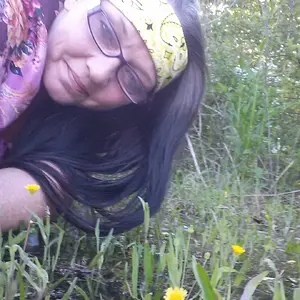
In the first pic below I have added the woman on the right
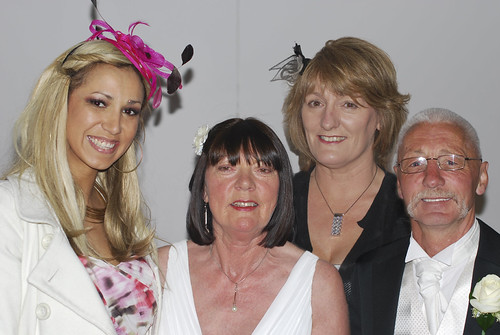

add 1 by milos5, on Flickr

And in this one its the "Tigger"
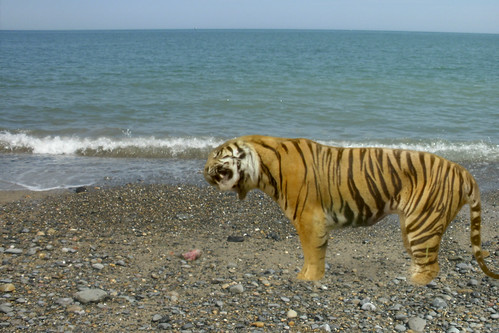

tigger at sea by milos5, on Flickr

But to my eye both additions look like they are "stuck" to the picture or "sitting on the pic"

Is there a way to fix this and not make the additions seem so obvious

Thanks all

Milo
 
The primary issue when adding subjects to other photos, or adding digital backgrounds to a subject, is that the lighting needs to match and you need to reproduce depth by adding shadows.
 
The first one is not bad at all. I would not have been able to tell you added her had you not said it. The second one... Well, as was said above you need to get the paws in there as well. Also, some drop shadows will help with the second one. However, the lighting is just not right in the second one. Maybe, once you get the paws in there, try burning in the tiger to get it to match the lighting of the background.
 
Just to simplify things
The problem is not so much as how to add shadow or lighting or fix paws.
The problem is to try to get rid of that that "Sitting on top of Picture" look

milo
 
Just to simplify things
The problem is not so much as how to add shadow or lighting or fix paws.
The problem is to try to get rid of that that "Sitting on top of Picture" look

milo
Fixing the shadows and lighting issues, will help a lot with the 'sitting on top' issue.
 
Yup, lighting.
 
Just to simplify things
The problem is not so much as how to add shadow or lighting or fix paws.
The problem is to try to get rid of that that "Sitting on top of Picture" look

milo

It looks like it is "Sitting on top of the Picture" because your mind is telling you that it is flat and does not belong there. You need to trick the mind, by matching the lighting and shadows that your mind expects to be there. They look out of place, so you need to make them look like they belong. It doesn't get any more simple than that.
 
The first one does look good, and I didn't notice that she had been added.
 
Just to simplify things
The problem is not so much as how to add shadow or lighting or fix paws.
The problem is to try to get rid of that that "Sitting on top of Picture" look

milo

That is the problem...
Because the lighting isn't the same it looks like a copy and paste job
 
and the best way to fix the lighting is ?????
 
There are a number of lighting options in Photoshop. I'm not in front of my Photoshop computer right now, but there should be a Lighting Effects Filter that could emulate light coming from a particular area, that kind of thing. That'd be one way to go. Also, by matching the general color and feel and hue through Color Balance, Curves Adjustment, color correction, contrast, etc., you can try and more easily match the look, color, lighting, and feel. Now, I don't substitute animals into other photos very often, but these would be some of the first things that I would look at personally. Perhaps someone who does it often can jump in here too, but something tells me I'm not too far off.
 
and the best way to fix the lighting is ?????

I don't think anyone went into detail because you stated "The problem is not so much as how to add shadow or lighting.."

You need to look at how the light falls on the original subjects, you then need to recreate this on the additional subject. You need to do the same with shadowing too. As an example.. Look at the light on the faces, they do not match. Also, look at the shadow from subject #1's hat, and the shadow from below subject #2's flower, and below subject #3's ear. There should be a shadow below the additional subjects' hairpiece.
 
I would say if you wanted to fix the lighting it would take years and years of photoshop experience. I might even venture to say it might not be possible.
Regardless it's not really worth doing on these particular photos. You will never recoup the money from time lost "fixing" the lighting.
 

Create an account or login to comment

You must be a member in order to leave a comment

Create account

Create an account on our community. It's easy!

Log in

Already have an account? Log in here.

New Topics

Back
Top Bottom