What's new

american gothic family

allison_dcp

TPF Noob!
Joined
Jun 14, 2012
Messages
274
Reaction score
25
Location
Ohio
Can others edit my Photos
Photos OK to edit
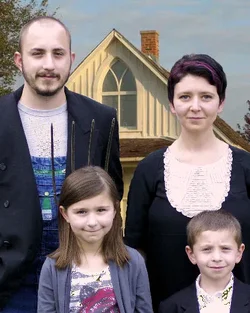
This was taken last year with my point and shoot(wish I had my SLR then) for my sister and her family. She wanted to simulate American Gothic, I just thought I'd take it a step further. I think its pretty cool, but I cant figure out why its so darn pixilated. It doesnt look like this until I copy and past the family onto the pic of the house, then re-size it. Suggestions?
$full-housesmith.webp
http://images.mpix.com/0/13/000/6261319/full-housesmith2.jpglargethumb.jpg
 
not the best cut and paste job. The pitch fork is growing out of the daughter's back.
Like the idea. Execution wasn't so hot.
 
I agree with you MLeek. This was before I started actually trying to take good pictures. How could I make the cut and paste job better?
 
It'll be difficult to make a perfect cut and paste job on a composite like this because the lighting in the original painting and the lighting on your subjects are different. Therefore, however neatly you cut it the harsh difference between the two will reveal itself at the edges of your subjects.

There could also be a resolution discrepency between your photo and the painting file which will affect its realism.

I like the idea though, but you need to find a way to execute it a bit better. Find a high resolution version of the painting and try to light your subjects in a way that matches the light the painter tried to achieve.

For example, you can see on the barn that the "sun" was camera right and low - probably at the end of the day. That shadows are quite long even on the narrow gable of the barn. Try to light your subjects in the same was so their shadows match those of the painting and you'll be on your way to creating a more realistic composite. :)
 
It's posterized rather than pixilated. Make sure you promote both images to 16-bit color. If the background image was a GIF or BMP or other format with 8-bit color or with a limited palette then the overlay, the people, would have been forced into that palette causing posterization.
 
To cut out the photo, use a mask and feather the edges slightly. I use CS5 and in the Refine Mask panel there are controls for radius, smooth, feather, etc. I cut out a lot of photos for 2.5D and love this panel. I made a few faux mag covers and added people into movie scenes working on very low rez photos and found that adding adjustment clipping layers for curves or levels to even out the foreground photo helps. Masks are good on the faces and arms to get the skin tone to match if the BG photo has a person that you want to match too. Also throw a color filter adjustment over the whole thing.

Love the creative idea on an American Gothic family!
 
Love the concept, creative and fun.
 

Create an account or login to comment

You must be a member in order to leave a comment

Create account

Create an account on our community. It's easy!

Log in

Already have an account? Log in here.

New Topics

Back
Top Bottom