What's new

Another photo for C+C! :D

lepierce3

TPF Noob!
Joined
Oct 6, 2011
Messages
50
Reaction score
3
Location
Texas
Can others edit my Photos
Photos OK to edit
Hope I'm not getting on anyone's nerves yet, but I have some more questions lol.

Ok well, I was attempting to use my new understanding of aperture to take some more practice photo's of my sister. I used her room as the backdrop this time because I love the bright colors she's got going on in there, and she has a huge window that lets lots of light in. The room seemed to be lit very well, and I only used the natural light. So I used an aperture of between 4-5 something (I kept switching it trying to get ok results, but I still wanted a kinda blurred out background. I used an iso of 400, and then the shutter speed set itself because I was shooting in aperture priority mode.

So my problem comes with the fact that even with (what I thought was) good lighting, everything kept coming out blurry. The shutter speed kept setting itself really long (like 1/6), and I feel that was the problem, but I couldn't change it. I didnt want to bring up the iso either because I get terrible grain otherwise.

So what should I have done in order to get nice sharp results? I feel like that's one of my biggest problems, I just cant get sharp portraits no matter what I do. Do you think there's a possibility it's my camera? I'm using an Olympus E-300 with a 14-45mm 3.5-5.6 lens. I also have a 18-180mm 3.5-6.3 lens which I tried once but still got blurry results.

Is there anything I can do to fix this problem, or am I pretty much screwed until I can afford a new camera?


This was the sharpest image I got, and I still feel it's a little blurry. I even focused on her eyes :(

PB046524.jpg
 
Do you have it on manual mode? It sounds like one the shutter setting is set on auto.
 
Hope I'm not getting on anyone's nerves yet, but I have some more questions lol.

Ok well, I was attempting to use my new understanding of aperture to take some more practice photo's of my sister. I used her room as the backdrop this time because I love the bright colors she's got going on in there, and she has a huge window that lets lots of light in. The room seemed to be lit very well, and I only used the natural light. So I used an aperture of between 4-5 something (I kept switching it trying to get ok results, but I still wanted a kinda blurred out background. I used an iso of 400, and then the shutter speed set itself because I was shooting in aperture priority mode.

So my problem comes with the fact that even with (what I thought was) good lighting, everything kept coming out blurry. The shutter speed kept setting itself really long (like 1/6), and I feel that was the problem, but I couldn't change it. I didnt want to bring up the iso either because I get terrible grain otherwise.

So what should I have done in order to get nice sharp results? I feel like that's one of my biggest problems, I just cant get sharp portraits no matter what I do. Do you think there's a possibility it's my camera? I'm using an Olympus E-300 with a 14-45mm 3.5-5.6 lens. I also have a 18-180mm 3.5-6.3 lens which I tried once but still got blurry results.

Is there anything I can do to fix this problem, or am I pretty much screwed until I can afford a new camera?


This was the sharpest image I got, and I still feel it's a little blurry. I even focused on her eyes :(

PB046524.jpg


You need to either bump up the ISO or use a larger aperture. A larger aperture might not produce a sharp photo though. A shutter speed 1/6 is WAY too slow for a handheld photo (assuming its handheld). You need a fast shutter speed if you want a sharp photo. The rule is usually to keep your shutter speed 2x the focal length. If you are using a 50mm lens then you would want a shutter speed of 100. Lighting inside usually isn't the best. When I take photos of my daughter inside (I don't have many windows) I bump up the ISO, use an aperture of f/2.2-3.5 and I keep my shutter speed as fast as I can. Grain, for the most part, can be taken care of in post processing.

While inside try using shutter priority. Set your shutter speed for what you want and see what the camera does with the rest of the settings.
 
Well, this is probablly going to sound really dumb lol, but I accidentally set the exposure compensation all the way to the left, so all my images on manual mode turn out pretty much black. I've played with the camera, read the manual, and read online, but I can't seem to select the exposure compensation again so that I can change it back...I press the button thats supposed to select it and it doesn't, then I tried going into the menu but the option is greyed out so I can't select it...I even tried using the 'reset' button which seemed to change everything back to auto except for the exposure compensation which still stayed the same! Arg!
 
Thats weird. Exposure compensation should still come into play in aperture and shutter priority, or it does in my camera at least. I don't really know too much but I would think that you could compensate for it. When you adjust your exposure in manual just overexpose it a little. I don't get why all your pictures would come out black though - I mean negative exposure compensation would underexpose it slightly but it shouldn't turn it completely black.
 
Have you tried changing your exposure compensation in aperture mode? I looked it up and your camera works like mine. You press the +/- button and use the wheel to adjust the exposure compensation - sound right? Well, in manual mode when you press that +/- button and spin the wheel it will change your aperture instead of the exposure compensation. You've probably already tried this but I figured I'd mention it...
 
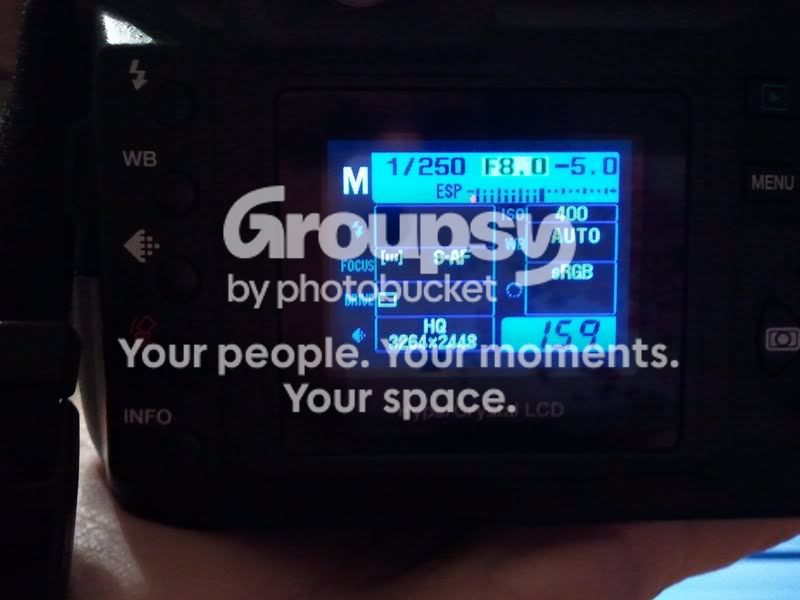
Yeah...I don't know why it's doing that...It doesnt look like it's set to anything, but then I take a picture and suddenly it looks like this:

mail.jpg


And the image has turned out almost completely black :/
 
yeah it looks like its set to -5? If you take it out of manual mode (put it in shutter or aperture or program) does it still show the -5?
 
In shutter it doesnt say -5, but the images still come out kinda dark (but the camera will let me select the exposure comp button, so if it -were- at -5, I could at least change it). I've been using Aperture mode because those come out normal, and the exposure comp isn't set to -5.

I'm starting to think my camera is just possessed haha.
 
If you can change the exposure compensation in shutter it should automatically change in manual mode. At least that is how my camera works and thats what I've gathered from the stuff I just read about your camera. Thats a little odd. Try playing with +/- exposure compensation button in shutter priority and make it go to +1 then check manual mode and see what it says. It should change it. Thats really strange that you can't change the exposure compensation through the menu. Hmmmm..... You could still use manual mode with it stuck on -5 just add 5 stops overexposure!
 
How would I do that? :O

And yeah, I just tried changing it in the another mode, but it didnt seem to make a difference. The other modes work right, but in manual mode it's just stuck! :(
 
Do you know how to shoot in manual mode? You know how to change aperture and shutter until you get a correct exposure?

Thats really weird that you can change it in every mode but manual.


So, I edited your photo. I can't do much since I'm not at home and there is no editing program on this laptop but..I did sharpen it slightly and I think it made a difference.
 
Investigate the Exposure triangle. Also, don't expect to get a blurred out background with your subject directly in front of the background. The 'blurred out background' is Depth of Field, which is another thing you should investigate. As for your shutter, 1/6 is REALLY SLOW, which is probably why the image isn't sharp. Increase your ISO and try to get at the very least a 1/100. Have you read your camera manual? If not, read it cover to cover, several times. Also, check out this blog (How Do I Use My Digital SLR?), you will benefit from it. Also, buy this book if at all possible: http://www.amazon.com/Understanding...00&sr=8-1]Understanding Exposure 3rd Edition


Good luck!
 

Create an account or login to comment

You must be a member in order to leave a comment

Create account

Create an account on our community. It's easy!

Log in

Already have an account? Log in here.

Back
Top Bottom