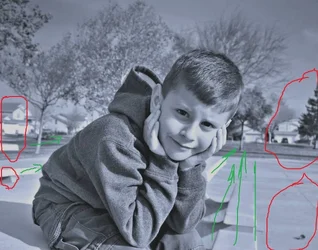
Ahh... didn't think it was vignette because it was just in that corner, rather than all edges of the photo.
A snapshot looks like a photo that was just taken at random with no thought to composition, lighting, etc. Look on facebook and most all children's photos uploaded by their parents - those are snapshots.
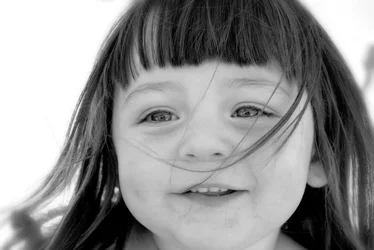
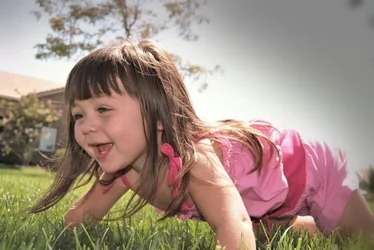
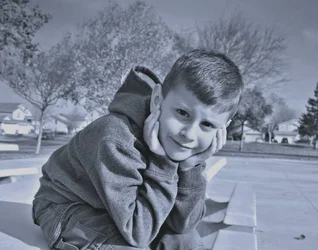
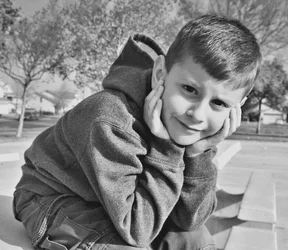
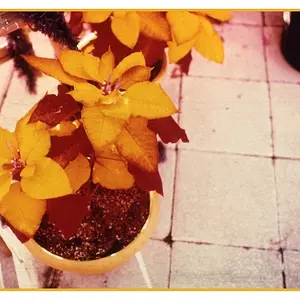
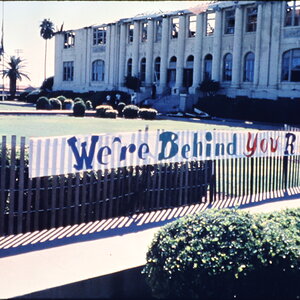
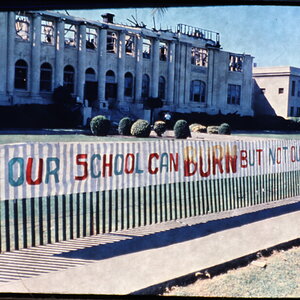
Look at the differences here between these 4 photos. 1 and 4 do not look like snapshots (I just saw that I originally said #1 looks like a snapshot but that was incorrectly typed). In both 1 and 4 you have the subject posing and it seems as if you had a vision for what you wanted and how the frame should be composed. #3 is a pretty good example of what you should do in certain situations that COULD look like snapshots if you do not isolate the subject in a proper frame composition. There was probably madness going on around the subject, distracting background or whatnot.. you zoomed in tight and isolated the face of the subject. Well done on that part.
If I am outside with my dog and she just looks up at me and I snap a quick picture without regard to frame composition, background, lighting, etc - that's a snapshot. However, if I put her in a specific spot and make her sit or lie down and look cute, whatever.. that's a photo. I am NOT saying that you capturing a random moment is always a snapshot.. that's certainly not the case. As you learn and you grow you'll be able to turn those "snapshot moments" into beautiful pictures by knowing how to compose the frame in that moment. Sometimes there's just no photo to be had. Other times you just haven't seized the moment to compose the frame creatively.
Pick up a copy of "Learning to See Creatively" (latest edition). This will help you see ways that you can compose your frame and it will help train your eye to...well... see creatively. It helped me immensely when I started out and I still go back and review that book from time to time. You'll also learn to see things in your frame that you may not be seeing right now. Such as in #3 you have that cute subject with a tree growing out of her head. That's another thing you should avoid in portraits - distracting backgrounds and anything coming out of someone's head. Trust me when I say that it will be frustrating as hell trying to keep all of this in mind when you're shooting but it WILL become natural with practice and study.
A few things to look out for when composing your shots:
- Distracting, overpowering backgrounds. Remember, your SUBJECT should be the main focus - not what is going on around or behind the subject. Creative situations are exempt of course.
- Hands in pockets
- Sunglasses (the eyes are almost ALWAYS the main focus in a portrait - some creative conditions do not apply this rule though, such as a subject looking down at a grave, looking up at someone else, etc).
- Subject's feet - socks and shoes or nothing at all. It's kind of like doing the deed with just your socks on.. lol
- Dirty fingernails and/or hands
- Items in pant's pockets (cell phones, cigarette packs, etc). These items draw too much attention in a portrait when they are bulging out of pockets.
- Clipping fingers/toes and limbs. Your subject will literally look like an amputee in some situations like this.
Those are just a few things to look out for when composing your shots. Keep in mind that no rule in photography is 100% applicable for every shot. As you grow and learn you will know when you can get away with bending or ignoring a rule completely and still produce a quality shot.
You're in the right place. TFP is an amazing resource for learning so stick around and keep on shooting










![[No title]](/data/xfmg/thumbnail/38/38261-db20f6f92ee8f0d4c5cf1536e308638b.jpg?1734172147)
![[No title]](/data/xfmg/thumbnail/35/35262-02f8eba4a2a92dbae0b55547bba80b4f.jpg?1734166920)
![[No title]](/data/xfmg/thumbnail/35/35263-86f580cf5d28d23109a45984030a79ad.jpg?1734166920)
![[No title]](/data/xfmg/thumbnail/42/42280-60cc6d4893a2f440eac7dd2248e733a9.jpg?1734176695)
![[No title]](/data/xfmg/thumbnail/42/42268-15c1c02cec1d71208987fc7c7ec7784c.jpg?1734176663)
![[No title]](/data/xfmg/thumbnail/31/31012-f5e0c7cdea2f2c3e44737e3f61c2461a.jpg?1734159086)

![[No title]](/data/xfmg/thumbnail/38/38262-10a9668da9a2b36a92cddde57caf87bc.jpg?1734172150)