What's new

BEGINNER please be nice, but would love your honest input

Jhazard

TPF Noob!
Joined
Jun 23, 2014
Messages
22
Reaction score
1
Location
Robert lee texas
Can others edit my Photos
Photos OK to edit
So i am totally new to everything photography related! bought my first camera after having my baby girl and had already spent $300 on professional pictures and she wasn't even 3 months old yet! originally i just wanted the camera to capture my own little one, but the more i read about photography and the more photos i see, the more i want to learn and expand.

ive been looking through the forum and keep seeing these amazing pictures, followed by tons of suggestions to make them better, and honestly feeling a little overwhelmed. where did everyone start when they were beginners, what are some suggestions to help me get started?

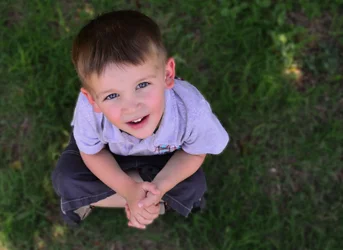
also i have photoshop but i am still learning to use it, the photo of the little boy i blured the background in but my edges are not very smooth, it was done on a laptop, any suggestions on how to get a smoother line?

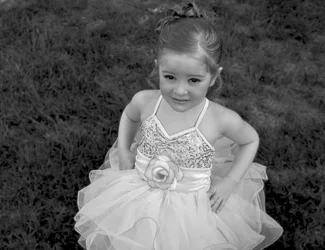
the picture of the girl in the tutu looks very harsh to me, she had a TON of makeup on, and i didnt know how to soften it.
 

Attachments

  • $048edit.webp
    $048edit.webp
    1.1 MB · Views: 210
  • $086bw.webp
    $086bw.webp
    623.8 KB · Views: 207
  • $035edit.webp
    $035edit.webp
    538.9 KB · Views: 198
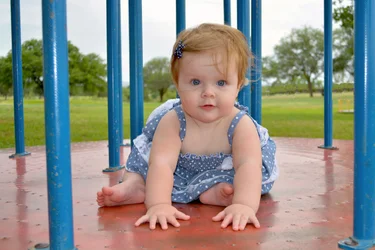
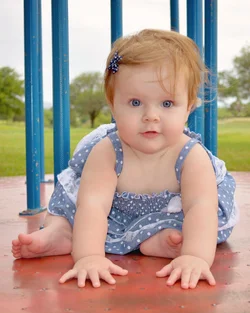
i also wonder if there is an easy way to edit the truck out of the background in the first picture, its very distracting
 
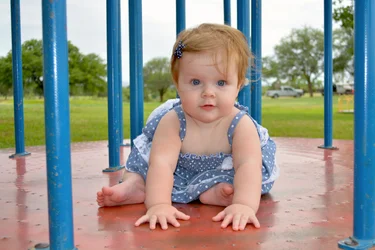
For a beginner, you did not do a sloppy job indeed...for the first shot, the baby indeed very beautiful...If this is mine it will be nice to have a little bit of space at the head of the child, just a bit. I will not worry about the background at this stage. Learn composition first. The little boy has the same cramp crop too... I didn't like the black and white in the middle. With children you have to be quick about shooting (pressing your shutter button), you entertain them with toys and talk to them and make them laugh. When you see a good pose, shoot.

For a starter, learn about exposure triangle. The rest will come easier later on.
 
#1 is pretty good, although her feet poking out are something of a (minor) distraction.
#2 camera position is too high, and you cropped her skirt. When the camera is way higher than the child, you get that "looking up" thing, and then she is squinting from the skylight. As to softening the makeup in post, I don't think I would even worry about that. It is her performance makeup, so leave it as is. You shouldn't think that you can fix everything in post. Get it right in the camera, and your editing will just be a matter of checking white balance, straighten, and crop.
#3 Pretty much the same, except that sometimes you do this on purpose. (I assume you did ?) I can't help with Photoshop, but if you want to have a shallow depth of field, use a wider aperture. But then his arms might be OOF as well, so be sure of what you intend. #3 probably should have been framed vertically.
 
As a general tip, I find pictures of children are usually better when taken from their level. Crouch down and shoot away. (this is putting a finer point on one of designer's comments).

As a starting set of pictures from a total noob, these are quite good. You could have done way worse.

Paigew is someone you want to hear from on shooting kids, btw. You might want to PM her. She's amazing and very sweet and helpful.
 
All three of these would have been better frames as "talls". Like the truck in the background? One, single step to the right, and the camera spun to "portrait" mode, so that the subject (both the child and the blue vertical poles) were in agreement with the camera's frame orientation...presto! no need to remove the truck in software.

Same with the little girl with the heavy makeup...a "tall" framing would have helped. The little boy, looking upwards? Now THAT is a perfect example of where you DO want to be above a small child!!! I find the patch of dead grass or whatever distracting, and think that would make a good square format shot.

My suggestion is this: look through the camera, and look allllllllllllllllllllllll the way around the subject, at the edges of the frame, and do a quick mental evaluation, and ask yourself if there is stuff that needs to "go", or not. Ask yourself if the subject is too close to the top of the frame, like the little girl with the makeup on...her head is touching the top of the frame..because the camera was held in "landscape" mode. This idea, of scanning the frame's outer regions, of literally FORCING yourself to LOOK, either in a counter-clockwise direction, or clockwise, for each composition, is the way to get better compositions. Within three weeks you will be making, not "taking", but making, better compositions.

Once you figure out what needs to be LEFT OUT, and what needs to be included, then you can come up with a 'composition', and from there, work on getting that composition captured with the right moment, the right expression, the right gesture. You can take 10 or 15 frames of the same,exact composition, and if the gesture is right, it'll be a winner. But, as a beginner, you need to learn how to separate the wheat from the chaff, before grinding the wheat into flour, or the bread's gonna be awful.
 
BEGINNER please be nice, but would love your honest input

Being nice and being honest have little to do with one another when critiquing your photos. You have set limitations on possible comments of them. I tended to learn more from scrapes and bruises, but that's me, possibly not you.
 
Aside from forums, check out the YouTube channel for AdoramaTV. They have tutorials for beginners to advanced and cover everything you'd want to know.
 
I like to shoot with a really wide aperture so that things like the truck are really out of focus to begin with. I think these are really good for a beginner. Keep reading the forum and practicing and it will all come together with time.
 
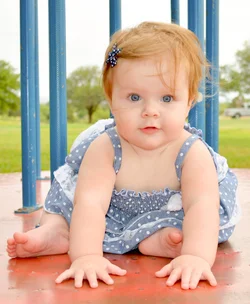
Thanks for all the helpful comments! And thank you The_Traveler for editing the photo
 
Aside from forums, check out the YouTube channel for AdoramaTV. They have tutorials for beginners to advanced and cover everything you'd want to know.

The best thing about Adorama TV??? The presenters work from pre-written scripts, so they ALWAYS know where their demonstrations and lessons are going; their video is always sharp and clear, with good audio; they never-ever-eeeeever tell you how to do something then realize they have made a mistake, and then backtrack and tell you to "disregard that last set of six steps and instead do ________." No, there is none of that kind of tiresome, unhelpful BS from Adorama TV. If they make a mistake, they RE-SHOOT the video and do their demo RIGHT.

Annnnd, as if that were not enough....they actually KNOW how to produce educational videos which, unlike a LOT of YouTube videos, are not simply some random guy, spouting off a week's worth of recent knowledge he just got off of the internetz.... No, Adorama TV's videos are actually worth watching, and will really teach you stuff. FOR FREE. No lesson plans, no poayment plan, no monthly membership fee, no recurring credit card or debit card charges.
 
I had no idea AdoramaTV was a thing. Sounds very cool. I wish I had it around 10 years ago.
 
$048edit1.webpI had a go too. altered the bulls eye catchlights, warmed it a TAD, got rid of truck, got rid of stray hairs on cheek, cropped...
 

Create an account or login to comment

You must be a member in order to leave a comment

Create account

Create an account on our community. It's easy!

Log in

Already have an account? Log in here.

Back
Top Bottom