What's new

Big Ol' Tree

William Baroo

No longer a newbie, moving up!
Joined
Aug 30, 2023
Messages
255
Reaction score
34
Location
FL
Can others edit my Photos
Photos OK to edit
Today I did a photo walk around the farm, with very little time because the light was dying. I used an A6700 and a Sigma 18-50mm. Just trying to learn to use the camera and also trying to improve my problems shooting in bad light.

I took a shot that surprised me. I thought it would come out awful and boring, but I needed to take pictures to get used to the camera, so I pushed the button. It looked pretty bad until I edited it, and then all sorts of colors popped out. I am not sure how to crop it, because I cropped it more than once, and every crop seems to have something the others do not. It's almost a subjectless photo, but I enjoy looking at it anyway.

It's just a shot up into a tree. Tell me how it could be made better. Is there a way to get the details of the bark to show up? The tree will be out there every day so I can keep trying.

DSC00063_DxO crop 2.webp
 
I'm a newbie using the free program Rawtherapee, but I tried to do what you wanted. Others could do much better than me for sure. I activated "Dynamic Range Compression", "Tone Mapping", and made tweaks in "LAB Adjustments". Also tweaked "Lightness", "Contrast" and "Saturation". I don't know what I am doing, but just get in there and move the sliders around until it looks better. :laughing:

TreeSwampFix.webp
 
That's a really interesting edit!
 
I've tried to watch a few Rawtherapee tutorials, but they haven't helped me much. I have a lot to learn.
First thing I do is click on the white triangle to see if it is overexposed, and adjust "compensation" till blacked out parts disappear. Then play with "Lightness", "Contrast", and "Saturation". The other stuff I don't know much about yet. Be careful not to add to much saturation as that is a common mistake you regret later. You can download Rawtherapee as it is free. Good luck!
 
Until you edited it, I didn't realize there was that much information on the dark side of the tree.

I'm using Photolab9. Today I tried to lighten things up. I tried to select the trunk and branches using an AI mask, but the mask covers way too much. It covers all of the fine branches near the top, so if I mess with it, the color of the sky coming through will be ruined. I have been trying to find a way to refine the mask so it won't cover the spaces between branches.

I have created one new version so far. I may have overdone it.

DSC00063_DxO crop 2_DxO crop 2 light.webp
 
I am not sure how to crop it, because I cropped it more than once, and every crop seems to have something the others do not. It's almost a subjectless photo,
By virtue of it's strong lines I'd say the tree was your subject. As such everything else in the image should support it.

It's just a shot up into a tree. Tell me how it could be made better. Is there a way to get the details of the bark to show up? The tree will be out there every day so I can keep trying.
1. White Balance is way off. First off what ever monitor you are using to edit on needs to be calibrated, so you know that what you see on it is what others will see online.
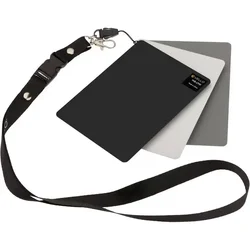
2. Get in t1767383514884.webphe habit of carrying a White balance target (less than $20). Each time you're in different light, hold it out and shoot a shot.
3. In Photolab 9, Using the Dropper Tool (Quick Fix)Go to the Color tab in the Edit workspace.
  1. Find the White Balance section, which defaults to "As Shot".
  2. Select the WB Color Picker tool (eyedropper).
  3. Click on a neutral gray or white area in your photo (like a white shirt, cloud, or gray card).
  4. PhotoLab will automatically adjust the white balance to neutralize that are
4. Once your eyes learn to distinguish the temperature of light in the field then the check cards won't be as important, and you'll be able to pick out sections to use to set the WB
5. Unlike your eyes, Cameras have a limited dynamic range (the tonal range distance between the darkest dark and the lightest light). Because of that I a scene like this you have a choice of blowing the sky or the shadows being to dark. With one shot you can expose for the Highlight and raise the shadows post (note when you raise the shadows you also increase any noise present in the shadows). The better option is to bracket your exposure over/under and combine the images post.
6. Editing ideally should be done on the raw file not a JPEG and definitely not a WepP image from TPF. As others have shown you get some really funky looking images/color. If you want others to edit your image the best option is to upload the full resolution image to a sharing site, and post the link in your post.

Have fun!!
 
Thanks for the help.

RE white balance, if I understand you correctly, you are saying to set it before I take the shot, not to try to fix it in Photolab. I changed the temperature of this shot a little when I edited it, but I made no effort to deal with white balance when I was shooting.
 
Thanks for the help.

RE white balance, if I understand you correctly, you are saying to set it before I take the shot, not to try to fix it in Photolab. I changed the temperature of this shot a little when I edited it, but I made no effort to deal with white balance when I was shooting.
No shooting the target is merely a "KNOWN" value to use later in editing. Leave your camera on auto WB, and follow the steps to correct in PL9 (above post). Also I can't emphasis enough that UNLESS you are editing on a calibrated monitor, when you post your image others may or may not see the same thing you see.
 
I think I get it now. RE calibration, I am trying to figure out whether I should get rid of my 2019 TCL TV and get an LG instead. I believe I can get this old TV calibrated for editing, but I am not sure what is best.
 
I think I get it now. RE calibration, I am trying to figure out whether I should get rid of my 2019 TCL TV and get an LG instead. I believe I can get this old TV calibrated for editing, but I am not sure what is best.
Devices worldwide use the color space sRGB standard. All devices overtime lose the ability to display colors properly and luminance. I calibrate my monitor ar least monthly and sometimes more, in a dedicated space with the same lighting.

While you maybe able to calibrate it with specific software designed for detailed adjustments to grayscale, gamma, and color gamut, but its a whole lot easier with a monitor. You can find a suitable one in the $200 range.
 
I guess I'm spoiled, but I have a 65" TV in the living room, and I use it for most PC jobs. I sit in a nice recliner. I haven't used a real monitor in years.
 
I ordered a white balance card, I read that the inside of a Sony lens cap also has a good reliable gray, and I checked into calibrating my TV.

I read that my phone model has a very accurate display, so I calibrated the TV to match it. I found out the TV was increasing the saturation and brightness a little, so it may be that my photos looked slightly richer and brighter when I was editing them than they do to people who see them here.

I don't know how good the calibration has to be. If I can't see a difference between the TV and phone, maybe it's all right now.

I don't know if a new TV is warranted or not, but at least I'm in the process of fixing things.
 
don't know how good the calibration has to be. If I can't see a difference between the TV and phone, maybe it's all right now.
Actually this is a good way to check. After editing I upload to Flickr as a sharing site. I then randomly check the images there using my phone and tablet.
 
I picked up a new TV, and my hope is that I will be able to go back and forth between editing settings and watching settings a lot faster than I did with the old one.
 
I shot the tree again today and got a somewhat better exposure, but once I saw what the near side of the tree could look like in photos, I decided I should go out again, zoom in with a bigger camera, and see if I can get a detailed, colorful shot of the near side. I'll do it tomorrow unless something comes up. I can upload a crop from today's shot to give the general idea.

I need to do it before the red leaves drop off the other tree.

What would be a better lens for trying to get the tighter shot? Sigma 105 mm or Sigma 24-70 mm?

A6700176j_DxO wide 700.webp
 
Last edited:

Create an account or login to comment

You must be a member in order to leave a comment

Create account

Create an account on our community. It's easy!

Log in

Already have an account? Log in here.

Back
Top Bottom