What's new

Bird on the Bay - Please Critique

RyanMucha

TPF Noob!
Joined
Jul 6, 2012
Messages
7
Reaction score
3
Can others edit my Photos
Photos OK to edit
$PhotoForumCritique.webp
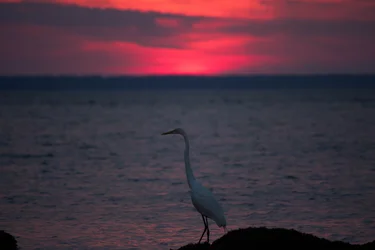
This is a photo I took when I was on vacation in Amagansett, New York. I saw the oppurtunity for the shot and climbed over some rocks to get the shot before the sun went down. I would love it if you could take the time to critique my work. Tell me what I could be doing better. Thanks!
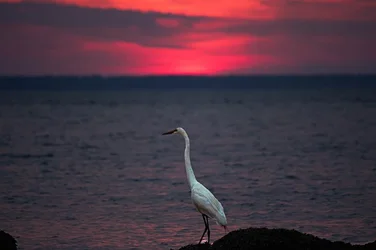
 
nice sunset.. but the bird is severely underexposed. It might work better as a silhouette, but it is debatable. Flash is almost always a good idea in shots like this, if you want the subject exposed properly.

You don't have EDIT or DON'T edit selected in your profile, so I took the liberty of doing some PP to the shot to see what it would look like... if you don't want your stuff edited, let me know, I will take it down. It was so underexposed, it was hard to keep much detail, or bring it up to the correct white levels.. but I tried. Let me know what you think.

$PhotoForumCritique.webp

Subject is also pretty centered. I started to crop it also, using the rule of thirds.. but decided not to since I don't even know if I should be posting edited images...
 
Last edited:
I did some editing and think that I got a better result. If you could give me any tips on further editing that would be great. By the way your edit looks great.

PhotoForumCritique | Flickr - Photo Sharing!

The main issue with your edit.. is that the bird is not white, it is Cyan! That is common with underexposed subjects... and you have to correct for it. You did get the brightness adjusted, now just color correct it. :)
 
Sorry for asking this but how would I go about doing that?
 
Lightroom 4
 
Lightroom 4

I use PS for all of my editing... I use LR4 primarily for cataloging my photos....

I believe LR can do some basic color balancing.. but I will have to check it after I get home. Don't have LR at work! :)
 
Subject is also pretty centered. I started to crop it also, using the rule of thirds.. but decided not to since I don't even know if I should be posting edited images...

Subject is in bottom third :mrgreen:
 
Subject is also pretty centered. I started to crop it also, using the rule of thirds.. but decided not to since I don't even know if I should be posting edited images...

Subject is in bottom third :mrgreen:

True.. but I think putting it on a power point (ROTS intersection) would be far superior! Don't you? :)
 

Create an account or login to comment

You must be a member in order to leave a comment

Create account

Create an account on our community. It's easy!

Log in

Already have an account? Log in here.

Back
Top Bottom