What's new

blowin' in the wind

lisa_13

TPF Noob!
Joined
Apr 13, 2008
Messages
240
Reaction score
1
Location
Boston, MA
Can others edit my Photos
Photos NOT OK to edit
a few more edits from a recent photoshoot of my friend meg
C&C appreciated

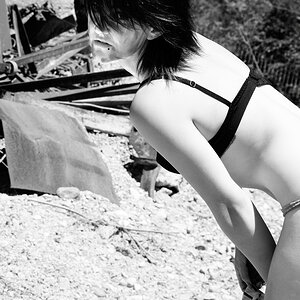
1)
3006049233_98ff82d7a8.jpg


2)
3006049131_e40f4ab894.jpg

i wish i hadn't cut her foot off on this.

3)
3006884986_5acc69baf9.jpg


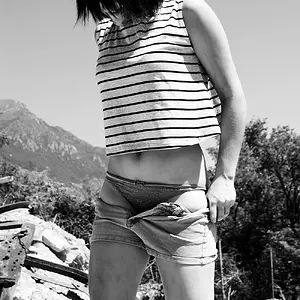
and one that meg took of me...
n1095180126_30121078_7674.jpg
 
Some nice work, C&C per req:

1. A nice casual pose, good expression, but the hair over her right eye is very distracting.

2. Another really nice, happy expression, agree it would have been better with the foot. Addtionally, I'd like to see a little more space image right. She looks like she's about one step from walking out of the image.

3. A little mid-tone rich, and again you have the subject posed too close to the edge. Ideally, we'd like to see her looking into the image, rather than out of it. I would suggest having her posed on the other side of the frame, or looking to her left.

Overall, you've got some really good ideas and your work is technically sound, but with room for improvement in posing and composition. Looking forward to seeing more.

Just my $00.02 worth - your mileage may vary.

~John
 
1.:thumbup:

2. & 3. I'm not crazy about the composition.

4. Too smooth.

My 2 cents worth, also.
 
Why is it when some people give CC they refer to themselves as "we".

While I find that the images are a little too "gray".

Girl looking out of the picture in 3 works really well. In MY opinion.

Just sayin.
 
Yeah... Agree (for the first time ever) with Bace. I like three's composition, and that makes it my favourite.
 
You say it like I'm never right?

Shame. (p.s. thanks :)...i think)

One more thing, what are you using to convert to B+W? Desaturation? Grayscale?
 
black and white conversion layer in PS
thanks for all the feedback!
 
I love the spirit of the model in #2 and the composition of #3. Beautiful girls, both of you. : )
 
black and white conversion layer in PS
thanks for all the feedback!

You might wanna try a Channel Mixer Layer. Check off Monochrome and play with the color sliders till you get the look you like.

As mentioned the images you've posted are great just a little to much gray.

Let us know how it goes!
 

Create an account or login to comment

You must be a member in order to leave a comment

Create account

Create an account on our community. It's easy!

Log in

Already have an account? Log in here.

Back
Top Bottom