What's new

Born Again Warbird C&C is welcome

seakritter

TPF Noob!
Joined
Aug 10, 2012
Messages
347
Reaction score
23
Location
North Florida
Can others edit my Photos
Photos NOT OK to edit
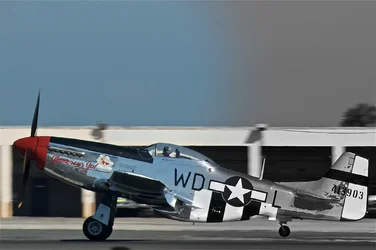
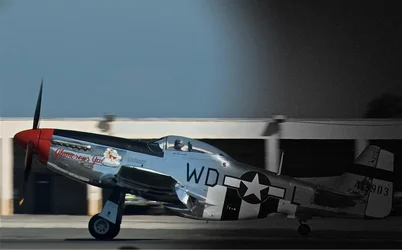
I was play with some Air Show shots and I set out to make a B&W of this P51. I then thought "yawn" it would have been another B&W of a Chrome plane, which would have been ok. I then had and idea, what if it was like he was rolling out of the past into the present " Born Again" if you will. I hope you like it , please let me know what you think.
 

Attachments

  • $image-938375370.webp
    $image-938375370.webp
    104.1 KB · Views: 165
Terrible edit. It looks like all you did was ad a gradient. If you want it to go to bw then color redo it. It wil be real easy in PS if you have a basic background with it
 
You've explained your concept well enough, but I don't get that from this shot. I don't care for the gradient as it is applied. I think you should keep fiddling with this.

What all is in the original shot? Do you have more space in front of the plane? Perhaps if you did something to tone down the garages in back it would help the plane stand out from the background.
 
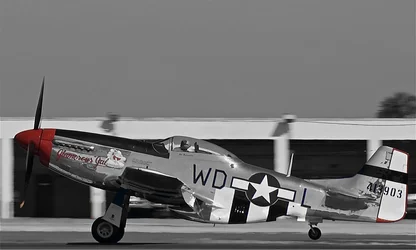
It's not a gradient , this was done with layers, and masks, I have no prob with being able to create B&W, with or without PS, I have a B&W of this one Just seemed Bit more boring. In one ver I didn't add the noise and a vignette to the B&W side. I'll attach it here. The point was not to create a simple B&W but use it for the effect of showing the plane move from the past to the present.
 

Attachments

  • $image-1589193524.webp
    $image-1589193524.webp
    66.8 KB · Views: 141
I know this will bring the heat, I also did a Spot color ( Oh No don't do it, lol) that is IMO nice, but I dare not show it here the for fear the Photo Gods will Strike me dead, lol
 
I think you need to increase the saturation continuously from one end of the plane to the other for this idea to really be effective. Or something. Maybe make the line between past and present more distinct? Anything but what you have now ;)

The second edit looks better than the first.
 
I think what bothers me the most when looking at this, is that the sky just looks like there is a thunderstorm brewing - and thats what I notice first. I don't see the plane until afterwards.

Can you try a different crop so that there is less sky and more plane?
 
amolitor said:
I think you need to increase the saturation continuously from one end of the plane to the other for this idea to really be effective. Or something. Maybe make the line between past and present more distinct? Anything but what you have now ;)

The second edit looks better than the first.

That's something I'll try I could increase the sat rate on the color side, I used a pretty soft transition on the masks, I'll play around with that, thanks.
 
ChristopherCoy said:
I think what bothers me the most when looking at this, is that the sky just looks like there is a thunderstorm brewing - and thats what I notice first. I don't see the plane until afterwards.

Can you try a different crop so that there is less sky and more plane?

I could , however I think it might center the plane even more then it already is, not sure but that might be worse.
 
Parker219 said:
Well I think its pretty creative, and I like your idea of past-present.

Thank you so much, it's a bit of a work in progress
 
I know this will bring the heat, I also did a Spot color ( Oh No don't do it, lol) that is IMO nice, but I dare not show it here the for fear the Photo Gods will Strike me dead, lol

I say go for it! I think with shots such as this, one should do something special because the background is distracting, so why not blow this thing out of the water?

B&W background, plane in garish colors, crop the sky, forget the "moving through time" idea, and crank the effects way up.
 
Designer said:
You've explained your concept well enough, but I don't get that from this shot. I don't care for the gradient as it is applied. I think you should keep fiddling with this.

What all is in the original shot? Do you have more space in front of the plane? Perhaps if you did something to tone down the garages in back it would help the plane stand out from the background.

The original left to right is about the same as shown, I shot it pretty tight, I cropped the sky the was a bit more of it but it was just more clear blue sky, which hurt more then helped. Might pretty hard to loose the garages they are pretty big. They are fairly out of focus already. Thanks.
 
Designer said:
I say go for it! I think with shots such as this, one should do something special because the background is distracting, so why not blow this thing out of the water?

B&W background, plane in garish colors, crop the sky, forget the "moving through time" idea, and crank the effects way up.

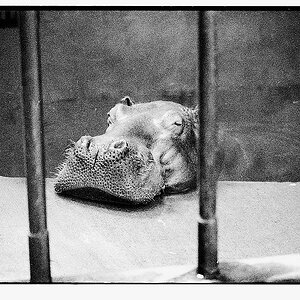
Just cause you asked, I just know I'll get in trouble, but here goes.
 

Attachments

  • $image-776331140.webp
    $image-776331140.webp
    64 KB · Views: 137

Create an account or login to comment

You must be a member in order to leave a comment

Create account

Create an account on our community. It's easy!

Log in

Already have an account? Log in here.

Back
Top Bottom