What's new

Bug in the Sun

Rod-UK

TPF Noob!
Joined
Mar 4, 2005
Messages
133
Reaction score
0
Location
Exeter Devon UK
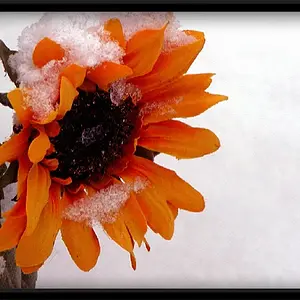
Again light and shade generated by the late evening sun.

Details; ISO200; Aperture f8; Shutter 1/500 sec; FL 182mm

Technical critique please, is this a good photo ?


_______________________
 
I like that one very much! I like it that the background is nice and dark, yet your flower is so vivid.
 
Rod-UK said:
is this a good photo ?
Before anyone can answer that, define 'good photo'.
What you need to ask yourself is 'what was I trying to achieve and have I managed it?' Often this is dictated by the reasons motivating you to take the picture.
The technical aspects are subservient to your intentions - a good picture isn't necessarily a technicaly perfect one, and vice versa.
That being said.
The lighting is nice, the highlights are holding detail as are the shadows, and what needs to be in focus,is.
The only technical criticism I'd make is that the colour balance is a little too warm. You get that with evening sunlight. Try knocking it down a couple of units.
If you can do it using colour temp settings then try going a bit above 5,000Kelvin.
 
Hertz van Rental said:
The only technical criticism I'd make is that the colour balance is a little too warm. You get that with evening sunlight. Try knocking it down a couple of units.
If you can do it using colour temp settings then try going a bit above 5,000Kelvin.

I don't really understand colour temp settings.

What I've done is go back into the RAW file and reduce the exposure by f0.5. Has this the same effect ?

I take your point about "what is a good photo" the question is ambiguous.

Thank you
 
Hmm. That just seems to desaturate the image and makes it look washed out.
If you look at the blacks in the background of the original they are 'warm'. Changing the colour temp is just an easy way of getting these back to nearer neutral in tone.
Colour temperature is to do with how much red or blue there is in the light. The bluer the light the higher the colour temperature.
Your eye automaticaly compensates for changes in the colour temp of a light source, but film can't. This is why you used to get two kinds of pro colour neg - tungsten and daylight. And you also had lots of Wratten colour correction filters such as 80A, 80B, 82A and so on. You used to find the colour temp of your light source using a colour temp meter and then use appropriate filtration to compensate. The aim was to get the colours back to 'natural'. Without doing tnis the colours developed a cast - too red or too blue - and it could look odd.
Digital alows you to set the colour temp in camera. Usualy it's set to Auto but this can lead to problems - or I have found that it can on my DSLR. I took two shots under the same conditions and the camera decided they were different colour temps with the result that one came out looking yellow.
I had originaly felt that your first shot had the colours looking a bit un-natural because of this. But on a longer view I don't think it bothers me nearly enough now to worry about.
If you have a bit of time on your hands though you might like to play around with the colour saturation and see if you can get the blacks in the back a little nearer neutral - just to see.

 
This has nothing to do with the photo it self but I have looked at a few of your posts now and just wanted to know why you put just a thumnail of your shots in your post? I know it is just one more step to see your shot but I find my self just backing out with out even taking a look. I bet you would get more responses if you just put the normal size shot in your posts.

just my two cents.....
 
nikon90s said:
This has nothing to do with the photo it self but I have looked at a few of your posts now and just wanted to know why you put just a thumnail of your shots in your post? I know it is just one more step to see your shot but I find my self just backing out with out even taking a look. I bet you would get more responses if you just put the normal size shot in your posts.

just my two cents.....


Thanks, point taken.

I'm using the only option (I know of ) on offer byTPF, if there is an alternative without using an intermediate service like "VillagePhoto's" please let me know


___________________
 
I think you need a tighter crop of the subject. There just seems to be a lot of dead space in the left side of the photo, nothing to "tell" in the left side of the photo. Also maybe a small increase in either the contrast or a slight curve adjustment in the red channel.
 
I use pbase to post my shots if costs to have them host my little pages but it is not that bad. I know there are a few others but I have only use pbase..
 

Create an account or login to comment

You must be a member in order to leave a comment

Create account

Create an account on our community. It's easy!

Log in

Already have an account? Log in here.

Back
Top Bottom