What's new

Burning disk

Jabber

TPF Noob!
Joined
May 24, 2011
Messages
3
Reaction score
0
Location
Lubbock
Can others edit my Photos
Photos OK to edit
Hey guys I'm new to all this and was wondering if someone can help me out... How do you put pictures on a disk so that you can print any size picture from one image without having to put a 4x6 5x7 and 8x10 of the same image of each pictire
 
All three sizes you mention have different aspect ratios. If you save only one image, then the printer has to make a decision for you about how to crop the image in order to get it to fit the aspect ratio of the print. Some printers do better than others,while some just don't care and lop off people's heads, dismiss important subjects, and otherwise take a fine image and screw it up.

You can always just save the original file, but then you will need to edit the image in post.
 
Ok thanks but is there a way to fix the aspect ratio so that I can print any size from one image?
 
You can always print any size from one image.....but the image has to have an aspect ratio....and if the print that you want is different, then the image will likely need to be cropped (or printed with space on the sides).

This is not new. 35mm film has a 2:3 ratio....and people have been making 3x5, 4x6, 5x7, 8x10 etc. prints from 35mm film for 50 years.
 
Ok thanks but is there a way to fix the aspect ratio so that I can print any size from one image?

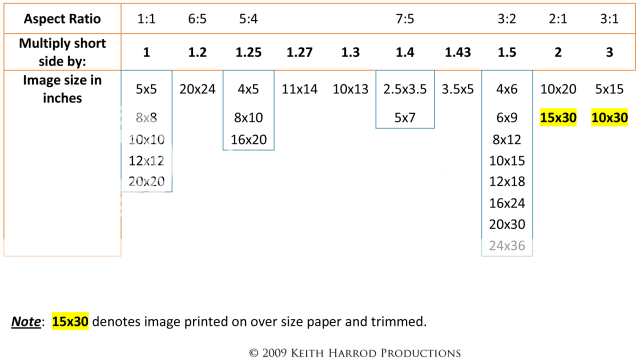
The short answer is no. If you size a pic at 4x6, you're actually sizing it at a 2:3 aspect ratio. For every 2 inches across, you have 3 inches down. So you could print it at 6x9, 8x12, etc., with no problem. If you size it at 2:3, and want to print an 8x10, the printer will crop it to fit the different aspect ratio, in this case, 8x10 is 1:1.25 aspect ratio.With the printers I've used in the past, usually the right hand side and bottom get cropped, don't know if that's universal, tho. Basically, you have to crop to the desired aspect ratio in post, there is no "one size fits all". If you size your pics at 4x6 and want an 8x10, you have to go back to the original and crop for 1:1.25 aspect ratio.
 
Ok thanks but is there a way to fix the aspect ratio so that I can print any size from one image?
No post process fix, other than cropping, will work.

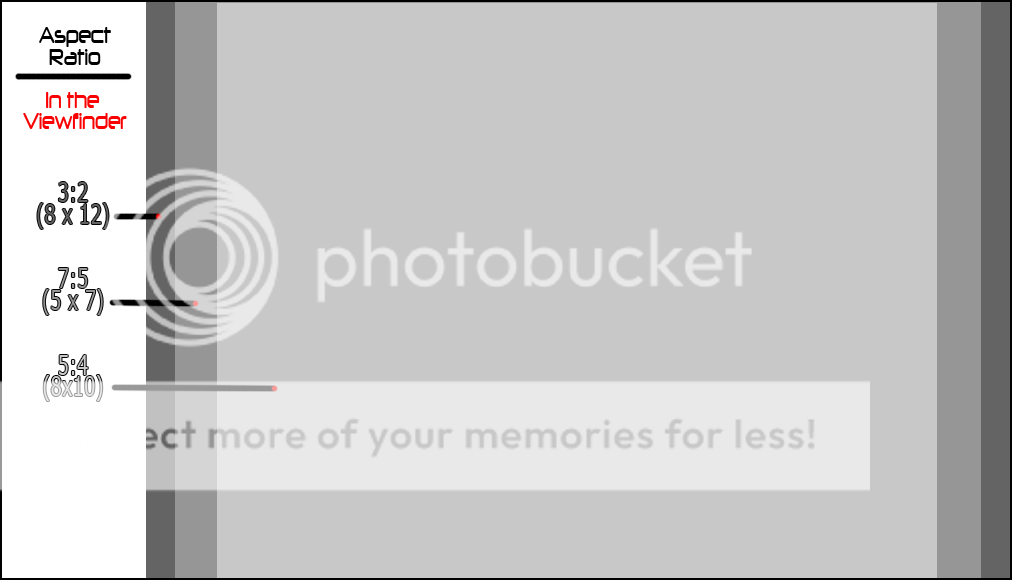
You have to frame and shoot the original so there is enough extra space to crop later. It's known as 'shooting fat'. So, you have to be mindful what each aspect ratio would look like in your camera's viewfinder.

ViewfinderAspectRatiocopy.png


AspectRatioChartv2.png
 
This is not new. 35mm film has a 2:3 ratio....and people have been making 3x5, 4x6, 5x7, 8x10 etc. prints from 35mm film for 50 years.

True, but with anything other than 4x6, you have to make cropping decisions.
Yes, that was my point. People have been having to make these cropping decisions forever....so there is no point in getting frustrated about it now. :)
 

Create an account or login to comment

You must be a member in order to leave a comment

Create account

Create an account on our community. It's easy!

Log in

Already have an account? Log in here.

New Topics

Back
Top Bottom