What's new

Busy Boy

squirrels

No longer a newbie, moving up!
Joined
Nov 3, 2012
Messages
908
Reaction score
437
Can others edit my Photos
Photos OK to edit
Hi Guys,

We're under the weather so I haven't been able to play with my new toys from Santa out and about. Here are some pics of my easiest subject taken with the new nifty fifty and used SB24. Since I have a crop sensor I've been spending a lot of time squashing myself backward against walls, but I'm guessing there is no easy way around that.

1 Paint

F-Stop: /2.5
Shutter Speed: 1/250
ISO: 100

2 Flashlight Unicorn
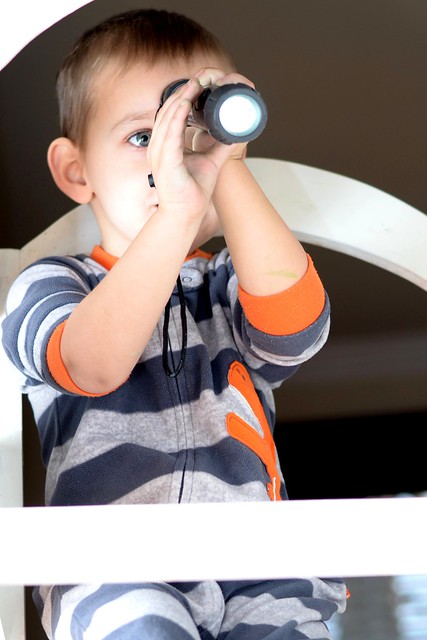
F-Stop: /2.5
Shutter Speed: 1/250
ISO: 100

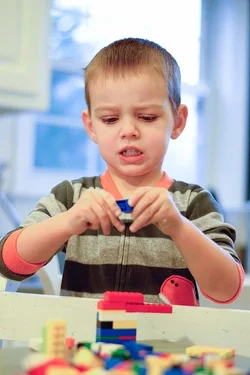
3 Horrible Color

F-Stop: /1.8
Shutter Speed: 1/250
ISO: 800

On this last one one, I tried using a reflector to see what I could do with it, but the incandescent light and the gold side (what was I thinking??) of the reflector really screwed up the color. I opened the raw file in Raw Therapee trying to fix it for the learning experience and became completely overwhelmed. Any recommended reading for this? Expression of frustration also reflects my feelings on trying to fix it.

Thank you for any comments!
C
 
The last one is just a white balance issue. You should be able to cool it down to look like the others.
 
Crop tighter and fix the color... cute boy so you have a good model to practice with.
 
The last one you just need to fix the white balance. I did the best I could with the jpg but you get the idea and if you have the RAW file you can do a lot better.

$8330576748_ffc70217e8_z.webp
 
Cute kid! Love the 2nd, but I think a tighter crop.. the white bar at the bottom made me think my browser didn't load the full image. lol
 
Thanks so much guys. I cropped them all and I edited the white balance, but Scuba's is much better. Today I learned that mixing cool background and warm foreground lighting is going to cause some trouble.

I also learned that my kid has been running around with a lopsided haircut over the ears since I last took the trimmers to him. :mrgreen:


[URL="http://www.flickr.com/photos/10258522@N02/8330762136/"]


[URL="http://www.flickr.com/photos/10258522@N02/8329704445/"]

http://www.flickr.com/photos/10258522@N02/8329704445/
 
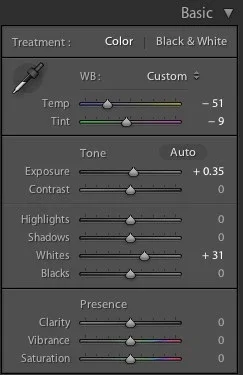
I used LR for the changes. I don't normally use PS that often so I couldn't get it to do what I wanted. Here are the changes I made. Since it was a JPG it didn't give me the color temp but I did a screen shot of the quick changes I made. I didn't go past the basic tab so everything I did was there.

$Screen shot.webp
 
Thanks Scuba for showing me what you did! Your version looks much less icy out the window than mine. I wish I'd had a shot of an angelic expression to work on. That mad face is stressing me out.

Ronlane, I vote for post processing improvements for all life's problems. After I tackle little man's hair, I'll fix up Mr. Squirrel's winter beard which is getting pretty burly. After that the skies the limit!
 
I like all the photos, though the first is perfect for me... In second photo that white bar over his legs kinda distracts me, in third one you cropped his elbow a little bit. You're so lucky to have a model in your home to shoot....
 
Last edited:
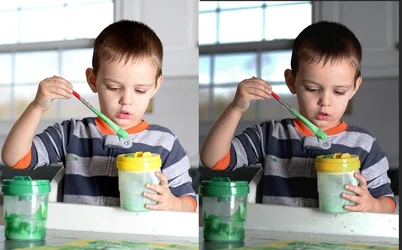
To me, the brightness in your pictures is all over the place, the first two much too bright and the last too dark.

View attachment 30693

You are not kidding. That is a drastic improvement. I'll tone these down substantially (and take off my sunglasses).

Looks like I was a over excited about the light my little flash put out. :meh:

Thank you!
C
C
 
Thanks for your feedback Sarmad. I agree. That white bar needed to go, but not his elbows (or ankles :)).
C
 
Since you didn't get nutsy-crazy over my last comment, let me point out something else.
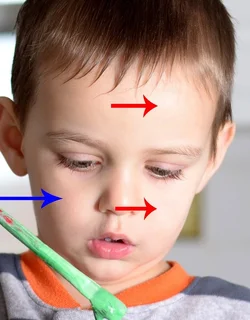
Note the very bright areas at the red arrows, almost blown out, and the relatively normal skin tone at the blue arrow.
That kind of wide variation in skin tone, particularly in a child, means that a correction as you try to even out the color will often produce an unpleasant blotchy result.

That's caused by light on the surface that isn't diffused enough and too small a source, like a single flashlight at an object.

$83307arrow.webp
 
I'll try to keep the nutsy-crazies to a minimum. Anything short of "your kids are ugly and we can't fix ugly", and you should be fine with me. I like hearing that the boys are cute, but I can always ask the grandparents for that.

That's caused by light on the surface that isn't diffused enough and too small a source, like a single flashlight at an object.

Or an sb24 set at 1/16th power bounced off a white fridge 3 feet away, for example?

I was wishing I had a lower setting on the flash. I played a little with the zoom to see if that combined with the bounce would help tone it down even more, but I think I was making my light source even smaller? It looks like in these close quarters even if I could power down more it wouldn't solve the too small part of the problem and I can only angle the flash up.

Maybe a diffuser between flash and fridge or fridge and boy?
C
 

Create an account or login to comment

You must be a member in order to leave a comment

Create account

Create an account on our community. It's easy!

Log in

Already have an account? Log in here.

Back
Top Bottom