What's new

C&C Please one image

rmagers

TPF Noob!
Joined
Jun 25, 2011
Messages
70
Reaction score
1
Location
Omaha, NE
Can others edit my Photos
Photos OK to edit
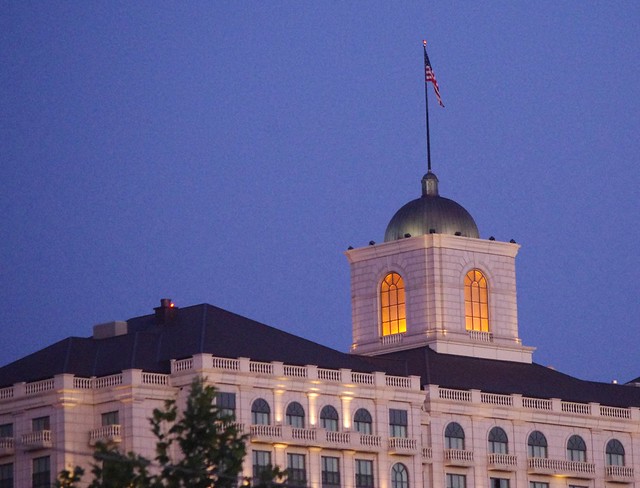
Give me your thoughts. I do notice what looks like vignetting on the sides. What causes this? and how do I prevent. Any other C&C appreciated.


Some lenses have a natural vignetting due to their design.

If you mean the dark sky on the left, that may be natural lighting.
 
C&C per req: The first thing I notice is the noise and sensor dirt, both easily fixed in post. The image itself isn't terribly interesting; any time you have a shot with a flag, try and get the flag waving rather than hanging limply. As for the vignette, I'm inclined to suspect that it was just the darker part of the sky; the sunrise/set appears to have been image right.

Just my $00.02 worth - your mileage may vary.

~John
 
Ditto on the noise. It was the first thing that I noticed. I am from Ontario, so showing more of the building might give it some context. I'm not sure if this is an American landmark. I like the colour contrast you get with the deep blue in the sky and the warmth from the interior lighting. I can see that is probably what attracted you to the shot.
 

Here is the shot with NR and side by side for comparison.

flag.jpg
 
Oldmacman: Thanks for the edit. Looks much better. Was this a simple fix? Yes the color contrast was what attracted me. I think this is just a hotel in Salt Lake City.

As for the noise... this is probably due having to increase the ISO to get the shat handheld. Good to know this can be fixed.

Thanks to all for the C&C. Much appreciated
 
Oldmacman: Thanks for the edit. Looks much better. Was this a simple fix? Yes the color contrast was what attracted me. I think this is just a hotel in Salt Lake City.

As for the noise... this is probably due having to increase the ISO to get the shat handheld. Good to know this can be fixed.

Thanks to all for the C&C. Much appreciated

Literally a few seconds with the NR slider. Do you have Lightroom or Photoshop to help with editing? This was done with Lightroom.
 
Well, I'm going to put in my $0.02 worth here.

When we take pictures of people, we learn there are cropping rules; you don't cut people off at the joints, for example. Although there are times when it works well, this picture just appears that the bottom of the building was just chopped off. That just the feeling I got while looking at it Because the tree is right there, you know the ground is near, it just ain't showin.

It is a really good photo, and that was just my first impression when I saw the photo.

Happy Shooting
 
Oldmacman: I am only using GIMP at the time. What is "the NR slider?" I am sure it is capable of doing this but I haven't worked in it much.
 
Oldmacman: I am only using GIMP at the time. What is "the NR slider?" I am sure it is capable of doing this but I haven't worked in it much.

Gimp has some good tools in it.. don't use it much though. Try this link ReducingCCDNoise « GIMP Guru . GimpGuru has a lot of good info....
 
Thanks for advise. I tried link and it is easy. Amazing what you can do when you know it available.
 
Ok, I am a newb as well. However all I shoot is architecture and man made stuff pretty much. I have never found people terribly interesting. So take everything with a grain of salt

First off good photo, I would have been snapping the building too.

C&C, Here is what I see in it.
1) The noise which has been covered and is a pretty easy fix.
2) The bottom half of the building, I am guess it was left out due to the unsightly mess of urban clutter. Not much you can do about that, however the way it was cropped with the side of the building being sliced along an angle is a bit (IMHO) distracting. I often try to create a false bottom, basically a slice along one of the floors so (my brain at least) doesn't immediately recognize there is a lot missing.
3) Play with the angle at which you are shooting the building, this image looks to be at about 45 degrees. Personally I like mine at about 20 degrees or so, it will cut off the side but allows the entire front to be in the photo.
4) Given the rather cool color tones you have going on in there, I would be tempted to try it for an HDR or play with some of the levels.

That's my advice, it's worth what you paid for it.

 

Create an account or login to comment

You must be a member in order to leave a comment

Create account

Create an account on our community. It's easy!

Log in

Already have an account? Log in here.

Back
Top Bottom