What's new

Can I get some opinios on these two pictures please

Mikeyb90

No longer a newbie, moving up!
Joined
Feb 9, 2013
Messages
126
Reaction score
34
Location
Ohio, US
Can others edit my Photos
Photos OK to edit
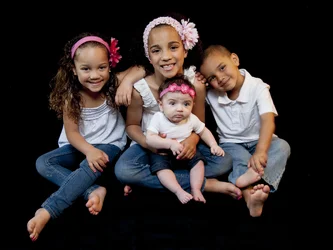
1.

$kids2.webp

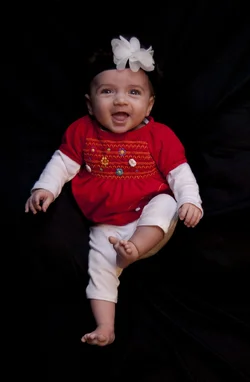
2.

$Emma7(2).webp
 
seriously though, lighting is harsh in 1 and underexposed in 2. the floating effect kinda messes with me as the viewer...hence the jest in first post. I like the babys expression. lol

oh, also you've lost a bit of shadow detail in the hair on the oldest and the boy leaning on her. due to the lighting as it was, you could probly bring it out in processing, but might be better to use a hair light or strobe above...and better softer lighting.
 
seriously though, lighting is harsh in 1 and underexposed in 2. the floating effect kinda messes with me as the viewer...hence the jest in first post. I like the babys expression. lol

oh, also you've lost a bit of shadow detail in the hair on the oldest and the boy leaning on her. due to the lighting as it was, you could probly bring it out in processing, but might be better to use a hair light or strobe above...and better softer lighting.
/
Its weird.. these look way different than they did in PS and the prints for that matter.. What do you look at to determine underexposure?
 
seriously though, lighting is harsh in 1 and underexposed in 2. the floating effect kinda messes with me as the viewer...hence the jest in first post. I like the babys expression. lol

oh, also you've lost a bit of shadow detail in the hair on the oldest and the boy leaning on her. due to the lighting as it was, you could probly bring it out in processing, but might be better to use a hair light or strobe above...and better softer lighting.
/
Its weird.. these look way different than they did in PS and the prints for that matter.. What do you look at to determine underexposure?


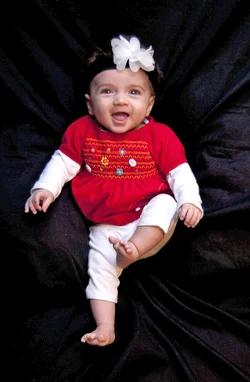
babys face is too dark to me. couuld be a personal preference. however there is a bit of noise in the face...usually shows in shadow areas of an underexposed image like that. For me, the reds should pop and whites be white not a dingy white/gray, again...from being underexposed.

Could be a bit of 'web kill' too, if they print fine...then I would not worry about it.
 
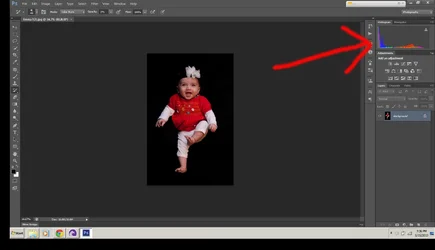
IT's all part of learning. Google the histrogram and read up on how to read it. There is not much data on the right...and even a gap where the data stops short of the right. With a large black background it will have more data on the left, but even still, there should be more to the right. "expose to the right"

I brought up your levels and exposure/gamma and chit like that and see the purple backdrop he was laying on. I dunno if you processed it out or what, but next time when you shoot it, expose for baby, and if you really don't wan the back in it, burn it out, don't alter exposure or levels to hide it. ;-)
 
IT's all part of learning. Google the histrogram and read up on how to read it. There is not much data on the right...and even a gap where the data stops short of the right. With a large black background it will have more data on the left, but even still, there should be more to the right. "expose to the right"

I brought up your levels and exposure/gamma and chit like that and see the purple backdrop he was laying on. I dunno if you processed it out or what, but next time when you shoot it, expose for baby, and if you really don't wan the back in it, burn it out, don't alter exposure or levels to hide it. ;-)

Thanks for your help.. I really appreciate it. the background was just a black sheet, and I processed it out while editing the raw image with the black level.
 
IT's all part of learning. Google the histrogram and read up on how to read it. There is not much data on the right...and even a gap where the data stops short of the right. With a large black background it will have more data on the left, but even still, there should be more to the right. "expose to the right"

I brought up your levels and exposure/gamma and chit like that and see the purple backdrop he was laying on. I dunno if you processed it out or what, but next time when you shoot it, expose for baby, and if you really don't wan the back in it, burn it out, don't alter exposure or levels to hide it. ;-)

Thanks for your help.. I really appreciate it. the background was just a black sheet, and I processed it out while editing the raw image with the black level.

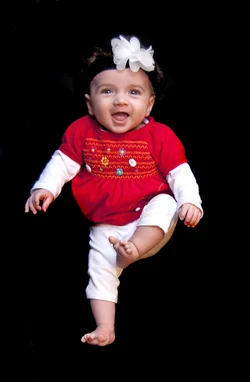
That affected your image as a whole, including your subject. Next time just edit it out singularly. There are many ways. My preference is to use the history brush set on color burn at about 40-50% or so and burn it out...usually it does not affect the subject if you feather it while burning, if so, cntrl z and lower % then redo in wisps until its gone and it won't injure the subject. ;-)
 
These are not good examples, but enough to illustrate what I said above. It took maybe 2 minutes...if that to do. So when processing your original, you can do better and practice with it. Even if it's not a keeper, it's good practice.

I upped exposure and adjusted gamma, and levels. Made it a tad too bright, just for illustrating example.

Then in the second image, all I did was use the history brush tool, color burn, set at 40 %, then made brush large...about size a tad smaller than a dime...then wisked over the blanket. You can see where I touched her hands a bit and it darkened them, I left it to show you what will happen. When I hit the clothes..no big deal...no effect...that's why I like the history brush, but on skin tone..it can and usualy will affect it, so I would have then undo and set to lower percent, zoomed in and been careful and did it right.

but the burning part was maybe 30 seconds. very quick and effective.

The whole point if it, to me, is to show that it is better IMO to attack the background separately, when you adjust the levels of the whole image to darken a background, it can have negative effects on the subject.
$Emma7(2)-5.webp


$Emma7(2-6).webp
 
Now you have a brightened and not underexposed baby doing the riverdance.
 

Create an account or login to comment

You must be a member in order to leave a comment

Create account

Create an account on our community. It's easy!

Log in

Already have an account? Log in here.

New Topics

Back
Top Bottom