What's new

can you double check my WB?

Pukka312

TPF Noob!
Joined
Dec 7, 2012
Messages
193
Reaction score
50
Location
US
Can others edit my Photos
Photos OK to edit
Hey guys, i just recalibrated my monitor...twice. I have doubts that my Spyder 3 is correctly calibrating the color. With the Spyder software it really looks awfully warm, but assumed it was ok. However, I loaded some photos straight from my camera to another person's IMAC and the color seemed fine, but when I uploaded the same pics to my PC, they looked terribly warm. So I recalibrated my PC with the standard calibration program built in the computer and everything looks much better by sight. So these were edited with my PC settings, but wanted to make sure they aren't coming off too cool. The difference between the Spyder 3 and PC calibration has such a drastic difference in color, I'm worried about which color is more accurate.
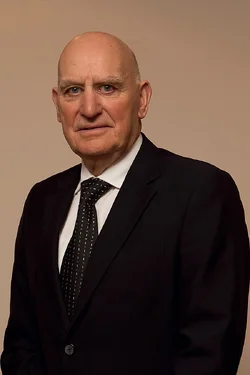
$IMG_9742-38web.webp
 
It does look quite warm. Was that a white shirt?
 
It does look quite warm. Was that a white shirt?

yes, and I left the WB alone. This is SOOC auto WB settings. I was terrified to change it until I heard from someone. :) My current settings are cooler than what Spyder 3 sets to...so imagine it about 5 times warmer and that's about where the Spyder 3 software would set me.

 
any better? I had to eyeball it in photoshop, and I usually prefer to use LR for WB, but this was a faster route for uploading.
$IMG_9742-38web cool.webp
 
any better? I had to eyeball it in photoshop, and I usually prefer to use LR for WB, but this was a faster route for uploading.
<img src="http://www.thephotoforum.com/forum/attachment.php?attachmentid=40302"/>

I think this is spot on. The previous was too warm.
 
any better? I had to eyeball it in photoshop, and I usually prefer to use LR for WB, but this was a faster route for uploading.
<img src="http://www.thephotoforum.com/forum/attachments/general-gallery/40302-can-you-double-check-my-wb-img_9742-38web-cool.jpg"/>

I think this is spot on. The previous was too warm.

thanks for the help! Much appreciated
 
My work monitor is not calibrated, but I tried to edit it and I could not get his shirt to look white. It was a dull gray color at best. What color is his tie? Blue? Green?
 
My work monitor is not calibrated, but I tried to edit it and I could not get his shirt to look white. It was a dull gray color at best. What color is his tie? Blue? Green?

the tie was their company tie...it was black with Green and white specks.
 
I ended up with a -7, -12 in my raw editor to get to a white shirt, and normal skin tones. It looks to be quite over-sharpened.
 
I ended up with a -7, -12 in my raw editor to get to a white shirt, and normal skin tones. It looks to be quite over-sharpened.

Yeah, the web compression action I use has a sharpening component. It's not sharpened like that on the original file...but the internet speed here is too awful to attempt to load pics over 1 MB...ugh, I miss the US internet speeds
 
any better? I had to eyeball it in photoshop, and I usually prefer to use LR for WB, but this was a faster route for uploading.
FWIW - Photoshop Camera Raw has the same white balance tool that Lightroom's Develop module has.
 
any better? I had to eyeball it in photoshop, and I usually prefer to use LR for WB, but this was a faster route for uploading.
FWIW - Photoshop Camera Raw has the same white balance tool that Lightroom's Develop module has.

My Raw files won't upload to photoshop. I had tried to download the newest version of photoshops Raw converter but it still wouldn't work. So I have to upload my RAW files to LR... so the above 2nd edit was actually me tweaking a JPEG
 
Did your photoshop not come with "Bridge?" Bridge is Photoshop's Raw editor.
 
Did your photoshop not come with "Bridge?" Bridge is Photoshop's Raw editor.

Bridge wouldn't open the files either. I couldn't figure out why they both failed to open, so I gave up and installed the Lightroom I had lying around. I was too lazy to explore anything beyond updating the raw converter...but I actually like using Lightroom, so it's all good. Much faster to adjust WB and exposure in LR...if I learn more of LR, I may give up photoshop except for the more artistic edits
 
What kind of camera are you shooting? Cannot remember if I had to set the camera's profile first in Bridge. Baffling.
 

Create an account or login to comment

You must be a member in order to leave a comment

Create account

Create an account on our community. It's easy!

Log in

Already have an account? Log in here.

New Topics

Back
Top Bottom