What's new

Candle light - CC

Nautifish

TPF Noob!
Joined
Sep 15, 2010
Messages
178
Reaction score
0
Location
Ontario Canada
Can others edit my Photos
Photos OK to edit
Well i decided to play around with my Camera settings a couple of nights ago. Dark room with just Candles....This is one of the shots i took and would love to hear your comments....

Thank you.
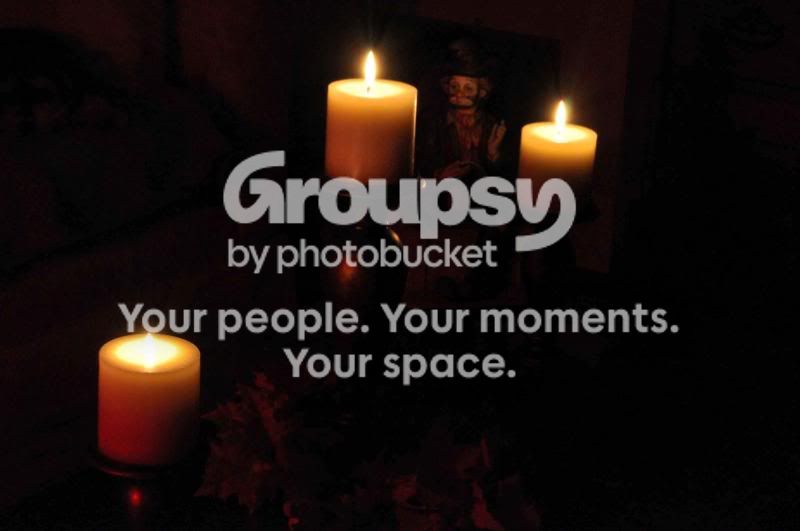
DSC_3483.jpg
 
looks soft.

tripod?
 
Man u are a tough crowd.....& i thought this was a pretty good photo....:er:
Nikon D5000
55mm
1/3s - F22
-1.0EV
 
There is no way you took this in a dark room, at f22 and 1/3 of a second. Your iso would have had to be through the roof!!!

then again, it is a very dark photo, but f/22 and 1/3s would make it pitch black in my experience
 
Man u are a tough crowd.....& i thought this was a pretty good photo....:er:
Nikon D5000
55mm
1/3s - F22
-1.0EV

I think croping it to vertical, just the 2 candles and scary clown *might* work better. The third candle draws away, and it's cut off. Te couch also needs to go. It is a decent image subject wise. Try again, focusing with the lights on first? The darkness makes the clown even scary-er.

You need to find a better way to compress your images. They always seem pixelated to me. Always.
 
f22 is probably also adding to the softer look of the shot because of the diffraction effect. Generally speaking this starts after f8, but remains pretty minor up to around f13 on crop sensor DSLRs and there after gets progressivly worse. This is something you can't counter as its a factor of the lens and camera body interactions.
Thus generally f13 and sometimes f16 is the ideal on crop sensor whilst fullframe tend to get about a one stop advantage over these values.

Of course the specific point at which it becomes "too soft" is dependant upon the camera body, lens and the photographers own desires.
 
Bitter lol @ you...I love clowns....

Thanx for the advice guys....I have my camera settings set to medium size photo should i maybe change it too small? Also do you really think shooting in JPG Could be causing a problem?

They look ok on my monitor but as i have said before this is an old Monitor.
 
I think you might be confusing the JPEG settings - the small and medium are there to produce an overall smaller picture in dimensions and essentially a smaller file size - this means you are effectivly losing image data to get those smaller sizes. I would recomend large and fine JPEG setting - since that ensures the most possible data and thus an overall better quality.

I also recommend reading around as you continue to develop your shooting and look into RAW shooting as well - do some reading around it and maybe oneday experiment with RAW+JPEG shooting mode (so that you've a jpeg to fall back on and that you know how to work with and the RAW to experiment with
 
I find the image very noisy and the couch in the background doesn't help the situation. Sorry to be rude, but I'm not a fan of the picture.
 

Create an account or login to comment

You must be a member in order to leave a comment

Create account

Create an account on our community. It's easy!

Log in

Already have an account? Log in here.

New Topics

Back
Top Bottom