What's new

Cloud Drama

Joined
Jun 14, 2013
Messages
4,030
Reaction score
1,482
Location
Oklahoma
Can others edit my Photos
Photos NOT OK to edit
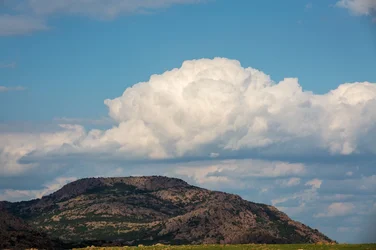
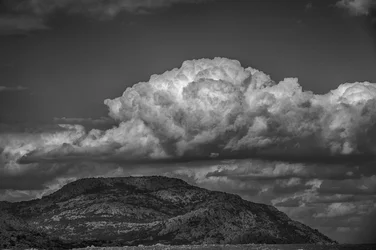
So, I posted a couple naturescapes the other day that weren't too interesting. I received some good feedback and critique on them, and what to do better. The main problem was lack of interesting foreground. I used zoom yesterday to try again on a small mountain with clouds above.

$cloud.webp
 
Fantastic cloud image, I love taking pics of clouds too :)
 
Sexy.
 
btw.............. shot with the new 5Diii and a 70-200L 2.8 IS II with a CPL on front. I was leaving an area, turning right. I looked left and saw the cloud over the mountain doing the popcorn thing, quickly turned left, drove 1/4 mile and snapped it. Target of opportunity.
 
Love clouds very much. This one although it is a great shot, I find the small mountain sort of dominating the scene. I am wondering what the coloured version looks like...


$5D3_0051.webp


I guess I could have titled it "Mountain Cloud" or the like. Or just A Mountain. My goal was to get somthing dominating, or clearer subject matter. It's a weak point of mine, composition. :wink:
 
I think your instincts are good. The same of the mountain is echoed in the cloud (esp. in the B/W version). And it does look very dramatic!
 
Actually, the flat top on that mountain? It's a parking lot! Yep, you can drive 3 1/2 miles to the top at 2400 feet. Great view up there!
 
Nice B&W conversion, but I am always curious how folks do these things, so, would you care to share your conversion process? It is a little dark for me, particularly when I compare it to the colour version. If it was mine, I might try to lighten it up just a bit, however a lot of what you can do with it will depend on how you did the conversion.

WesternGuy
 
Not too shabby, snerd. Definitely on the right track with that one. I LOVE the similar shapes. That was one helluva' cloud!
 
Nice B&W conversion, but I am always curious how folks do these things, so, would you care to share your conversion process? It is a little dark for me, particularly when I compare it to the colour version. If it was mine, I might try to lighten it up just a bit, however a lot of what you can do with it will depend on how you did the conversion.

WesternGuy

Oh my, you mean I'm supposed to remember how I processed it too?! LOL!!

I think that I initially did the basics in LR, upped the exposure a little, dropped the highlights, increased shadows a tad, then I usually use the Clarity control up to 20% or so. Then I think I sharpend it a little, maybe another 10% over the import setting of 25%. Then I opened it in ColorEfex Pro, one of the NIK filters. I played with that awhile, but finally just did the conversion to B&W in it. Brought the resulting .tif file into SilverEfex Pro, another NIK filter, and adjusted to my liking from a preset. Tada!!
 
Last edited:

Create an account or login to comment

You must be a member in order to leave a comment

Create account

Create an account on our community. It's easy!

Log in

Already have an account? Log in here.

New Topics

Back
Top Bottom